Logo
MINECRAFTBIBLE
Items
Items

All game items

Blocks
Blocks

Building blocks

Mobs
Mobs

Creatures & monsters

Biomes
Biomes

World biomes

Structures
Structures

Generated structures

Recipes
Recipes

Crafting guides

Advancements
Advancements

Achievements

Loot Tables
Loot Tables

Drop rates

Tags
Tags

Item groupings

All Versions
View all data →
Capes
Cape ArchiveNEW

Browse rare Minecon capes, OptiFine capes, and custom capes from players worldwide

Browse

Player Database
Player DatabasePopular

Search any player

Skin Browser
Skin Browser

Browse & download skins

Cape Gallery
Cape GalleryNEW

Minecon & OptiFine capes

Seed Vault
Seed Vault

Curated seeds

Learn

Guides
GuidesNew

Tutorials & tips

Blog
Blog

News & updates

Community

Community Hub
Community HubHub

Posts, discussions & more

All Versions
View community →
Seed Analyzer
Seed Analyzer

World seed analysis

Loot Explorer
Loot Explorer

Drop rates

Crafting Calculator
Crafting Calculator

Material planning

Enchant Calculator
Enchant Calculator

Probability math

Redstone Lab
Redstone Lab

Signal timing

Trading Profit
Trading Profit

Villager ROI

All Versions
View all tools →
Mods
Mods

Browse all mods

Plugins
Plugins

Server plugins

Resource Packs
Resource Packs

Textures & sounds

Shaders
Shaders

Visual enhancements

Datapacks
Datapacks

World logic

Scanner
Mod Intelligence

Scan & analyze any mod

All Versions
View all mods →
Loading...
IntroductionIntroductionVersion HistoryVersion HistoryGuidesGuidesBlog & NewsBlog & News
ItemsItemsBlocksBlocksMobsMobsRecipesRecipesBiomesBiomesStructuresStructuresAdvancementsAdvancementsLoot TablesLoot TablesTagsTags
ModsModsPluginsPluginsResource PacksResource PacksShadersShadersDatapacksDatapacks

MinecraftBible

The Ultimate Wiki

Logo
MINECRAFTBIBLE

The ultimate Minecraft reference. Every item, block, mob, and recipe documented with precision.

Community

  • Skin Browser
  • Cape Gallery
  • Seed Vault
  • Blog
  • Guides

Database

  • Items
  • Blocks
  • Mobs
  • Recipes
  • Biomes
  • Structures

Tools

  • Seed Analyzer
  • Mod Intelligence
  • Crafting Calculator
  • Enchant Calculator

Mods & Packs

  • Mods
  • Plugins
  • Resource Packs
  • Shaders
  • Datapacks

Site & Legal

  • About
  • Authors
  • Editorial Policy
  • Corrections
  • Contact
  • Privacy Policy
  • Terms of Service
  • DMCA
  • Sitemap

© 2026 MinecraftBible. Not affiliated with Mojang or Microsoft.

PrivacyTermsContact
Mooblooms (With Data-Driven Variants)
ModLicenseRef-All-Rights-Reserved

Mooblooms (With Data-Driven Variants)

a mod that adds mooblooms to the game

430
Downloads
2
Followers
4 months ago
Updated
📦
10
Versions
mobsutilityworldgenforgeneoforge
Download Latestv1.0.0View on Modrinth

📖About Mooblooms (With Data-Driven Variants)

Welcome to Mooblooms mod for NeoForge & Forge,
This mod adds 16 variants of Moobloom to the game but as of V2 for 1,21.4 you can add your own variants with datapacks and resource packs! (Example Pack Download)

The Variants we add within the base mod are Allium, Azure Bluet, Blue Orchid, Closed Eyeblossom, Cornflower, dandelion, Lily of the Valley, Open Eyeblossom, Orange Tulip, Oxeye Daisy, Pink Tulip, Poppy, Red Tulip, Torchflower, White Tulip, Wither Rose, Cactus Flower (1.21.5)

The Mooblooms can spawn within Flower Forests, Meadows or Sunflower Plains but you can adjust this within the data driven variants datapack if you want to add more biomes or removes possible biomes

Whats possible with custom variants!
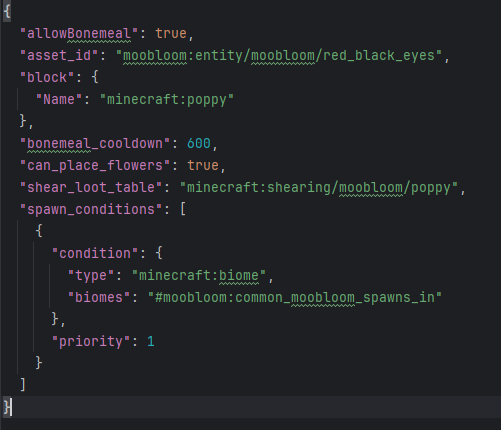
With adding your own variants there are plenty of options you can adjust,
The first few being the biome the mob appears in, the loot table the mob drops when it has been sheared, the block that renders on the mobs back and the texture of the custom variant (we provide about 16 free textures for you to use (one for each mc colour))

Next we have added some new options like can you click bonemeal on this variant to produce more of the flowers on its back, also the cooldown between clicking bonemeal on the variant and finally can this variant place its flower type random within the world
All these options can be adjust per variant and you can also adjust these values within the variants we have made just by renaming the json file as the flower type you want to adjust

All Custom Options:options
👥 Team & Contributors

BelgieYT
BelgieYTOwner

⚙️ Compatibility

Environment
✅ Client & Server
Loaders
forgeneoforge
Minecraft Versions
1.21.11

🔗 Links

Modrinth Page