Logo
MINECRAFTBIBLE
Items
Items

All game items

Blocks
Blocks

Building blocks

Mobs
Mobs

Creatures & monsters

Biomes
Biomes

World biomes

Structures
Structures

Generated structures

Recipes
Recipes

Crafting guides

Advancements
Advancements

Achievements

Loot Tables
Loot Tables

Drop rates

Tags
Tags

Item groupings

All Versions
View all data →
Capes
Cape ArchiveNEW

Browse rare Minecon capes, OptiFine capes, and custom capes from players worldwide

Browse

Player Database
Player DatabasePopular

Search any player

Skin Browser
Skin Browser

Browse & download skins

Cape Gallery
Cape GalleryNEW

Minecon & OptiFine capes

Seed Vault
Seed Vault

Curated seeds

Learn

Guides
GuidesNew

Tutorials & tips

Blog
Blog

News & updates

Community

Community Hub
Community HubHub

Posts, discussions & more

All Versions
View community →
Seed Analyzer
Seed Analyzer

World seed analysis

Loot Explorer
Loot Explorer

Drop rates

Crafting Calculator
Crafting Calculator

Material planning

Enchant Calculator
Enchant Calculator

Probability math

Redstone Lab
Redstone Lab

Signal timing

Trading Profit
Trading Profit

Villager ROI

All Versions
View all tools →
Mods
Mods

Browse all mods

Plugins
Plugins

Server plugins

Resource Packs
Resource Packs

Textures & sounds

Shaders
Shaders

Visual enhancements

Datapacks
Datapacks

World logic

Scanner
Mod Intelligence

Scan & analyze any mod

All Versions
View all mods →
Loading...
IntroductionIntroductionVersion HistoryVersion HistoryGuidesGuidesBlog & NewsBlog & News
ItemsItemsBlocksBlocksMobsMobsRecipesRecipesBiomesBiomesStructuresStructuresAdvancementsAdvancementsLoot TablesLoot TablesTagsTags
ModsModsPluginsPluginsResource PacksResource PacksShadersShadersDatapacksDatapacks

MinecraftBible

The Ultimate Wiki

Logo
MINECRAFTBIBLE

The ultimate Minecraft reference. Every item, block, mob, and recipe documented with precision.

Community

  • Player Database
  • Skin Browser
  • Cape Gallery
  • Community Hub
  • Seed Vault

Database

  • Items
  • Blocks
  • Mobs
  • Recipes
  • Biomes
  • Structures

Tools

  • Seed Analyzer
  • Mod Intelligence
  • Crafting Calculator
  • Enchant Calculator

Mods & Packs

  • Mods
  • Plugins
  • Resource Packs
  • Shaders
  • Datapacks

© 2026 MinecraftBible. Not affiliated with Mojang or Microsoft.

PrivacyTermsContact
MineTracer
ModMIT

MineTracer

Logs and rolls back block, container, sign, and kill actions. Powerful lookup, rollback, and inspector commands for server admins. Filter by user, time, range, action, or item for precise control.

1.1K
Downloads
11
Followers
2 months ago
Updated
📦
21
Versions
managementutilityfabric
Download Latestv1.10.33View on Modrinth

📖About MineTracer

MineTracer

MineTracer is a powerful and lightweight block, container, sign, and kill logging mod for Minecraft servers designed to help server administrators monitor, investigate, and roll back player actions with ease. Built for Fabric, MineTracer provides advanced logging and rollback capabilities while remaining simple to use.

This mod is still under developement so don't expect everything to work flawlessly. Please write an issue report on GitHub if you find a bug, I am happy to recieve feedback!


Features Banner

  • Advanced Query System
    Search logs using flexible filters such as player name, time range, radius, action type, and specific item or block IDs. Combine multiple filters for precise lookups.

  • Rollback Functionality
    Instantly undo player actions within a specified area, time frame, or by specific users. Rollbacks are safe and only affect the filtered actions, minimizing risk of unwanted changes.

  • Inspector Mode
    Toggle inspector mode to view block history in real time. Right-click or break blocks to see a detailed log of recent actions at that location.


Commands Banner

/minetracer lookup <filters>

Search through logs using any combination of filters.

/minetracer rollback <filters>

Roll back player actions matching the specified filters.

/minetracer page <number>

Navigate through paginated lookup results.

/minetracer inspector

Toggle inspector mode for real-time block history.

/minetracer save

Force save all log data to disk


Filters

  • user:<player> – Filter by player name
  • time:<duration> – Filter by time (e.g., 1h, 30m, 2d)
  • range:<blocks> – Filter by radius in blocks from your current position
  • action:<type> – Filter by action type (broke, placed, withdrew, deposited, kill)
  • include:<item> – Filter by specific item or block ID

Permissions

  • minetracer.command.lookup – Access to lookup command
  • minetracer.command.rollback – Access to rollback command
  • minetracer.command.inspector – Access to inspector mode
  • minetracer.command.page – Access to pagination

Images

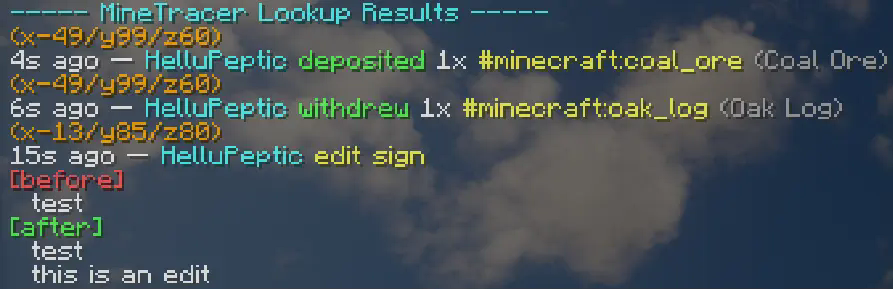
Lookup results by Mine Tracer

👥 Team & Contributors

HelluPeptic
HelluPepticOwner

⚙️ Compatibility

Environment
🖥️ Server-side
Loaders
fabric
Minecraft Versions
1.21.11

🔗 Links

Modrinth Page