
MINECRAFTBIBLE
Loading...

Unique sleep overhaul and rest system
Midnight Thoughts enhances the Minecraft sleep mechanic, making nights more rewarding and memorable.
While resting, players may see thoughts, random facts, or nightmares.
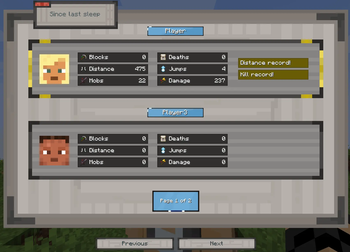
Players who sleep through the night receive the Rested effect and a summary of their activity since the last sleep.
The mod uses the Useless Facts API, providing a large and constantly updated database of random facts.
Supported languages
Each player has their own statistics, and everyone on the server can view each other's results.
At the end of the night, a summary screen highlights:
The server can define a default interface theme in the mod configuration.
Players can also choose their own theme:
The mod introduces a comfort system that affects sleep quality.
When a player goes to bed, their rest level after waking depends on the comfort level around the bed.
Comfort is influenced by nearby elements such as:
Some blocks increase comfort, while others decrease it.
Well Rested provides bonuses to speed, strength, and block mining speed, increases the player's HP, and also adds gradual health regeneration. The effect of the additional health and regeneration doesn't diminish over time, unlike other buffs
After waking up, the player receives the Rested effect.
Each level progresses through three phases, gradually weakening over time:
However, higher Rested levels are always stronger overall.
For example, Phase 3 of Level 5 is still stronger than Phase 1 of Level 1.
When playing with others, the MVP always receives the most powerful buff, regardless of the conditions in which they slept.
Additionally:
Sleep quality also affects the player's experience:
In the config, you can customize the HUD interface settings, enable or disable the moon image, adjust the animation speed, or disable the HUD entirely. You can also configure the Well Rested effect bonuses, the interior scan radius, MVP status and more.
The theme set in the config is the default for the entire server. However, if a player changes their theme, their personal selection will override the server default and be displayed in their interface
{
  "sleepOverlay": {
    "minSlideDisplayTimeMs": 2500,
    "maxSlideDisplayTimeMs": 4000,
    "fadeInDurationMs": 300,
    "fadeOutDurationMs": 300,
    "overlayOpacity": 0.4,
    "textOpacity": 1.0,
    "imageOpacity": 0.6,
    "specialSlideChance": 0.05,
    "enableOverlay": true,
    "enableImage": true,
    "enableDailySummaryScreen": true,
    "useFactsApi": true,
    "userContentReplaces": false,
    "hideChatWhenSleeping": true
  },
  "wellRested": {
    "levels": {
      "level5": {
        "durationMinutes": 15,
        "speedPhase1": 0.5,
        "speedPhase2": 0.3,
        "speedPhase3": 0.16,
        "strengthPhase1": 0.24,
        "strengthPhase2": 0.16,
        "strengthPhase3": 0.08,
        "hastePhase1": 0.35,
        "hastePhase2": 0.2,
        "hastePhase3": 0.1,
        "attackSpeedPhase1": 0.12,
        "attackSpeedPhase2": 0.06,
        "attackSpeedPhase3": 0.03,
        "healthBonus": 10.0,
        "regenBonus": 0.1
      },
      "level4": {
        "durationMinutes": 10,
        "speedPhase1": 0.4,
        "speedPhase2": 0.24,
        "speedPhase3": 0.12,
        "strengthPhase1": 0.2,
        "strengthPhase2": 0.12,
        "strengthPhase3": 0.06,
        "hastePhase1": 0.28,
        "hastePhase2": 0.16,
        "hastePhase3": 0.08,
        "attackSpeedPhase1": 0.1,
        "attackSpeedPhase2": 0.05,
        "attackSpeedPhase3": 0.02,
        "healthBonus": 8.0,
        "regenBonus": 0.08
      },
      "level1": {
        "durationMinutes": 3,
        "speedPhase1": 0.16,
        "speedPhase2": 0.08,
        "speedPhase3": 0.04,
        "strengthPhase1": 0.08,
        "strengthPhase2": 0.04,
        "strengthPhase3": 0.02,
        "hastePhase1": 0.1,
        "hastePhase2": 0.05,
        "hastePhase3": 0.02,
        "attackSpeedPhase1": 0.04,
        "attackSpeedPhase2": 0.02,
        "attackSpeedPhase3": 0.01,
        "healthBonus": 2.0,
        "regenBonus": 0.02
      },
      "level3": {
        "durationMinutes": 7,
        "speedPhase1": 0.32,
        "speedPhase2": 0.18,
        "speedPhase3": 0.08,
        "strengthPhase1": 0.16,
        "strengthPhase2": 0.08,
        "strengthPhase3": 0.04,
        "hastePhase1": 0.22,
        "hastePhase2": 0.12,
        "hastePhase3": 0.06,
        "attackSpeedPhase1": 0.08,
        "attackSpeedPhase2": 0.04,
        "attackSpeedPhase3": 0.02,
        "healthBonus": 6.0,
        "regenBonus": 0.06
      },
      "level2": {
        "durationMinutes": 5,
        "speedPhase1": 0.24,
        "speedPhase2": 0.12,
        "speedPhase3": 0.06,
        "strengthPhase1": 0.12,
        "strengthPhase2": 0.06,
        "strengthPhase3": 0.03,
        "hastePhase1": 0.16,
        "hastePhase2": 0.08,
        "hastePhase3": 0.04,
        "attackSpeedPhase1": 0.06,
        "attackSpeedPhase2": 0.03,
        "attackSpeedPhase3": 0.01,
        "healthBonus": 4.0,
        "regenBonus": 0.04
      }
    }
  },
  "mvp": {
    "enabled": true,
    "minScoreRequired": 10,
    "pointsPerDistance100": 2,
    "pointsPerBlock": 3,
    "pointsPerMob": 15,
    "pointsPerJump10": 1,
    "penaltyPerDeath": 30,
    "mvpWellRestedDurationMinutes": 21
  },
  "comfort": {
    "enabled": true,
    "scanRadius": 5
  },
  "server": {
    "resetPhantomTimerForNonSleepers": true
  },
  "ui": {
    "theme": "classic",
    "hideWellRestedHud": false,
    "hideThemeSwitchButton": false
  }
}
UI themes: "classic", "tech", "magic", "vanilla".
The NeoForge version has an additional parameter:
"wellRestedHudPosition": "primary"
This changes the position of the well-rested hud. "primary" is above the hunger bar, "alternative" is in the lower left corner (as in all other versions)
Well Rested effect modifiers are added directly to the player's generic stats
Custom facts configuration"useFactsApi": true,
"userContentReplaces": false
useFactsApi - enables or disables the external API.
userContentReplaces - determines whether user-defined facts completely replace the facts from the local database.
During mod initialization, configuration directories are automatically created in the config folder.

Custom facts can be added to these directories. By default, they are appended to the existing local database.
If userContentReplaces is set to true, all local database facts are fully replaced with user-defined content.
If replacement is enabled (userContentReplaces: true), but no custom facts are provided in at least one category, that category will be automatically populated with entries from the local database.
{
  "entries": [
    { "text": "Text example", "rarity": 1.0 }
  ]
}
text - the fact contentrarity - defines how frequently the entry appears (rarity weight)
You can define your own custom achievements in the mod's config. Achievements with specified requirements for obtaining, a description, and an achievement name are added to the achievements.json file.
For example:
{
  "achievements": [
    {
      "id": "test_achievment",
      "name": "First Night",
      "tooltip": "You survived the first night!",
      "conditions": {
        "deathsMax": 999
      }
    }
  ]
}
The id determines whether an achievement has already been earned. Multiple achievements can share the same id, but they will be counted as one. This means that if a player has already earned an achievement with the same id, all other achievements will also be counted as earned
The achievement constructor provides the following parameters (conditions):
deathsEq;
deathsMin;
deathsMax;

mobsKilledEq;
mobsKilledMin;
mobsKilledMax;

blocksDestroyedEq;
blocksDestroyedMin;
blocksDestroyedMax;

distanceWalkedEq;
distanceWalkedMin;
distanceWalkedMax;

jumpsEq;
jumpsMin;
jumpsMax;

damageDealtEq;
damageDealtMin;
damageDealtMax;
Example:
{
  "achievements": [
    {
      "id": "test_achievment",
      "name": "First Night",
      "tooltip": "You survived the first night!",
      "conditions": {
        "deathsMax": 999 - The maximum number of deaths possible to get the achievement
        "mobsKilledMin": 10 - Minimum number of mobs to kill to get the achievement
        "jumpsEq": 1 - The exact number of jumps required to get the achievement
      }
    }
  ]
}
The mod respects the vanilla playerSleepingPercentage gamerule.
If this value is set below 100%, only players who actually slept during the night will receive:
Players who did not sleep will not receive these rewards.
The config includes the following option:
"server": {
  "resetPhantomTimerForNonSleepers": true
}
This setting controls how the phantom rest timer (timeSinceLastRest) is reset when the night is skipped.
When enabled (true):
This prevents situations where players who didn’t participate in skipping the night are still targeted by phantoms later.
When disabled (false):
timeSinceLastRest value and may still be targeted by phantoms on future nightsYou can extend the comfort system using data packs by adding blocks to special tags.
Place your tag files in:
data/midnightthoughts/tags/block/
Each file must contain a JSON list of blocks:
{
  "replace": false,
  "values": [
    "minecraft:example_block"
  ]
}
Setting "replace": false ensures that new blocks are added without overriding the default ones. Tags in Minecraft are used to group blocks together through datapacks and mods.
These tags increase comfort and contribute to the Well Rested level:
comfort_lightingcomfort_carpetcomfort_furniturecomfort_decorationcomfort_structureEach category contributes +1 level to the effect (up to 5 levels).
These tags reduce comfort around the bed:
comfort_negative_darkcomfort_negative_hostilecomfort_negative_macabreToo many negative blocks may lower the final Rested level or cause nightmares.
The complete list of blocks used by the comfort system can be found here:
Full list: