Logo
MINECRAFTBIBLE
Items
Items

All game items

Blocks
Blocks

Building blocks

Mobs
Mobs

Creatures & monsters

Biomes
Biomes

World biomes

Structures
Structures

Generated structures

Recipes
Recipes

Crafting guides

Advancements
Advancements

Achievements

Loot Tables
Loot Tables

Drop rates

Tags
Tags

Item groupings

All Versions
View all data →
Capes
Cape ArchiveNEW

Browse rare Minecon capes, OptiFine capes, and custom capes from players worldwide

Browse

Player Database
Player DatabasePopular

Search any player

Skin Browser
Skin Browser

Browse & download skins

Cape Gallery
Cape GalleryNEW

Minecon & OptiFine capes

Seed Vault
Seed Vault

Curated seeds

Learn

Guides
GuidesNew

Tutorials & tips

Blog
Blog

News & updates

Community

Community Hub
Community HubHub

Posts, discussions & more

All Versions
View community →
Seed Analyzer
Seed Analyzer

World seed analysis

Loot Explorer
Loot Explorer

Drop rates

Crafting Calculator
Crafting Calculator

Material planning

Enchant Calculator
Enchant Calculator

Probability math

Redstone Lab
Redstone Lab

Signal timing

Trading Profit
Trading Profit

Villager ROI

All Versions
View all tools →
Mods
Mods

Browse all mods

Plugins
Plugins

Server plugins

Resource Packs
Resource Packs

Textures & sounds

Shaders
Shaders

Visual enhancements

Datapacks
Datapacks

World logic

Scanner
Mod Intelligence

Scan & analyze any mod

All Versions
View all mods →
Loading...
IntroductionIntroductionVersion HistoryVersion HistoryGuidesGuidesBlog & NewsBlog & News
ItemsItemsBlocksBlocksMobsMobsRecipesRecipesBiomesBiomesStructuresStructuresAdvancementsAdvancementsLoot TablesLoot TablesTagsTags
ModsModsPluginsPluginsResource PacksResource PacksShadersShadersDatapacksDatapacks

MinecraftBible

The Ultimate Wiki

Logo
MINECRAFTBIBLE

The ultimate Minecraft reference. Every item, block, mob, and recipe documented with precision.

Community

  • Player Database
  • Skin Browser
  • Cape Gallery
  • Community Hub
  • Seed Vault

Database

  • Items
  • Blocks
  • Mobs
  • Recipes
  • Biomes
  • Structures

Tools

  • Seed Analyzer
  • Mod Intelligence
  • Crafting Calculator
  • Enchant Calculator

Mods & Packs

  • Mods
  • Plugins
  • Resource Packs
  • Shaders
  • Datapacks

© 2026 MinecraftBible. Not affiliated with Mojang or Microsoft.

PrivacyTermsContact
Lumi's Lots
ModMIT

Lumi's Lots

Backports and reworks modern features while adding new features to 1.7.10.

119
Downloads
2
Followers
4 months ago
Updated
📦
11
Versions
decorationgame-mechanicsutilityforge
Download Latestv1.7.0View on Modrinth

📖About Lumi's Lots

Mod Icon

Lumi's Lots

Just things I deemed important enough to add.

Backports and reworks modern features while adding new features to 1.7.10.

Features

Backported/Reworked Features

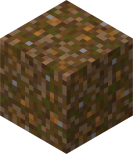
  1. Composting Dirt Crafted from dirt and eight compostable items.
    ID: lumis_lots:composting_dirt
    Darker dirt with green and brown spots
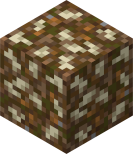
  2. Composted Dirt A result of letting composting dirt sit.
    ID: lumis_lots:composted_dirt
    Darker dirt with white spots
  3. Hoes Breaking Leaves Hoes now break leaves at various speeds depending on material type
  4. Meta Key Copy/Pasting You can now use the left and right meta key (⌘ on macOS) for copy, cutting, selecting all, and pasting
  5. Sponge Functionality Sponges can now be found in the creative inventory and have complete functionality. Obtainable by fishing

New Features

  1. Inventory Movement Allows the user to move within most GUIs
  2. No Music Cooldown Removes the cooldown between music tracks
  3. Wither Bones Dropped from wither skeletons and can be crafted into wither bonemeal
    ID: lumis_lots:wither_bone
    A long, dark bone
  4. Wither Bonemeal Crafted from wither bones and can be used to de-age plants, clear grass/flowers from an area, or turn plants into bushes
    ID: lumis_lots:wither_bonemeal
    Bonemeal recoloured with the wither colour palette
  5. Deepslate Cobblestone Generators (EtFuturum necessary) Makes cobblestone/stone generators produce their deepslate equivalent at Y=22 and below

Gameplay guide

Compost

Composting dirt can be crafted by placing eight compostable items around a block of dirt. Once placed down it will begin to age into composted dirt, a process which can be sped up by placing a water source nearby. Once aged into composted dirt it can be broken to drop 3-5 bonemeal and a block of dirt. If you're using fortune bonemeal drops follow the formula Drop rate = Y * ⌊1.5 * Fortune level⌋, Y ∈ {3, 4, 5}.
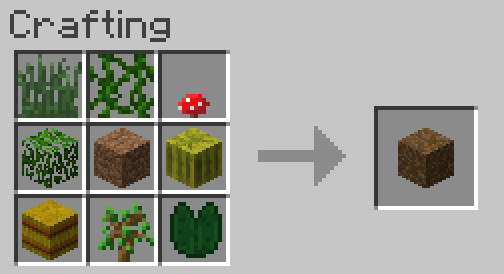
Crafting grid with dirt in centre surrounded by compostable items

Compostable items
  • Apples,
  • Baked Potatoes,
  • Bread,
  • Brown Mushrooms,
  • Cacti,
  • Eggs,
  • Fish,
  • Flowers,
  • Grass,
  • Hay Blocks,
  • Leaves,
  • Lily Pads,
  • Melon Blocks,
  • Melon Seeds,
  • Melon Slices,
  • Nether Wart,
  • Potatoes,
  • Pumpkins,
  • Pumpkin Seeds,
  • Raw Beefs,
  • Raw Chickens,
  • Raw Porkchops,
  • Red Mushrooms,
  • Rotten Flesh,
  • Saplings,
  • Sugar Cane,
  • Vines,
  • Wheat Seeds,
  • Wheat

Wither Bones & Bonemeal

When killed a wither skeleton will drop wither bones following the formula Drop rate = Y + Looting level, Y ∈ {0, 1, 2, 3}. These bones can be crafted into wither bonemeal. When used on a crop it will reverse the crop's stage, opposite to bonemeal. When placed upon the ground it will remove nearby grass and flower. Finally, if used upon a plant it will either turn it to a bush or in the case of tall grass turn it to short grass. Another use is it can be a replacement for black dye in recipes.

How to use

Add this mod to your game's mods folder along with Unimixins 0.1.23 or greater.

👥 Team & Contributors

LumiLovesYou
LumiLovesYouOwner

⚙️ Compatibility

Environment
✅ Client & Server
Loaders
forge
Minecraft Versions
1.7.10

🔗 Links

Modrinth Page