Logo
MINECRAFTBIBLE
Items
Items

All game items

Blocks
Blocks

Building blocks

Mobs
Mobs

Creatures & monsters

Biomes
Biomes

World biomes

Structures
Structures

Generated structures

Recipes
Recipes

Crafting guides

Advancements
Advancements

Achievements

Loot Tables
Loot Tables

Drop rates

Tags
Tags

Item groupings

All Versions
View all data →
Capes
Cape ArchiveNEW

Browse rare Minecon capes, OptiFine capes, and custom capes from players worldwide

Browse

Player Database
Player DatabasePopular

Search any player

Skin Browser
Skin Browser

Browse & download skins

Cape Gallery
Cape GalleryNEW

Minecon & OptiFine capes

Seed Vault
Seed Vault

Curated seeds

Learn

Guides
GuidesNew

Tutorials & tips

Blog
Blog

News & updates

Community

Community Hub
Community HubHub

Posts, discussions & more

All Versions
View community →
Seed Analyzer
Seed Analyzer

World seed analysis

Loot Explorer
Loot Explorer

Drop rates

Crafting Calculator
Crafting Calculator

Material planning

Enchant Calculator
Enchant Calculator

Probability math

Redstone Lab
Redstone Lab

Signal timing

Trading Profit
Trading Profit

Villager ROI

All Versions
View all tools →
Mods
Mods

Browse all mods

Plugins
Plugins

Server plugins

Resource Packs
Resource Packs

Textures & sounds

Shaders
Shaders

Visual enhancements

Datapacks
Datapacks

World logic

Scanner
Mod Intelligence

Scan & analyze any mod

All Versions
View all mods →
Loading...
IntroductionIntroductionVersion HistoryVersion HistoryGuidesGuidesBlog & NewsBlog & News
ItemsItemsBlocksBlocksMobsMobsRecipesRecipesBiomesBiomesStructuresStructuresAdvancementsAdvancementsLoot TablesLoot TablesTagsTags
ModsModsPluginsPluginsResource PacksResource PacksShadersShadersDatapacksDatapacks

MinecraftBible

The Ultimate Wiki

Logo
MINECRAFTBIBLE

The ultimate Minecraft reference. Every item, block, mob, and recipe documented with precision.

Community

  • Player Database
  • Skin Browser
  • Cape Gallery
  • Community Hub
  • Seed Vault

Database

  • Items
  • Blocks
  • Mobs
  • Recipes
  • Biomes
  • Structures

Tools

  • Seed Analyzer
  • Mod Intelligence
  • Crafting Calculator
  • Enchant Calculator

Mods & Packs

  • Mods
  • Plugins
  • Resource Packs
  • Shaders
  • Datapacks

© 2026 MinecraftBible. Not affiliated with Mojang or Microsoft.

PrivacyTermsContact
Locator Heads
ModLGPL-3.0-only

Locator Heads

Show player heads on the locator bar and other usefull settings.

284.5K
Downloads
392
Followers
2 months ago
Updated
📦
13
Versions
game-mechanicssocialutilityfabric
Download Latestv1.6.4View on Modrinth

📖About Locator Heads

website

Locator Heads

is a client-side Minecraft mod that displays nearby players as heads on your XP bar, making it easy to track their location and direction at a glance. Customize colors, borders, filtering options, and add a compass overlay to enhance your multiplayer experience.



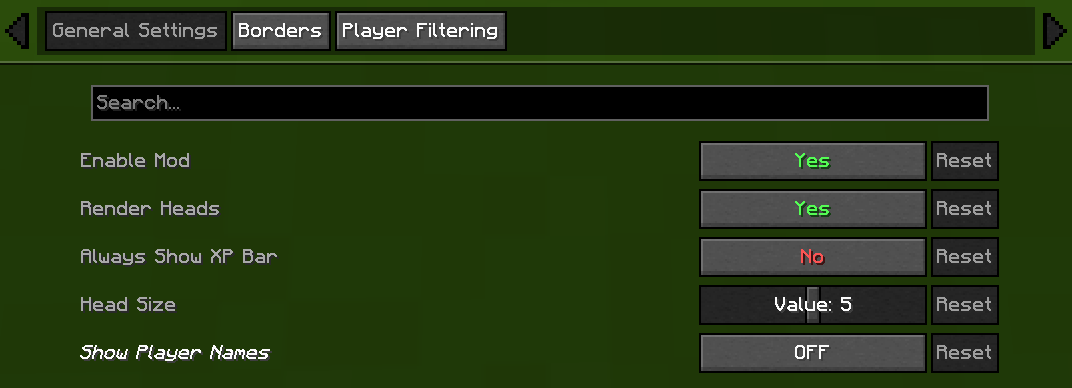
⚙️ General Settings

  • Enable/Disable Mod
    Chose weather or not mod is on or off.
  • Render Heads
    Choose if you want heads to be rendered (can be used to only show names)
  • Always show XP bar
  • Head Size
    Change the size of the heads
  • Show Player Names
Player Name Option Description
Never No names on the locator bar. (default)
Always Names permanently visible above all player heads.
Looking At Names appear only when you look within a 30°
Player List Names show when the in-game player list is open.

Player Heads

Player Heads

Player Heads

Player Heads

🧭 Compass

  • Show Compass
    Toggle the compass overlay on or off
  • Compass Colour
    Customize the color of the compass direction letters using hex color picker
  • Compass Shadow
    Toggle black outline around compass letters for better visibility

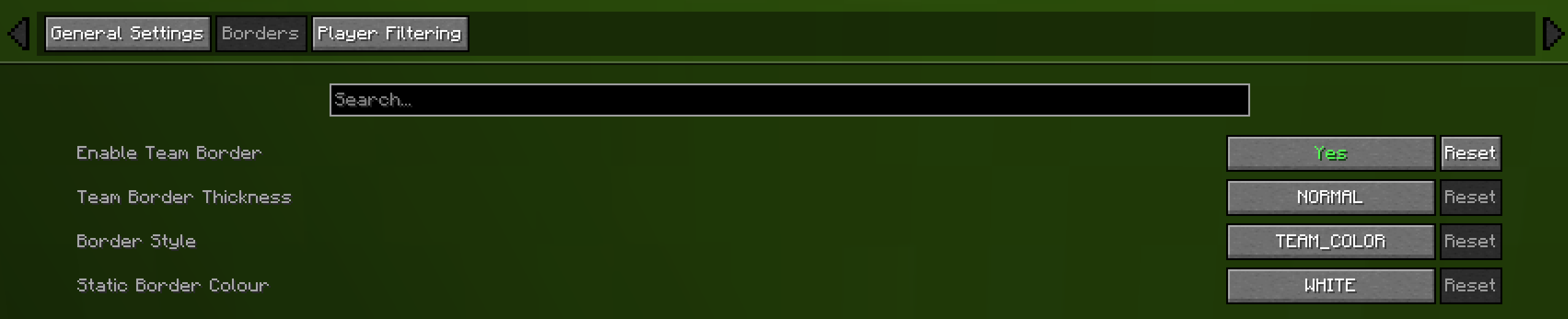
🎨 Borders

  • Enable Border
    If enabled the border is on
  • Border Thickness
    How many pixels thick the border should be
  • Border Style
    Can be eithere "TEAM_COLOUR" or "STATIC_COLOUR"
  • Static Border Colour
    Choose what colour the static border will have

Team Borders

Team Borders

🎯 Advanced Player Filtering

choose who appear on your locator bar:

  • All Players (default)
    Shows everyone.
  • Include Only
    Display only the players listed in your filter.
  • Exclude Only
    Hide only the players listed, showing all others.

Filter Syntax

  • Separate names by commas (,), semicolons (;), colons (:), or periods (.).

Example:
Jeb_, Dinnerbone; LadyAgnes

Filter


🔗 Dependencies

Required

Fabric API

Optional (Recommended)

Mod Menu Cloth Config API

👥 Credits

  • Original Head Rendering Concept & Code — MCRcortex MCRcortex

🔧 Update Help

  • 1.21.9 — Lemonszz Lemonszz
  • 1.21.10 — aport73 aport73

💡 Feature Requests

  • Always show XP bar — TechPro424 TechPro424
  • Static border — Starrider37 Starrider37
  • Compass — xisumavoid xisumavoid and Zedaph Zedaph

👥 Team & Contributors

Haage
HaageOwner

⚙️ Compatibility

Environment
💻 Client-side
Loaders
fabric
Minecraft Versions
1.21.11

🔗 Links

Modrinth Page