Logo
MINECRAFTBIBLE
Items
Items

All game items

Blocks
Blocks

Building blocks

Mobs
Mobs

Creatures & monsters

Biomes
Biomes

World biomes

Structures
Structures

Generated structures

Recipes
Recipes

Crafting guides

Advancements
Advancements

Achievements

Loot Tables
Loot Tables

Drop rates

Tags
Tags

Item groupings

All Versions
View all data →
Capes
Cape ArchiveNEW

Browse rare Minecon capes, OptiFine capes, and custom capes from players worldwide

Browse

Player Database
Player DatabasePopular

Search any player

Skin Browser
Skin Browser

Browse & download skins

Cape Gallery
Cape GalleryNEW

Minecon & OptiFine capes

Seed Vault
Seed Vault

Curated seeds

Learn

Guides
GuidesNew

Tutorials & tips

Blog
Blog

News & updates

Community

Community Hub
Community HubHub

Posts, discussions & more

All Versions
View community →
Seed Analyzer
Seed Analyzer

World seed analysis

Loot Explorer
Loot Explorer

Drop rates

Crafting Calculator
Crafting Calculator

Material planning

Enchant Calculator
Enchant Calculator

Probability math

Redstone Lab
Redstone Lab

Signal timing

Trading Profit
Trading Profit

Villager ROI

All Versions
View all tools →
Mods
Mods

Browse all mods

Plugins
Plugins

Server plugins

Resource Packs
Resource Packs

Textures & sounds

Shaders
Shaders

Visual enhancements

Datapacks
Datapacks

World logic

Scanner
Mod Intelligence

Scan & analyze any mod

All Versions
View all mods →
Loading...
IntroductionIntroductionVersion HistoryVersion HistoryGuidesGuidesBlog & NewsBlog & News
ItemsItemsBlocksBlocksMobsMobsRecipesRecipesBiomesBiomesStructuresStructuresAdvancementsAdvancementsLoot TablesLoot TablesTagsTags
ModsModsPluginsPluginsResource PacksResource PacksShadersShadersDatapacksDatapacks

MinecraftBible

The Ultimate Wiki

Logo
MINECRAFTBIBLE

The ultimate Minecraft reference. Every item, block, mob, and recipe documented with precision.

Community

  • Player Database
  • Skin Browser
  • Cape Gallery
  • Community Hub
  • Seed Vault

Database

  • Items
  • Blocks
  • Mobs
  • Recipes
  • Biomes
  • Structures

Tools

  • Seed Analyzer
  • Mod Intelligence
  • Crafting Calculator
  • Enchant Calculator

Mods & Packs

  • Mods
  • Plugins
  • Resource Packs
  • Shaders
  • Datapacks

© 2026 MinecraftBible. Not affiliated with Mojang or Microsoft.

PrivacyTermsContact
JourneyMap Tracker
ModMIT

JourneyMap Tracker

A client-side mod that uses DynMap to create and update journeymap waypoints for players.

2.0K
Downloads
2
Followers
4 months ago
Updated
📦
4
Versions
utilityfabric
Download Latestv1.1.1View on Modrinth

📖About JourneyMap Tracker

JourneyMap Tracker is a mod that creates and updates JourneyMap waypoints of tracked players given a DynMap URL.

Not all web map software will work, but so far I haven't found one that doesn't work.

The following are known to work:

  • Squaremap
  • Whatever EarthMC uses (couldn't find it)

Setting the URL and other parameters

You can either type /jmtracker url <url here> or set it using the config through ModMenu or running /jmtracker config.

There is an option in the config for modifying the polling delay but it doesn't seem to go below one second.

For the other parameters, you're going to have to press f12, navigate to Network, and right click -> open in new tab a file that repeatedly gets fetched. It's name should be something like players.json or tiles.json.
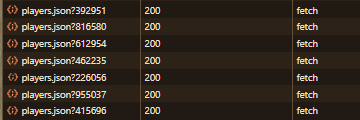
players.json getting fetched

If the exact URL of the file isn't <your url>/tiles/players.json, you're gonna have to set the url suffix to what the /tiles/players.json is instead.

For the world specific option, if an individual player's object doesn't contain a world object, you need to turn it off.

For the position sub category, it's the opposite: if the player object directly has x,y, and z values, leave it blank. If not, change it to the name of the object containing the values.
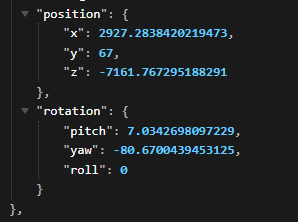
position thing

In this example, it would be set to position since the x y and z values are in a position object.

Tracking / Untracking players

Tracking and untracking players is unfortunately not possible through the config.

To track and untrack players, you have to use the commands:

/jmtracker add/remove <playername>

Issues and/or feature requests can be posted on my issue tracker.

👥 Team & Contributors

Orangy
OrangyOwner

⚙️ Compatibility

Environment
💻 Client-side
Loaders
fabric
Minecraft Versions
1.21.10

🔗 Links

Modrinth Page