Logo
MINECRAFTBIBLE
Items
Items

All game items

Blocks
Blocks

Building blocks

Mobs
Mobs

Creatures & monsters

Biomes
Biomes

World biomes

Structures
Structures

Generated structures

Recipes
Recipes

Crafting guides

Advancements
Advancements

Achievements

Loot Tables
Loot Tables

Drop rates

Tags
Tags

Item groupings

All Versions
View all data →
Capes
Cape ArchiveNEW

Browse rare Minecon capes, OptiFine capes, and custom capes from players worldwide

Browse

Player Database
Player DatabasePopular

Search any player

Skin Browser
Skin Browser

Browse & download skins

Cape Gallery
Cape GalleryNEW

Minecon & OptiFine capes

Seed Vault
Seed Vault

Curated seeds

Learn

Guides
GuidesNew

Tutorials & tips

Blog
Blog

News & updates

Community

Community Hub
Community HubHub

Posts, discussions & more

All Versions
View community →
Seed Analyzer
Seed Analyzer

World seed analysis

Loot Explorer
Loot Explorer

Drop rates

Crafting Calculator
Crafting Calculator

Material planning

Enchant Calculator
Enchant Calculator

Probability math

Redstone Lab
Redstone Lab

Signal timing

Trading Profit
Trading Profit

Villager ROI

All Versions
View all tools →
Mods
Mods

Browse all mods

Plugins
Plugins

Server plugins

Resource Packs
Resource Packs

Textures & sounds

Shaders
Shaders

Visual enhancements

Datapacks
Datapacks

World logic

Scanner
Mod Intelligence

Scan & analyze any mod

All Versions
View all mods →
Loading...
IntroductionIntroductionVersion HistoryVersion HistoryGuidesGuidesBlog & NewsBlog & News
ItemsItemsBlocksBlocksMobsMobsRecipesRecipesBiomesBiomesStructuresStructuresAdvancementsAdvancementsLoot TablesLoot TablesTagsTags
ModsModsPluginsPluginsResource PacksResource PacksShadersShadersDatapacksDatapacks

MinecraftBible

The Ultimate Wiki

Logo
MINECRAFTBIBLE

The ultimate Minecraft reference. Every item, block, mob, and recipe documented with precision.

Community

  • Skin Browser
  • Cape Gallery
  • Seed Vault
  • Blog
  • Guides

Database

  • Items
  • Blocks
  • Mobs
  • Recipes
  • Biomes
  • Structures

Tools

  • Seed Analyzer
  • Mod Intelligence
  • Crafting Calculator
  • Enchant Calculator

Mods & Packs

  • Mods
  • Plugins
  • Resource Packs
  • Shaders
  • Datapacks

Site & Legal

  • About
  • Authors
  • Editorial Policy
  • Corrections
  • Contact
  • Privacy Policy
  • Terms of Service
  • DMCA
  • Sitemap

© 2026 MinecraftBible. Not affiliated with Mojang or Microsoft.

PrivacyTermsContact
InventoryHUD+
ModLicenseRef-All-Rights-Reserved

InventoryHUD+

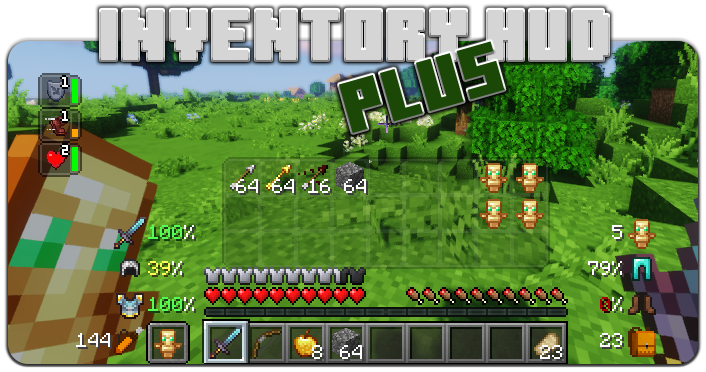
Adds your main inventory, potion effects and your equipments to your HUD. And few other features.

3.2M
Downloads
364
Followers
6 months ago
Updated
📦
30
Versions
adventuremanagementstoragefabricforgeneoforge
Download Latestv3.4.29View on Modrinth

📖About InventoryHUD+

Quick mod showcase
twitter (X) link

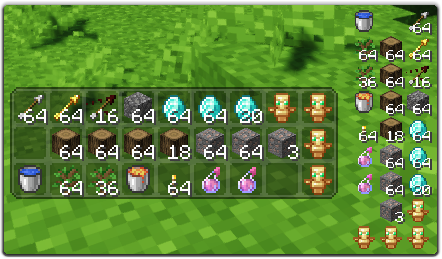
This mod contains a few features, first of all - Inventory HUD, it shows your inventory while you are playing, you can switch between mods (mini/normal and horizontal/vertical), also you can change background transparency and toggle animation on/off
Replace this with a description

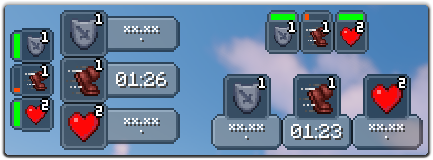
Next feature is PotionHUD, it shows your potion effects with timer or duration bar if you are using mini mode, you can change gap between effects and background transparency in config, and you can enable horizontal mode as well
Replace this with a description

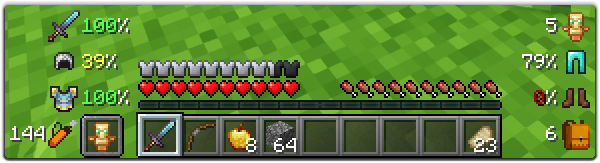
And last but not least feature is ArmorHUD, it shows durability of your armor and equipment, also shows how many free slots do you have in your inventory and how many arrows do you have. This HUD is fully customizable, you can change scale, type of damage indicator or turn on/off each part of your equipment
Replace this with a description

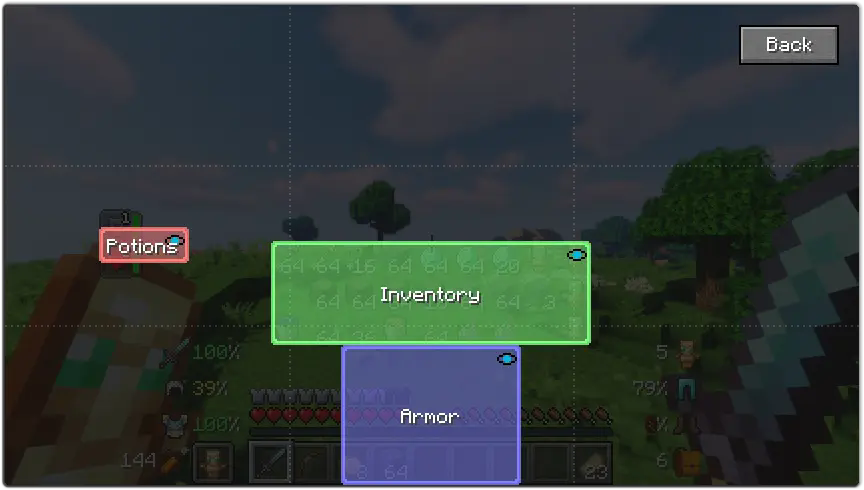
You can change a lot of options in config ("Mod" button in Main Menu, then "Config"), also you can change the position for each HUD by simply dragging and dropping them. To open ingame config screen you can use keybind ("O" by default)
Replace this with a description


If you want to help me to make this mod better, you can translate it to your language and send json file to me.

You can find original lang file here: en_us.json

Supported languages
  • Chinese Simplified (Mainland China) (zh_cn) (thanks to Satxm)
  • Chinese Traditional (Taiwan) (zh_tw) (thanks to yichifauzi)
  • Czech (cs_cz) (thanks to Janys159)
  • English (en_us)
  • French (fr_fr) (thanks to Peperehobbits01)
  • German (de_de) (thanks to arrowlevel)
  • Hungarian (hu_hu) (thanks to Kalmix88)
  • Italian (it_it) (thanks to cranos96)
  • Japanese (ja_jp) (thanks to co_91)
  • Korean (ko_kr) (thanks to gueso-gato1355)
  • Portuguese - Brasil (pt_br) (thanks to VitorLeonardo)
  • Russian (ru_ru)
  • Spanish (es_es) (thanks to Zeedif)
  • Turkish (tr_tr) (thanks to MefeBey)
  • Ukrainian (uk_ua) (thanks to Elvis_Danger)

👥 Team & Contributors

DmitryLovin
DmitryLovinOwner

⚙️ Compatibility

Environment
💻 Client-side
Loaders
fabricforgeneoforge
Minecraft Versions
1.21.11

🔗 Links

Modrinth Page