Logo
MINECRAFTBIBLE
Items
Items

All game items

Blocks
Blocks

Building blocks

Mobs
Mobs

Creatures & monsters

Biomes
Biomes

World biomes

Structures
Structures

Generated structures

Recipes
Recipes

Crafting guides

Advancements
Advancements

Achievements

Loot Tables
Loot Tables

Drop rates

Tags
Tags

Item groupings

All Versions
View all data →
Capes
Cape ArchiveNEW

Browse rare Minecon capes, OptiFine capes, and custom capes from players worldwide

Browse

Player Database
Player DatabasePopular

Search any player

Skin Browser
Skin Browser

Browse & download skins

Cape Gallery
Cape GalleryNEW

Minecon & OptiFine capes

Seed Vault
Seed Vault

Curated seeds

Learn

Guides
GuidesNew

Tutorials & tips

Blog
Blog

News & updates

Community

Community Hub
Community HubHub

Posts, discussions & more

All Versions
View community →
Seed Analyzer
Seed Analyzer

World seed analysis

Loot Explorer
Loot Explorer

Drop rates

Crafting Calculator
Crafting Calculator

Material planning

Enchant Calculator
Enchant Calculator

Probability math

Redstone Lab
Redstone Lab

Signal timing

Trading Profit
Trading Profit

Villager ROI

All Versions
View all tools →
Mods
Mods

Browse all mods

Plugins
Plugins

Server plugins

Resource Packs
Resource Packs

Textures & sounds

Shaders
Shaders

Visual enhancements

Datapacks
Datapacks

World logic

Scanner
Mod Intelligence

Scan & analyze any mod

All Versions
View all mods →
Loading...
IntroductionIntroductionVersion HistoryVersion HistoryGuidesGuidesBlog & NewsBlog & News
ItemsItemsBlocksBlocksMobsMobsRecipesRecipesBiomesBiomesStructuresStructuresAdvancementsAdvancementsLoot TablesLoot TablesTagsTags
ModsModsPluginsPluginsResource PacksResource PacksShadersShadersDatapacksDatapacks

MinecraftBible

The Ultimate Wiki

Logo
MINECRAFTBIBLE

The ultimate Minecraft reference. Every item, block, mob, and recipe documented with precision.

Community

  • Skin Browser
  • Cape Gallery
  • Seed Vault
  • Blog
  • Guides

Database

  • Items
  • Blocks
  • Mobs
  • Recipes
  • Biomes
  • Structures

Tools

  • Seed Analyzer
  • Mod Intelligence
  • Crafting Calculator
  • Enchant Calculator

Mods & Packs

  • Mods
  • Plugins
  • Resource Packs
  • Shaders
  • Datapacks

Site & Legal

  • About
  • Authors
  • Editorial Policy
  • Corrections
  • Contact
  • Privacy Policy
  • Terms of Service
  • DMCA
  • Sitemap

© 2026 MinecraftBible. Not affiliated with Mojang or Microsoft.

PrivacyTermsContact
Integrated circuit
ModMIT

Integrated circuit

Adds integrated circuits to compact your redstone circuits into one block

28.5K
Downloads
147
Followers
5 months ago
Updated
📦
30
Versions
game-mechanicstechnologyutilityfabric
Download Latestv1.6.6View on Modrinth

📖About Integrated circuit

Integrated Circuit

Available for fabric
Requires fabric api
Works best with cloth config
See me on GitHub
Available on Modrinth
Chat on Discord

A Minecraft mod that adds an integrated circuit redstone component.
Each integrated circuit block has a 15x15 grid where you can place two-dimensional
redstone components. Each side of the circuit can be used as an input or output for your circuit.
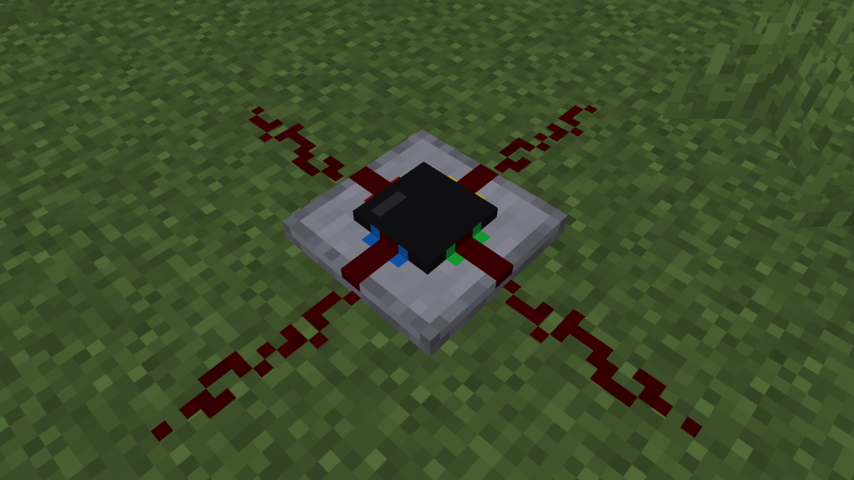
The integrated circuit block

Example circuit

How to use

To craft an integrated circuit, you need 2 redstone dust, 1 quartz, 1 black terracotta, and 3 concrete or stone arranged like so:
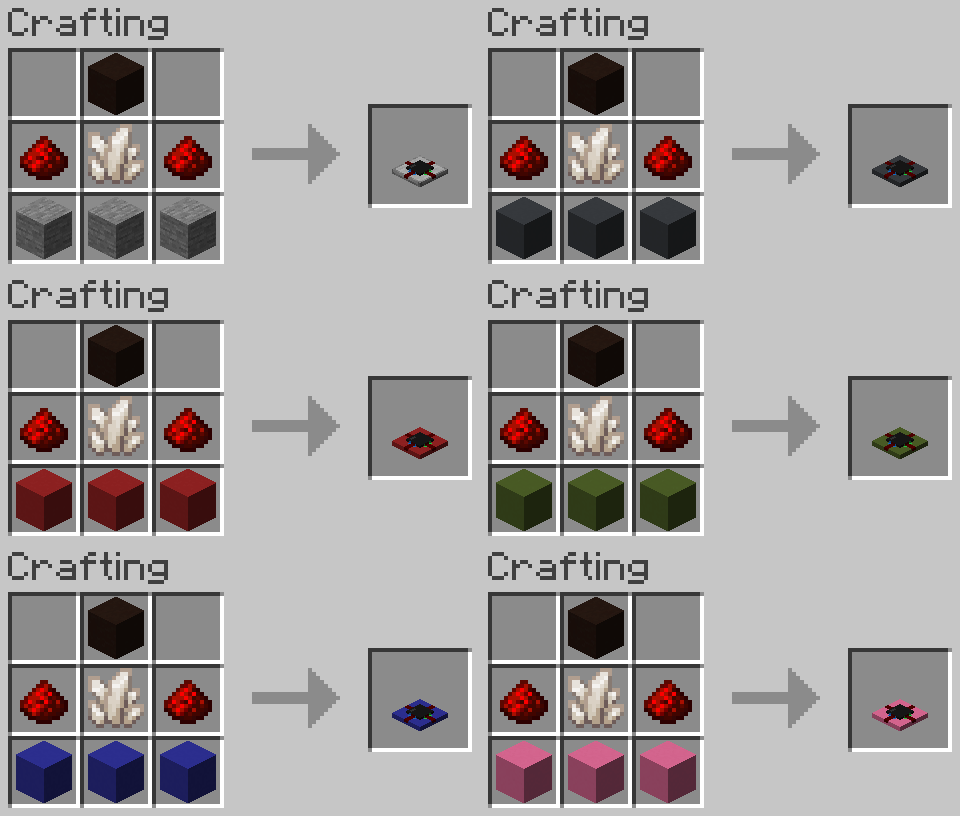
Crafting recipe

When you place one down and click on it, it will open the circuit editor screen.
You can select a block on the left, and place it in the 15x15 grid as you normally would in minecraft.
To rotate a component, you use the scroll wheel.
Adjusting repeater delay or the comparator mode is done by right clicking on a component.

The four ports are labeled using four colors to associate them with the sides of the integrated circuit block.
Each port can be an input or output, which can be changed by right clicking it in the editor.

You can also copy circuits by putting an integrated circuit in the crafting grid,
along with empty integrated circuits, similar to how books are copied, or re-dye them a different color
by crafting them with a dye item, like with wool or shulker boxes.

Config

When having cloth-config and ModMenu installed,
a config can be accessed from the Mod's modmenu page.
Without cloth-config installed, the mod will use the vanilla keybindings and default config options.

The config allows to customize the three main keybindings for placing, destroying and picking components.
You can also change the scroll behaviour (rotate component, scroll palette) and inverse the scroll direction.

Credits

Credits for the tweaked redstone component textures (levers, observers):

Vanilla Tweaks: https://vanillatweaks.net/

👥 Team & Contributors

replaceitem
replaceitemOwner

⚙️ Compatibility

Environment
✅ Client & Server
Loaders
fabric
Minecraft Versions
1.21.11

🔗 Links

Modrinth Page