Logo
MINECRAFTBIBLE
Items
Items

All game items

Blocks
Blocks

Building blocks

Mobs
Mobs

Creatures & monsters

Biomes
Biomes

World biomes

Structures
Structures

Generated structures

Recipes
Recipes

Crafting guides

Advancements
Advancements

Achievements

Loot Tables
Loot Tables

Drop rates

Tags
Tags

Item groupings

All Versions
View all data →
Capes
Cape ArchiveNEW

Browse rare Minecon capes, OptiFine capes, and custom capes from players worldwide

Browse

Player Database
Player DatabasePopular

Search any player

Skin Browser
Skin Browser

Browse & download skins

Cape Gallery
Cape GalleryNEW

Minecon & OptiFine capes

Seed Vault
Seed Vault

Curated seeds

Learn

Guides
GuidesNew

Tutorials & tips

Blog
Blog

News & updates

Community

Community Hub
Community HubHub

Posts, discussions & more

All Versions
View community →
Seed Analyzer
Seed Analyzer

World seed analysis

Loot Explorer
Loot Explorer

Drop rates

Crafting Calculator
Crafting Calculator

Material planning

Enchant Calculator
Enchant Calculator

Probability math

Redstone Lab
Redstone Lab

Signal timing

Trading Profit
Trading Profit

Villager ROI

All Versions
View all tools →
Mods
Mods

Browse all mods

Plugins
Plugins

Server plugins

Resource Packs
Resource Packs

Textures & sounds

Shaders
Shaders

Visual enhancements

Datapacks
Datapacks

World logic

Scanner
Mod Intelligence

Scan & analyze any mod

All Versions
View all mods →
Loading...
IntroductionIntroductionVersion HistoryVersion HistoryGuidesGuidesBlog & NewsBlog & News
ItemsItemsBlocksBlocksMobsMobsRecipesRecipesBiomesBiomesStructuresStructuresAdvancementsAdvancementsLoot TablesLoot TablesTagsTags
ModsModsPluginsPluginsResource PacksResource PacksShadersShadersDatapacksDatapacks

MinecraftBible

The Ultimate Wiki

Logo
MINECRAFTBIBLE

The ultimate Minecraft reference. Every item, block, mob, and recipe documented with precision.

Community

  • Skin Browser
  • Cape Gallery
  • Seed Vault
  • Blog
  • Guides

Database

  • Items
  • Blocks
  • Mobs
  • Recipes
  • Biomes
  • Structures

Tools

  • Seed Analyzer
  • Mod Intelligence
  • Crafting Calculator
  • Enchant Calculator

Mods & Packs

  • Mods
  • Plugins
  • Resource Packs
  • Shaders
  • Datapacks

Site & Legal

  • About
  • Authors
  • Editorial Policy
  • Corrections
  • Contact
  • Privacy Policy
  • Terms of Service
  • DMCA
  • Sitemap

© 2026 MinecraftBible. Not affiliated with Mojang or Microsoft.

PrivacyTermsContact
Immersive Storms
ModLGPL-3.0-or-later

Immersive Storms

Immersive fog and weather effects for mountains, deserts, pale gardens, and more!

33.3K
Downloads
85
Followers
3 months ago
Updated
📦
9
Versions
adventuredecorationfabricquilt
Download Latestv1.5.0View on Modrinth

📖About Immersive Storms

Immersive Storms

A small client-side mod that adds subtle and immersive fog and particle effects to various biomes, based on the weather.

Sandstorms
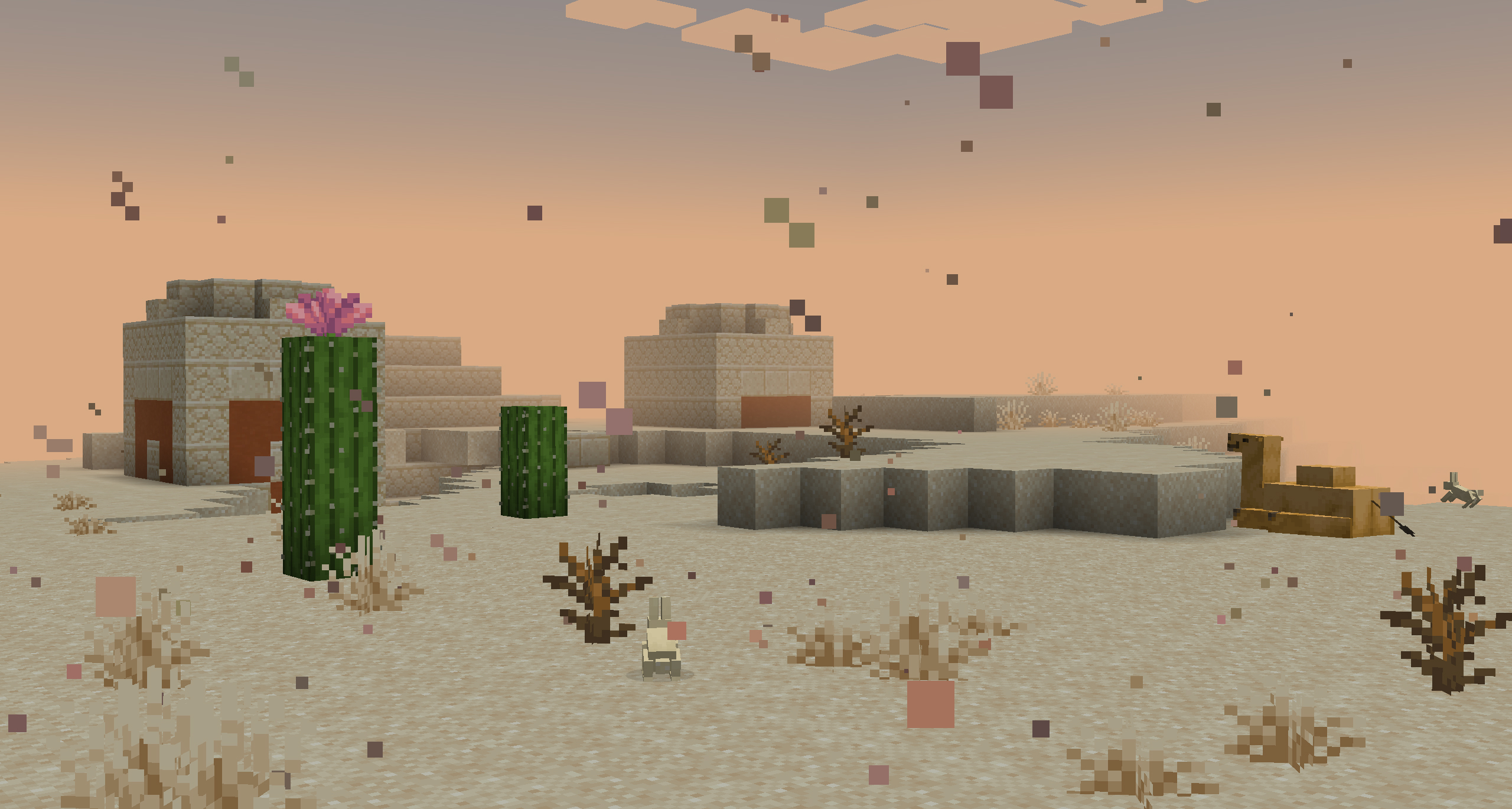
A Sandstorm blowing in across the Desert

Deserts, Badlands, and Savannas are now affected by Sandstorms. When it rains in the world, a dense sandy fog will close in and a fierce wind will kick up new dust particles. When thunderstorms roll in, this fog will get even thicker, making it very difficult to see where you are going.


Snowy Fog
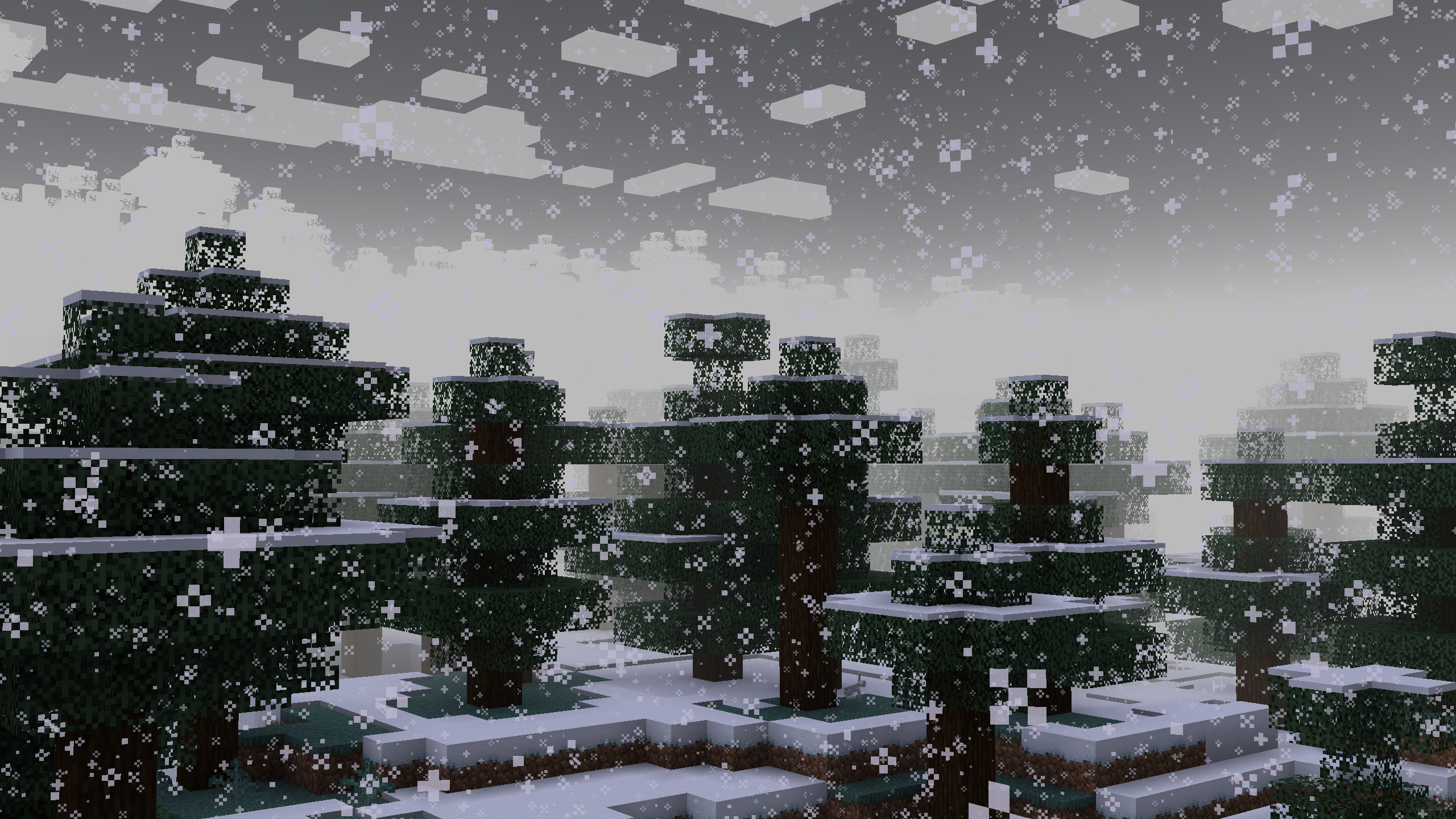
Blizzard fog in a Snowy Taiga

Fog is now whiter during snowy weather, and will get thicker during thunder storms, signalling a blizzard. While not as harsh as sandstorms, blizzards do still reduce visibility.


Foggy Swamps
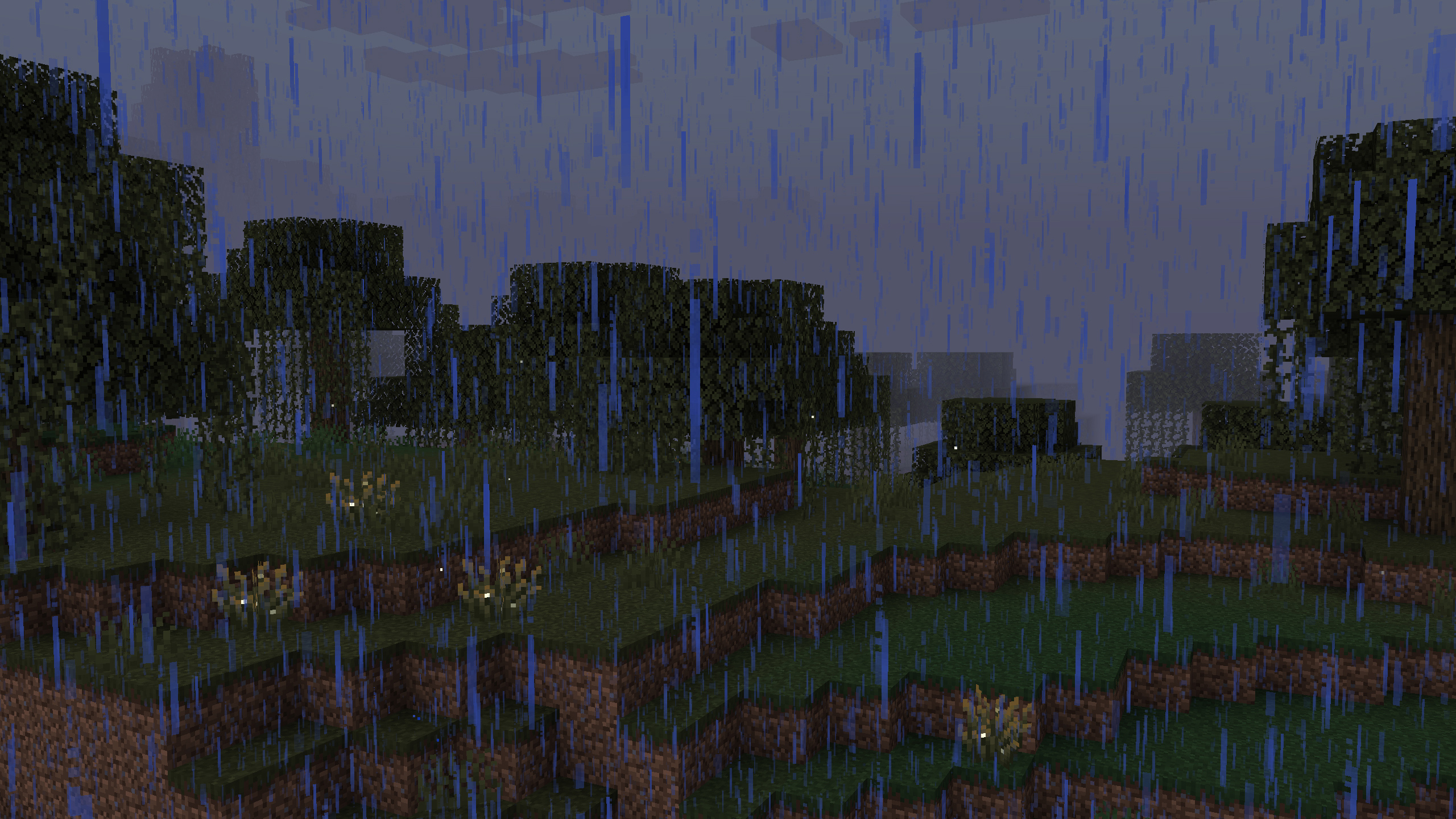
Swamp fog during a rain storm

A thick Fog now envelopes Swamps during rainy weather. This fog is as thick as the thickest sandstorms, but in all rainy weather, not just thunderstorms. This also applies in Pale Gardens, a much requested feature from the community.

Ambient Wind

Windswept hills and mountains have been made more windy in all weather conditions. A soft breeze will now carry bits of dust and rock with them. Deserts and badlands have been given this effect too (though the sound is a vanilla thing).


Compatibility

  • Scorchful: This mod is a standalone extraction of the sandstorm feature from Scorchful and is bundled with that mod as of 1.21.5.
  • Particle Rain: This mod is also compatible with Particle Rain. Sandstorm particles and sounds will be automatically disabled if Particle Rain is detected.
  • Shader Packs: The fog effects of this mod likely do not, and will not ever, work with most shaders packs as they have separate handling for fog. However, the particle and sound effects should work just fine.
  • Neoforge (Connector): This mod may work with Neoforge via Sinytra connector on versions where it is available; but this will neither be tested for nor supported.

Help and Support

You can report any bugs or issues you find to: https://github.com/theDeathlyCow/immersive-storms/issues

You can also get technical support in my Discord at https://discord.thedeathlycow.com

👥 Team & Contributors

TheDeathlyCow
TheDeathlyCowOwner

⚙️ Compatibility

Environment
💻 Client-side
Loaders
fabricquilt
Minecraft Versions
1.21.11

🔗 Links

Modrinth Page