Logo
MINECRAFTBIBLE
Items
Items

All game items

Blocks
Blocks

Building blocks

Mobs
Mobs

Creatures & monsters

Biomes
Biomes

World biomes

Structures
Structures

Generated structures

Recipes
Recipes

Crafting guides

Advancements
Advancements

Achievements

Loot Tables
Loot Tables

Drop rates

Tags
Tags

Item groupings

All Versions
View all data →
Capes
Cape ArchiveNEW

Browse rare Minecon capes, OptiFine capes, and custom capes from players worldwide

Browse

Player Database
Player DatabasePopular

Search any player

Skin Browser
Skin Browser

Browse & download skins

Cape Gallery
Cape GalleryNEW

Minecon & OptiFine capes

Seed Vault
Seed Vault

Curated seeds

Learn

Guides
GuidesNew

Tutorials & tips

Blog
Blog

News & updates

Community

Community Hub
Community HubHub

Posts, discussions & more

All Versions
View community →
Seed Analyzer
Seed Analyzer

World seed analysis

Loot Explorer
Loot Explorer

Drop rates

Crafting Calculator
Crafting Calculator

Material planning

Enchant Calculator
Enchant Calculator

Probability math

Redstone Lab
Redstone Lab

Signal timing

Trading Profit
Trading Profit

Villager ROI

All Versions
View all tools →
Mods
Mods

Browse all mods

Plugins
Plugins

Server plugins

Resource Packs
Resource Packs

Textures & sounds

Shaders
Shaders

Visual enhancements

Datapacks
Datapacks

World logic

Scanner
Mod Intelligence

Scan & analyze any mod

All Versions
View all mods →
Loading...
IntroductionIntroductionVersion HistoryVersion HistoryGuidesGuidesBlog & NewsBlog & News
ItemsItemsBlocksBlocksMobsMobsRecipesRecipesBiomesBiomesStructuresStructuresAdvancementsAdvancementsLoot TablesLoot TablesTagsTags
ModsModsPluginsPluginsResource PacksResource PacksShadersShadersDatapacksDatapacks

MinecraftBible

The Ultimate Wiki

Logo
MINECRAFTBIBLE

The ultimate Minecraft reference. Every item, block, mob, and recipe documented with precision.

Community

  • Skin Browser
  • Cape Gallery
  • Seed Vault
  • Blog
  • Guides

Database

  • Items
  • Blocks
  • Mobs
  • Recipes
  • Biomes
  • Structures

Tools

  • Seed Analyzer
  • Mod Intelligence
  • Crafting Calculator
  • Enchant Calculator

Mods & Packs

  • Mods
  • Plugins
  • Resource Packs
  • Shaders
  • Datapacks

Site & Legal

  • About
  • Authors
  • Editorial Policy
  • Corrections
  • Contact
  • Privacy Policy
  • Terms of Service
  • DMCA
  • Sitemap

© 2026 MinecraftBible. Not affiliated with Mojang or Microsoft.

PrivacyTermsContact
HUD bars
ModMIT

HUD bars

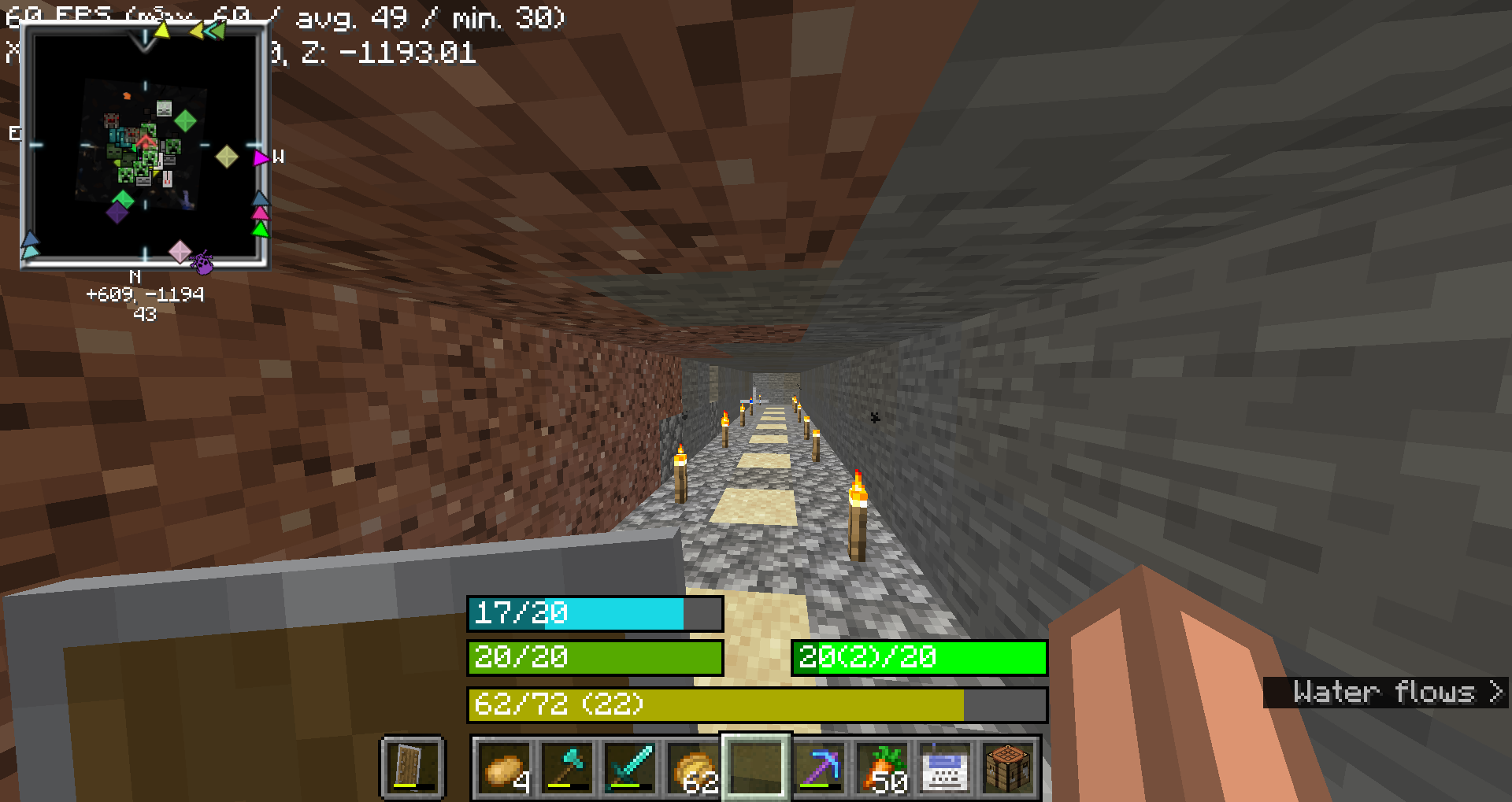
This mod replaces hud icons with bars

1.9K
Downloads
8
Followers
6 months ago
Updated
📦
8
Versions
cursedutilityfabric
Download Latestv1.1.6View on Modrinth

📖About HUD bars

This mod replaces the

  • health bar
  • hunger bar
  • armor bar
  • xp bar

with actual bars with numbers

An example

Health Bar

  • Format: Displays as "current/maximum", where current is the player's current health (including absorption), and maximum is the total health capacity.
    • Example: 20/20
  • Color:
    • Normal: #55AA00 (green)
    • With Absorption: #AAAA00 (yellow)
    • Poison Effect: #004400 (dark green)
    • Wither Effect: #000000 (black)
    • Frozen State: #00FFFF (cyan)
  • Border Color:
    • Blinking and Health Changed: #FFFFFF (white)
    • Blinking without Health Change: #FF0000 (red)
    • Health Changed without Blinking: #FF80FF (light purple)
    • No Change: #000000 (black)

Food Bar

  • Format: Displays as "current(saturation)/maximum", where current is the player's current food level and saturation is the saturation level.
    • Example: 15(5)/20
  • Color:
    • Hunger Effect: #AA55AA (purple)
    • Saturation Effect: #00FF00 (green)
    • Full (20 food levels): #00FF00 (green)
    • High (18-19 food levels): #33FF00 (bright green)
    • Moderate (7-17 food levels): #66FF00 (lime green)
    • Low (1-6 food levels): #FFFF00 (yellow)
    • Empty: #FF0000 (red)
  • Saturation Overlay:
    • Color: A darker shade of the food bar color, indicating the saturation level within the food bar.
    • Example: If the food bar is #00FF00 (green) and saturation is high, the overlay might be #007F00 (darker green).

Armor Bar

  • Format: Displays as "current/maximum", where current is the player's current armor level.
    • Example: 10/20
  • Color:
    • Transitions from #AA to #FF in red-green-blue channels as armor level increases, creating a gradient from grey to green:
      • Low Armor: More red, less green
      • High Armor: More green, less red
    • Example: At low armor, you might see #AA5555 (greyish-red) and at high armor, you might see #55FF55 (green).
  • Toughness Overlay:
    • Color: A darker shade of the armor bar color, indicating the armor toughness level within the armor bar.
    • Example: If the armor bar is #55FF55 (green) and toughness is high, the overlay might be #2A7F2A (darker green).

Experience Bar

  • Format: Displays as "current/required (level)", where current is the amount of experience gained towards the next level, required is the total experience needed for the next level, and level is the current experience level.
    • Example: 150/300 (10)
  • Color:
    • Experience Bar: #AAAA00 (yellow)

👥 Team & Contributors

BRNSystems
BRNSystemsOwner

⚙️ Compatibility

Environment
💻 Client-side
Loaders
fabric
Minecraft Versions
1.21.11

🔗 Links

Modrinth Page