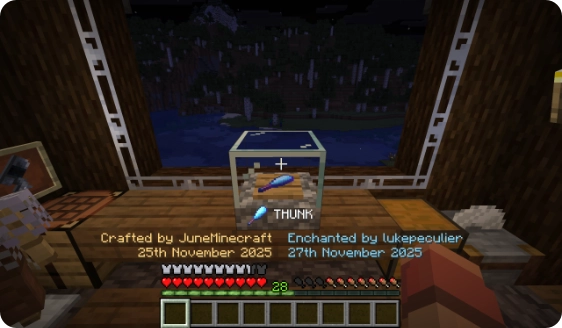
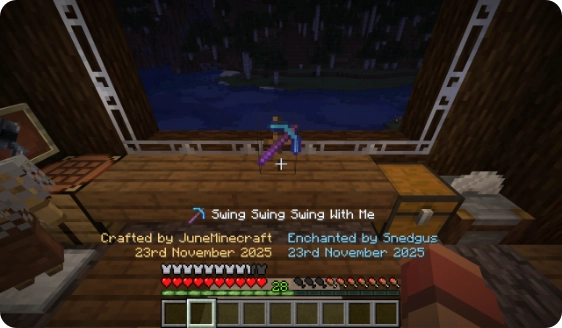
Logo
MINECRAFTBIBLE
Items
Items

All game items

Blocks
Blocks

Building blocks

Mobs
Mobs

Creatures & monsters

Biomes
Biomes

World biomes

Structures
Structures

Generated structures

Recipes
Recipes

Crafting guides

Advancements
Advancements

Achievements

Loot Tables
Loot Tables

Drop rates

Tags
Tags

Item groupings

All Versions
View all data →
Capes
Cape ArchiveNEW

Browse rare Minecon capes, OptiFine capes, and custom capes from players worldwide

Browse

Player Database
Player DatabasePopular

Search any player

Skin Browser
Skin Browser

Browse & download skins

Cape Gallery
Cape GalleryNEW

Minecon & OptiFine capes

Seed Vault
Seed Vault

Curated seeds

Learn

Guides
GuidesNew

Tutorials & tips

Blog
Blog

News & updates

Community

Community Hub
Community HubHub

Posts, discussions & more

All Versions
View community →
Seed Analyzer
Seed Analyzer

World seed analysis

Loot Explorer
Loot Explorer

Drop rates

Crafting Calculator
Crafting Calculator

Material planning

Enchant Calculator
Enchant Calculator

Probability math

Redstone Lab
Redstone Lab

Signal timing

Trading Profit
Trading Profit

Villager ROI

All Versions
View all tools →
Mods
Mods

Browse all mods

Plugins
Plugins

Server plugins

Resource Packs
Resource Packs

Textures & sounds

Shaders
Shaders

Visual enhancements

Datapacks
Datapacks

World logic

Scanner
Mod Intelligence

Scan & analyze any mod

All Versions
View all mods →
Loading...
IntroductionIntroductionVersion HistoryVersion HistoryGuidesGuidesBlog & NewsBlog & News
ItemsItemsBlocksBlocksMobsMobsRecipesRecipesBiomesBiomesStructuresStructuresAdvancementsAdvancementsLoot TablesLoot TablesTagsTags
ModsModsPluginsPluginsResource PacksResource PacksShadersShadersDatapacksDatapacks

MinecraftBible

The Ultimate Wiki

Logo
MINECRAFTBIBLE

The ultimate Minecraft reference. Every item, block, mob, and recipe documented with precision.

Community

  • Player Database
  • Skin Browser
  • Cape Gallery
  • Community Hub
  • Seed Vault

Database

  • Items
  • Blocks
  • Mobs
  • Recipes
  • Biomes
  • Structures

Tools

  • Seed Analyzer
  • Mod Intelligence
  • Crafting Calculator
  • Enchant Calculator

Mods & Packs

  • Mods
  • Plugins
  • Resource Packs
  • Shaders
  • Datapacks

© 2026 MinecraftBible. Not affiliated with Mojang or Microsoft.

PrivacyTermsContact
Heirlooms
ModGPL-3.0-only

Heirlooms

Crafting and enchanting unstackable items engraves them with a tooltip containing their history

4.2K
Downloads
35
Followers
2 months ago
Updated
📦
24
Versions
adventureequipmentutilityfabricforgeneoforge
Download Latestv1.3.1+1.21.11View on Modrinth

📖About Heirlooms

Explore All Mods ButtonFull Mod Description Button

Heirlooms Mod Banner

Flag US

Static Badge
Static Badge

About

The Heirlooms mod gives your favourite items a history which you can look back on.

New Tooltips

Your unstackable crafted items get a special tooltip showing

  • the date the item was crafted
  • the name of the player who crafted it.

New Blocks

Heirlooms adds two new blocks, which are perfect for holding your favourite items and elevating their symbolic importance:

  • Display Case - showcase your items in a glass enclosure
  • Display Rack - show your items on a wooden rack

Both blocks show information about the item, including the tooltip information the mod adds, when a player looks at the block in-world.

Tooltips

Any item that you craft which can't be stacked will receive an heirloom tooltip. Popular examples would include tools, weapons and armour.

Iron Sword and Netherite Chestplate recipes

Hidden by default

The tooltip information is only shown when holding down the CTRL or ALT keys while hovering over the item

The tooltip for an iron sword with a ctrl prompt

Supports modded items

As long as the item is made in a crafting table or a smithing table, or enchanted in an enchanting table, it should work, no matter the mod.
This example shows an item from Basic Weapons

The tooltip for a copper glaive

Blocks

Heirlooms adds two blocks to show off your items with
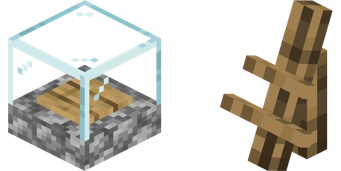
Display case and display rack isometric 3d models

Display Case

The display case is a full-sized block and shows items on the wooden plate in the center.

  • Perfect for blocks

Display Case Example

Display Rack

The display rack is a small block and shows items at an angle.

  • Perfect for tools, weapons, armour

Display Rack Example

Rendering Differences

The display case and rack render some items differently to each other. If an item is a block with a custom item texture (e.g. sugar cane, torch, sign) the display case will show the block model, while the rack shows the gui sprite:

3 Display cases and 3 display racks, showing the items contained being rendered differently

👥 Team & Contributors

June
JuneOwner

⚙️ Compatibility

Environment
✅ Client & Server
Loaders
fabricforgeneoforge
Minecraft Versions
1.21.11

🔗 Links

Modrinth Page