Logo
MINECRAFTBIBLE
Items
Items

All game items

Blocks
Blocks

Building blocks

Mobs
Mobs

Creatures & monsters

Biomes
Biomes

World biomes

Structures
Structures

Generated structures

Recipes
Recipes

Crafting guides

Advancements
Advancements

Achievements

Loot Tables
Loot Tables

Drop rates

Tags
Tags

Item groupings

All Versions
View all data →
Capes
Cape ArchiveNEW

Browse rare Minecon capes, OptiFine capes, and custom capes from players worldwide

Browse

Player Database
Player DatabasePopular

Search any player

Skin Browser
Skin Browser

Browse & download skins

Cape Gallery
Cape GalleryNEW

Minecon & OptiFine capes

Seed Vault
Seed Vault

Curated seeds

Learn

Guides
GuidesNew

Tutorials & tips

Blog
Blog

News & updates

Community

Community Hub
Community HubHub

Posts, discussions & more

All Versions
View community →
Seed Analyzer
Seed Analyzer

World seed analysis

Loot Explorer
Loot Explorer

Drop rates

Crafting Calculator
Crafting Calculator

Material planning

Enchant Calculator
Enchant Calculator

Probability math

Redstone Lab
Redstone Lab

Signal timing

Trading Profit
Trading Profit

Villager ROI

All Versions
View all tools →
Mods
Mods

Browse all mods

Plugins
Plugins

Server plugins

Resource Packs
Resource Packs

Textures & sounds

Shaders
Shaders

Visual enhancements

Datapacks
Datapacks

World logic

Scanner
Mod Intelligence

Scan & analyze any mod

All Versions
View all mods →
Loading...
IntroductionIntroductionVersion HistoryVersion HistoryGuidesGuidesBlog & NewsBlog & News
ItemsItemsBlocksBlocksMobsMobsRecipesRecipesBiomesBiomesStructuresStructuresAdvancementsAdvancementsLoot TablesLoot TablesTagsTags
ModsModsPluginsPluginsResource PacksResource PacksShadersShadersDatapacksDatapacks

MinecraftBible

The Ultimate Wiki

Logo
MINECRAFTBIBLE

The ultimate Minecraft reference. Every item, block, mob, and recipe documented with precision.

Community

  • Player Database
  • Skin Browser
  • Cape Gallery
  • Community Hub
  • Seed Vault

Database

  • Items
  • Blocks
  • Mobs
  • Recipes
  • Biomes
  • Structures

Tools

  • Seed Analyzer
  • Mod Intelligence
  • Crafting Calculator
  • Enchant Calculator

Mods & Packs

  • Mods
  • Plugins
  • Resource Packs
  • Shaders
  • Datapacks

© 2026 MinecraftBible. Not affiliated with Mojang or Microsoft.

PrivacyTermsContact
Health Indicators
ModLGPL-3.0-only

Health Indicators

Simple damage indicator mod that shows a floating health bar (or number) above entities. Additional features includes an attack direction indicator

1.7M
Downloads
442
Followers
3 months ago
Updated
📦
30
Versions
mobssocialutilityfabricneoforgequilt
Download Latestv21.11.1View on Modrinth

📖About Health Indicators

This mod displays other Players and Entities' health above them in the form of a health bar.
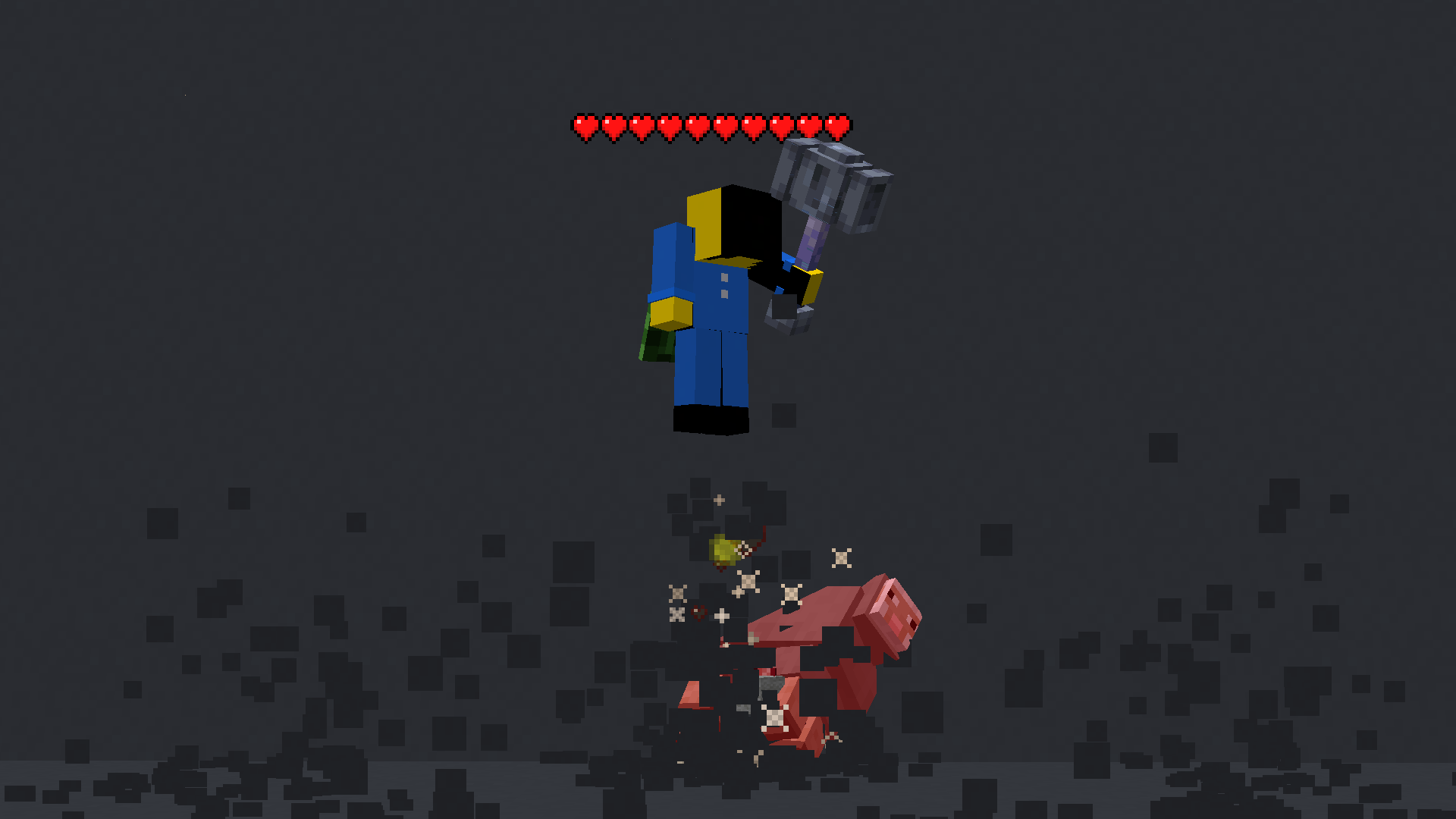
Image of a player with a floating health bar above their head

Features

This mod displays a highly-configurable health indicator (and optional armor indicator) above all entities that corresponds to their healths. The indicators have the following filters, where you can enable/disable visibility based on:

  • Entity Categories (Hostile, Passive, Players, Self)
  • Entity Types (eg: minecraft:pig or aether:aerbunny)
  • Player Names
  • Entities that have been attacked,
  • Entities that have been damaged
  • Entities that you are looking at
  • Entities that are within a certain distance

You can also adjust the

  • Size
  • Offset
  • Indicator Type (Hearts | Number)
  • Percentage Based Health
  • Text Color

Futher QOL features:

The indicator changes texture and appearance based on the effects the entity has, just like vanilla. The indicator will

  • Turn green if the entitiy is Poisoned,
  • Black if they are Withering
  • Display yellow hearts seperately for Absorption.
  • Vibrate if the entity has Regeneration
  • Change textures for Hardcore.

All the above can be disabled in the config if you don't like it.

More Details

Mod Keybinds

Note: These are all default keybinds. They can be modified like any other keybind: by going into Options > Controls > Keybinds

  • Enable Health Indicator: Left Arrow
  • Increase Indicator Offset: Up Arrow
  • Decrease Indicator Offset: Down Arrow
  • Override Config Filtering: Right Arrow
  • Enable Armor Indicator: Right Shift
  • Open Config: I
What attributes can I change in the config?
  • Indicator Type: Whether to display a floating health bar (like in the picture) or a numerical value.
  • Show Effects: Whether to change the textures of the indicator if the player has poison/wither/regen/freezing effects
  • Display offset: The health bar can be raised or lowered in the config. You also have the option to set a keybind to raise/lower it.
    • Step size: You can set the step size of the keybind in the config. With this, you can modify the amount the health bar is raised/lowered per click.
  • Size of the indicator: The indicator size can be modified in the config.
  • Percentage based health: The indicator can display health in percentages instead of a hard value
  • Toggle rendering: Health bar rendering can be disabled for specific entity types (Passive, Hostile, Player, Self)
  • Indicator can also be toggled to
    • Show only after you have hit the entity.
    • Show only if you are looking at the entity
    • Show only if the entity has been damaged (not at full health)
    • Not show for specific mobs/players. This can be set in the blacklist

👥 Team & Contributors

AdyTech99
AdyTech99Owner

⚙️ Compatibility

Environment
💻 Client-side
Loaders
fabricneoforgequilt
Minecraft Versions
1.21.11

🔗 Links

Modrinth Page