


Hardcore Revive+
A highly configurable data pack that lets you revive your friends in Hardcore mode.
📖About Hardcore Revive+
Need help? Join our Discord.
Are you tired of standard Minecraft death mechanics? Maybe dying over and over again just to respawn is too easy, or playing Hardcore mode with one life is too difficult. Hardcore Revive+ solves this problem by adding a highly configurable lives system to your Minecraft world that fits all scenarios.
Key Features
- Once a player loses all of their lives, they become a ghost. Ghosts are spectators that can generate and load chunks and possess players to grant them buffs.
- You can revive another fallen player by crafting a Soul Charm and dropping it on the ground. Once a ghost touches a Soul Charm, they are revived with a set amount of lives.
- Players are able to regain lost lives by consuming a Life Jam. You can regain as many lives as you want, as long as you do not go over the maximum.
- When Auto Revive is enabled, ghosts can be revived automatically after 10 minutes.
- When Lifesteal is enabled, killing another player grants another life.
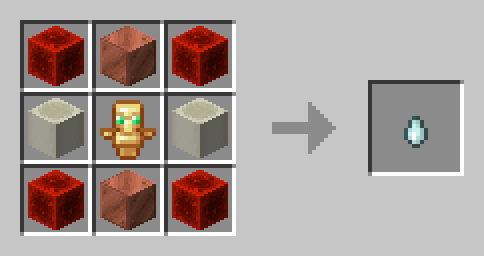
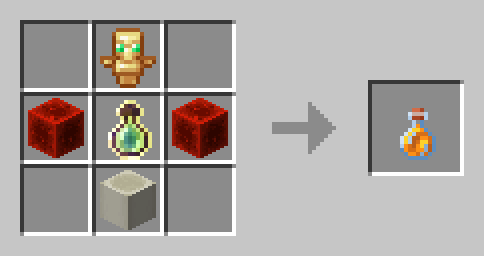
Configuration
Hardcore Revive+ comes with an expansive and easily accessible settings menu that can be opened using /trigger _hcrplus_settings. You will automatically be prompted to configure your preferred settings upon creating your world.
Lives
- Max Lives - The amount of lives each player receives. You can choose between 1, 3, or 5 lives.
- Name Colors - If enabled, players' names will be colored according to the amount of lives they have.
- Lives in Tab List - If enabled, the amount of lives each player has will be displayed in the tab list.
- Lives on Revival - The amount of lives each player receives after being revived. You can choose between 1 life, half of max lives, or max lives.
- Possession - When enabled, ghosts can spectate other players to grant them a selection of buffs.
- Lifesteal - When enabled, killing a player grants another life.
- Auto Revive - When enabled, ghosts will automatically be revived after 10 minutes.
- Auto Revive Timer - The amount of time in seconds before a ghost is automatically revived.
Items
- Soul Charm - When disabled, Soul Charms will no longer be craftable and split into their crafting recipe when dropped.
- Life Jam - When disabled, Life Jams will no longer be craftable and split into their crafting recipe when consumed.
- Soul Charm Debuffs - When enabled, crafting a Soul Charm will grant a selection of debuffs for 5 minutes, and being revived will grant debuffs for 1 minute.
- Anounce Revives - Sends a global message when a player is revived.
Debug Menu
- Give Soul Charm
- Give Life Jam
Incompatibilities
- Vanilla Hardcore mode
- Any "Unlock all recipes" data pack
- Essential Mod
- WorldGameRules
Removal
Need to uninstall Hardcore Revive+? You can remove all features by executing the command /function hcrplus:_uninstall in-game, and then deleting Hardcore Revive+ from either your datapacks folder or your mods folder.