Logo
MINECRAFTBIBLE
Items
Items

All game items

Blocks
Blocks

Building blocks

Mobs
Mobs

Creatures & monsters

Biomes
Biomes

World biomes

Structures
Structures

Generated structures

Recipes
Recipes

Crafting guides

Advancements
Advancements

Achievements

Loot Tables
Loot Tables

Drop rates

Tags
Tags

Item groupings

All Versions
View all data →
Capes
Cape ArchiveNEW

Browse rare Minecon capes, OptiFine capes, and custom capes from players worldwide

Browse

Player Database
Player DatabasePopular

Search any player

Skin Browser
Skin Browser

Browse & download skins

Cape Gallery
Cape GalleryNEW

Minecon & OptiFine capes

Seed Vault
Seed Vault

Curated seeds

Learn

Guides
GuidesNew

Tutorials & tips

Blog
Blog

News & updates

Community

Community Hub
Community HubHub

Posts, discussions & more

All Versions
View community →
Seed Analyzer
Seed Analyzer

World seed analysis

Loot Explorer
Loot Explorer

Drop rates

Crafting Calculator
Crafting Calculator

Material planning

Enchant Calculator
Enchant Calculator

Probability math

Redstone Lab
Redstone Lab

Signal timing

Trading Profit
Trading Profit

Villager ROI

All Versions
View all tools →
Mods
Mods

Browse all mods

Plugins
Plugins

Server plugins

Resource Packs
Resource Packs

Textures & sounds

Shaders
Shaders

Visual enhancements

Datapacks
Datapacks

World logic

Scanner
Mod Intelligence

Scan & analyze any mod

All Versions
View all mods →
Loading...
IntroductionIntroductionVersion HistoryVersion HistoryGuidesGuidesBlog & NewsBlog & News
ItemsItemsBlocksBlocksMobsMobsRecipesRecipesBiomesBiomesStructuresStructuresAdvancementsAdvancementsLoot TablesLoot TablesTagsTags
ModsModsPluginsPluginsResource PacksResource PacksShadersShadersDatapacksDatapacks

MinecraftBible

The Ultimate Wiki

Logo
MINECRAFTBIBLE

The ultimate Minecraft reference. Every item, block, mob, and recipe documented with precision.

Community

  • Player Database
  • Skin Browser
  • Cape Gallery
  • Community Hub
  • Seed Vault

Database

  • Items
  • Blocks
  • Mobs
  • Recipes
  • Biomes
  • Structures

Tools

  • Seed Analyzer
  • Mod Intelligence
  • Crafting Calculator
  • Enchant Calculator

Mods & Packs

  • Mods
  • Plugins
  • Resource Packs
  • Shaders
  • Datapacks

© 2026 MinecraftBible. Not affiliated with Mojang or Microsoft.

PrivacyTermsContact
Glowing Eyes
ModLGPL-3.0-or-later

Glowing Eyes

Glowing Eyes is a Minecraft Mod to make your eyes glow, inspired by the Vampirism mod!

52.5K
Downloads
153
Followers
4 months ago
Updated
📦
30
Versions
utilityfabricforgeneoforgequilt
Download Latestv2.1.3View on Modrinth

📖About Glowing Eyes

Glowing Eyes

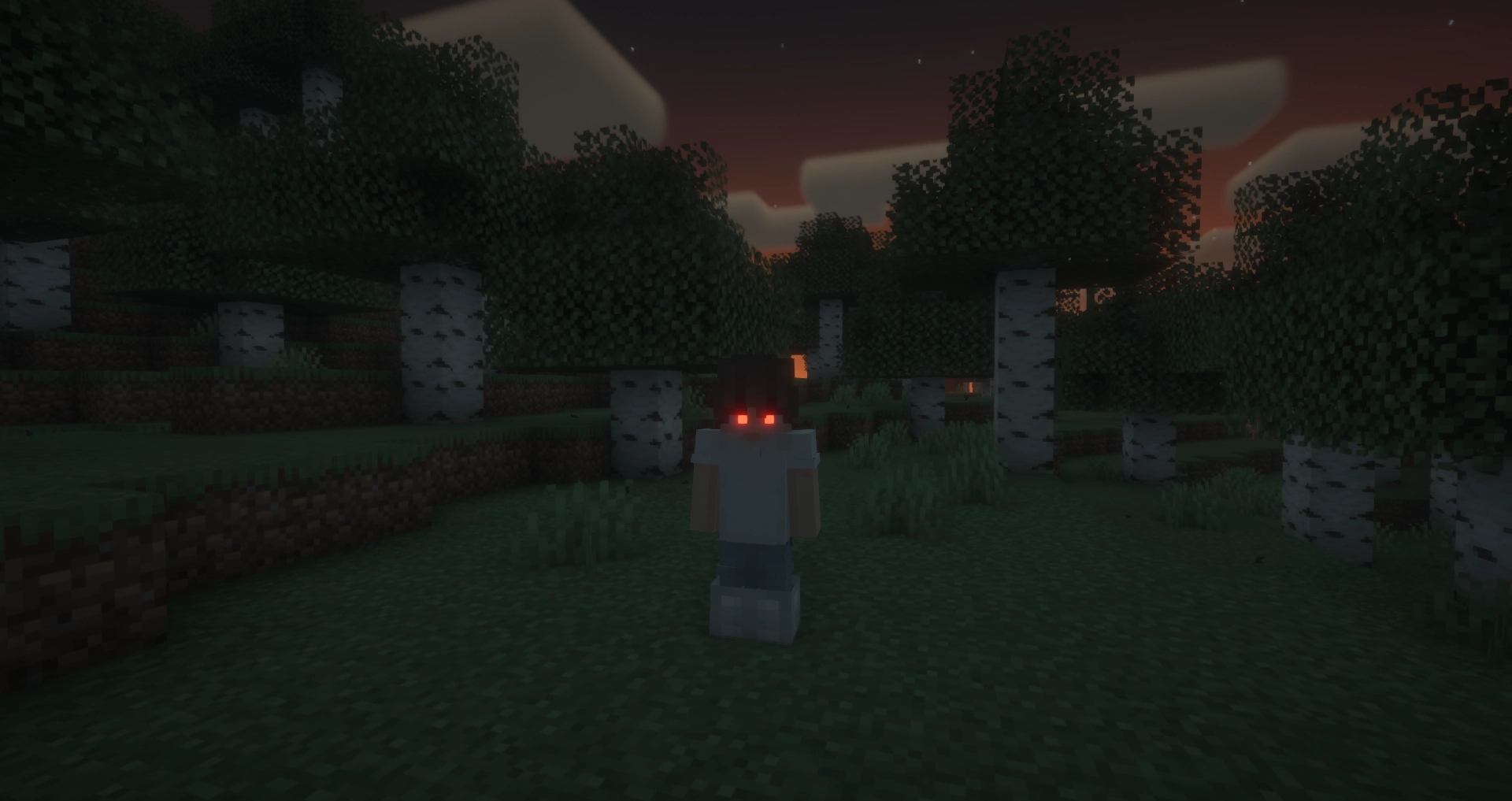
Glowing Eyes is a Minecraft mod that lets you customize and make your character’s eyes glow! Inspired by the Vampirism mod, this mod adds a detailed eye editor with color selection, presets, and new customization options. Stand out in the dark with glowing eyes!
Image

With Fresh Moves support!

Image

FAQ

Does this mod work in multiplayer?

Yes, however, the mod must be installed on both the server and the client for it to work properly. Players that do not have the mod can still play, but will not see the glowing eyes.

Why doesn’t the mod work / why don’t my eyes glow?

Most likely, you accidentally turned off your eyes. The default keybinding to toggle glowing eyes on and off is G. If that doesn’t fix the issue, please report a bug on the GitHub issues tab or in the Discord server.

Usage

General Usage

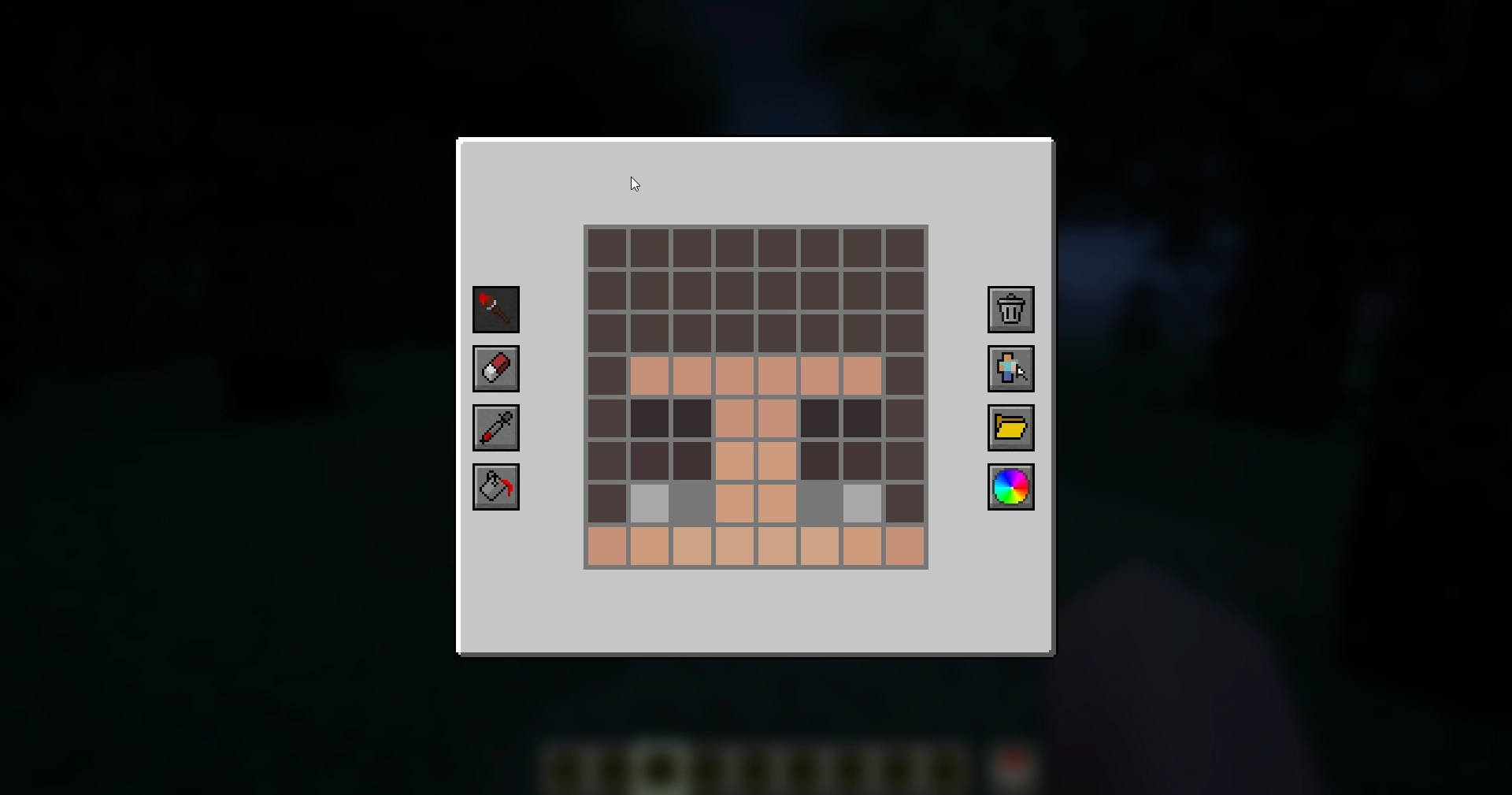
To access the eye editor, use the /eyes command or press the keybinding (H by default). This will open the customization menu, where you can tweak your glowing eyes.
Image

  • Left side: Drawing, erasing and color picking tools to design your glowing eyes.
  • Right side: Preset manager, color picker, and two additional buttons:
    • Skin part selector: Choose which part of the skin you want to apply glowing eyes to.
    • Reset button: Completely removes your current eyes, including other skin parts (but not presets).

Skin Parts

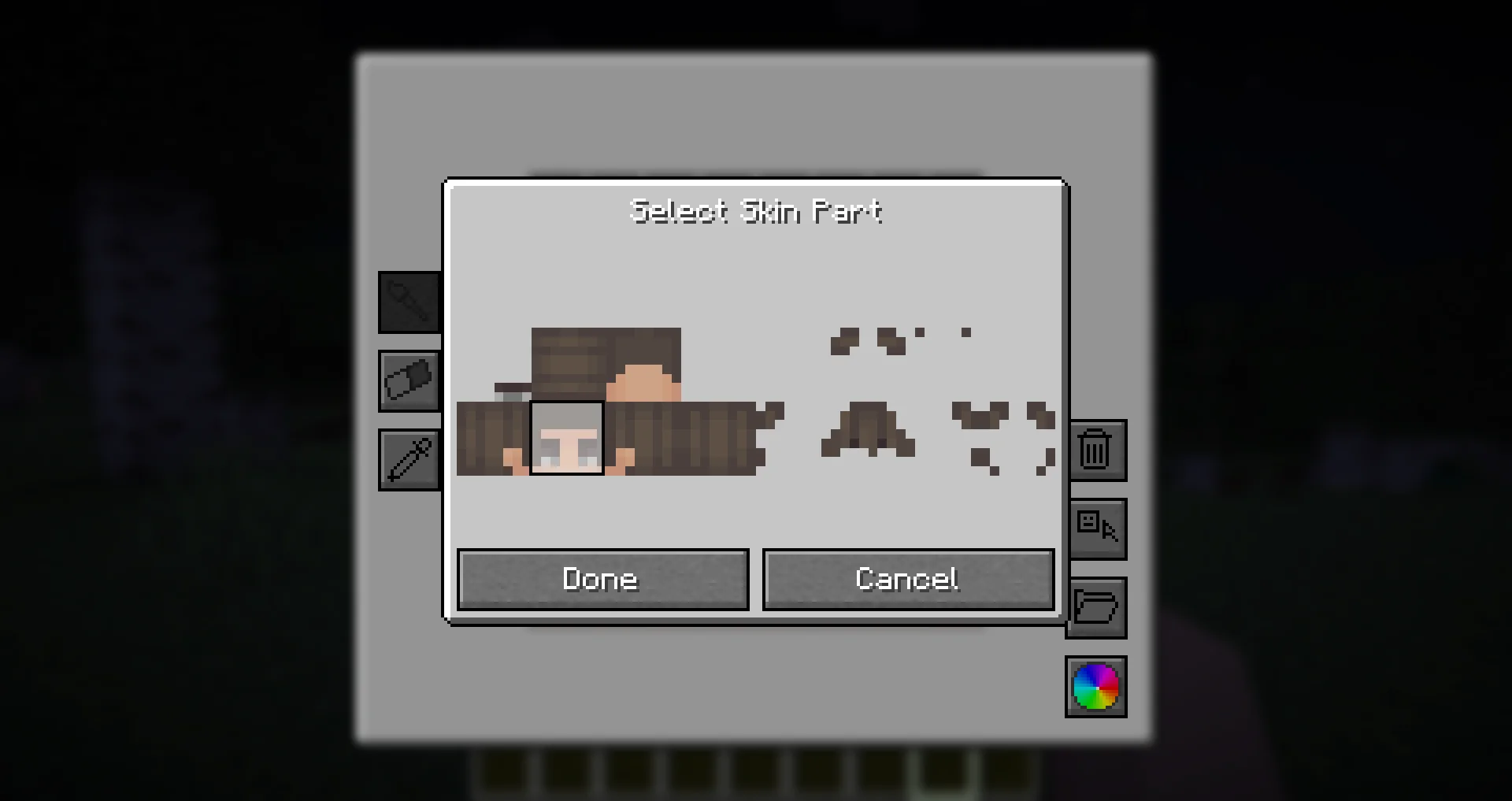
With the skin parts system, you are no longer limited to adding eyes only to the front of your character’s head. Now, you can apply glowing eyes anywhere on your head and head overlay!
Image

This feature allows for more creative and unique glowing eye designs, such as side or back-facing eyes!

Presets

Presets allow you to save and quickly switch between different glowing eye designs.
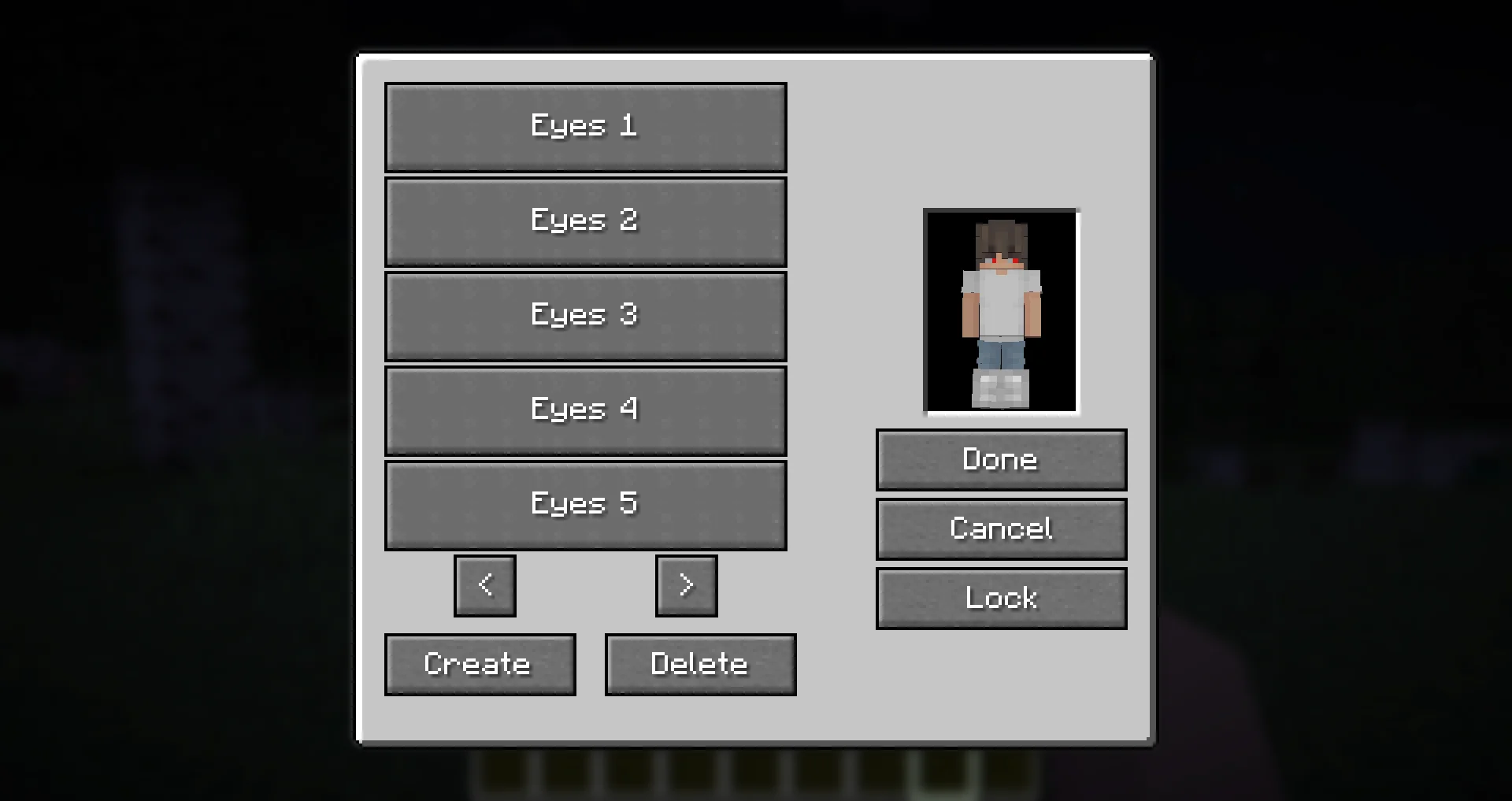
Image

  • The preset menu lets you create, save, and apply different presets.
  • All presets are saved in the presets.json file in your Minecraft directory.
  • Easily experiment with different glowing eye styles without losing your designs!

Need Support?

If you need help, have a question, or just want to chat, join the Discord server.
To report bugs or suggest features, please use the GitHub repository.

Thanks!

Big thanks to Olivo for helping with the editor GUI screen! If not him, this all would not be possible!
Thanks to the Vampirism mod and its authors/contributors for the idea, inspiration, and some code, please check them out!
Huge thanks to the Modded Minecraft Discord Server for their help with coding!

👥 Team & Contributors

AndreasMelone_
AndreasMelone_Owner

⚙️ Compatibility

Environment
💻 Client-side
Loaders
fabricforgeneoforgequilt
Minecraft Versions
1.21.91.21.10

🔗 Links

Modrinth Page