Logo
MINECRAFTBIBLE
Items
Items

All game items

Blocks
Blocks

Building blocks

Mobs
Mobs

Creatures & monsters

Biomes
Biomes

World biomes

Structures
Structures

Generated structures

Recipes
Recipes

Crafting guides

Advancements
Advancements

Achievements

Loot Tables
Loot Tables

Drop rates

Tags
Tags

Item groupings

All Versions
View all data →
Capes
Cape ArchiveNEW

Browse rare Minecon capes, OptiFine capes, and custom capes from players worldwide

Browse

Player Database
Player DatabasePopular

Search any player

Skin Browser
Skin Browser

Browse & download skins

Cape Gallery
Cape GalleryNEW

Minecon & OptiFine capes

Seed Vault
Seed Vault

Curated seeds

Learn

Guides
GuidesNew

Tutorials & tips

Blog
Blog

News & updates

Community

Community Hub
Community HubHub

Posts, discussions & more

All Versions
View community →
Seed Analyzer
Seed Analyzer

World seed analysis

Loot Explorer
Loot Explorer

Drop rates

Crafting Calculator
Crafting Calculator

Material planning

Enchant Calculator
Enchant Calculator

Probability math

Redstone Lab
Redstone Lab

Signal timing

Trading Profit
Trading Profit

Villager ROI

All Versions
View all tools →
Mods
Mods

Browse all mods

Plugins
Plugins

Server plugins

Resource Packs
Resource Packs

Textures & sounds

Shaders
Shaders

Visual enhancements

Datapacks
Datapacks

World logic

Scanner
Mod Intelligence

Scan & analyze any mod

All Versions
View all mods →
Loading...
IntroductionIntroductionVersion HistoryVersion HistoryGuidesGuidesBlog & NewsBlog & News
ItemsItemsBlocksBlocksMobsMobsRecipesRecipesBiomesBiomesStructuresStructuresAdvancementsAdvancementsLoot TablesLoot TablesTagsTags
ModsModsPluginsPluginsResource PacksResource PacksShadersShadersDatapacksDatapacks

MinecraftBible

The Ultimate Wiki

Logo
MINECRAFTBIBLE

The ultimate Minecraft reference. Every item, block, mob, and recipe documented with precision.

Community

  • Skin Browser
  • Cape Gallery
  • Seed Vault
  • Blog
  • Guides

Database

  • Items
  • Blocks
  • Mobs
  • Recipes
  • Biomes
  • Structures

Tools

  • Seed Analyzer
  • Mod Intelligence
  • Crafting Calculator
  • Enchant Calculator

Mods & Packs

  • Mods
  • Plugins
  • Resource Packs
  • Shaders
  • Datapacks

Site & Legal

  • About
  • Authors
  • Editorial Policy
  • Corrections
  • Contact
  • Privacy Policy
  • Terms of Service
  • DMCA
  • Sitemap

© 2026 MinecraftBible. Not affiliated with Mojang or Microsoft.

PrivacyTermsContact
Glamour Table
ModMIT

Glamour Table

An in-game texture editor for tools and canvases.

4.5K
Downloads
83
Followers
5 months ago
Updated
📦
19
Versions
equipmentgame-mechanicsdatapackfabricforgeneoforgequilt
Download Latestv6.1+modView on Modrinth

📖About Glamour Table

Resource Pack Info

This datapack requires the included resource pack to function! The resource pack is included as GlamourRP.zip in the root directory of the datapack. You can also download the resource pack on its own from the page for the specific version here on Modrinth. Regardless of how you download it, make sure it's added to your Minecraft resources directory and enabled in game!

Introduction

This datapack adds a two new utility blocks to Minecraft - the Painting Table and the Glamour Table.
The painting table can be used to create 1x1 custom paintings that can be hung in item frames.
The glamour table can be used to change the appearance of tools.
Both tables use paintbrushes to edit textures entirely in game.

Recipes

The painting table can be crafted using planks, a bowl, and a brush:
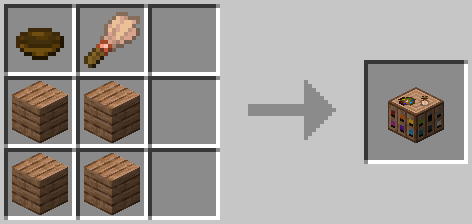
Crafting Recipe for the Painting Table

To use a painting table, you'll need to create canvases using sticks and a carpet. The color of carpet used will determine the base color of the canvas:
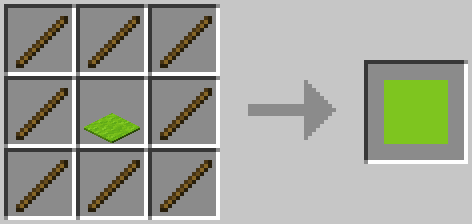
Crafting recipe for a lime canvas

The glamour table can be crafted using glowstone, a creaking heart, diamonds, and any carpet:
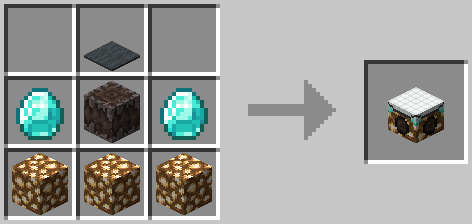
Crafting recipe for Glamour Table

To use the glamour table, you'll need to prepare your tools in a smithing table. Add an eye of ender and a piece of glowstone, and your tool's texture will be updated to an outline.

Smithing recipe to prepare items for glamour

To create paint brushes, add dye to brushes in a crafting table. The final color of the paint brush is determined using the same formula as dyed armor:
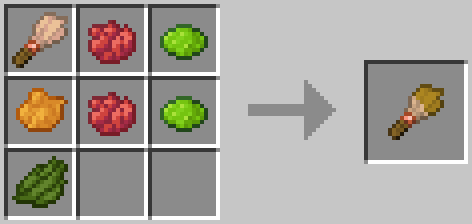
Crafting recipe to dye a brush

Editing Textures

Right click the glamour or paint table with the item you'd like to edit to place it. Paint tables can only edit canvases, and glamour tables can only edit items.
To edit the item's texture, you can either use dyes directly, or use a paintbrush. Just right click the pixel you want to edit with the dye or brush! You can also right click with a slime ball to remove a pixel.
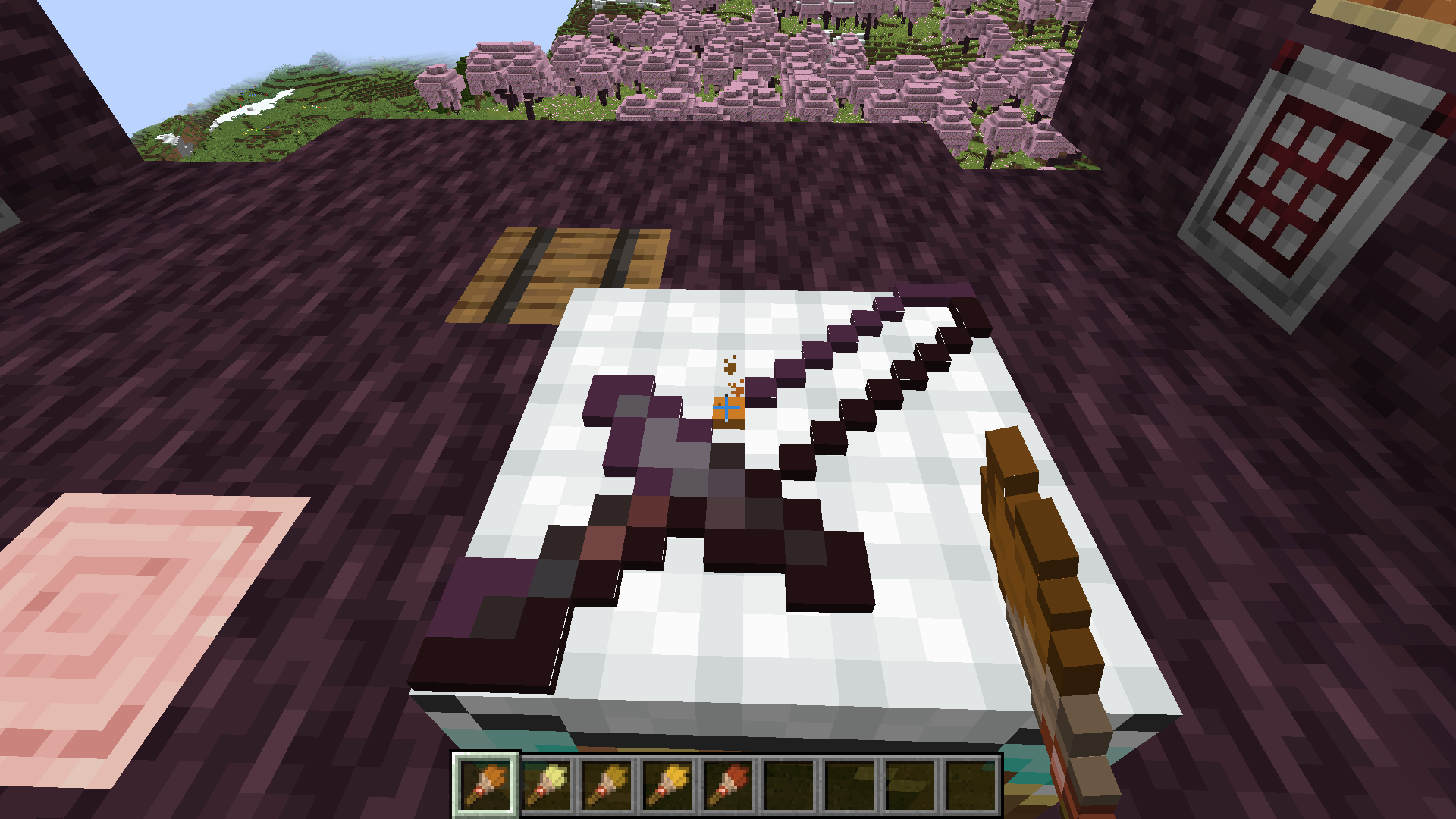
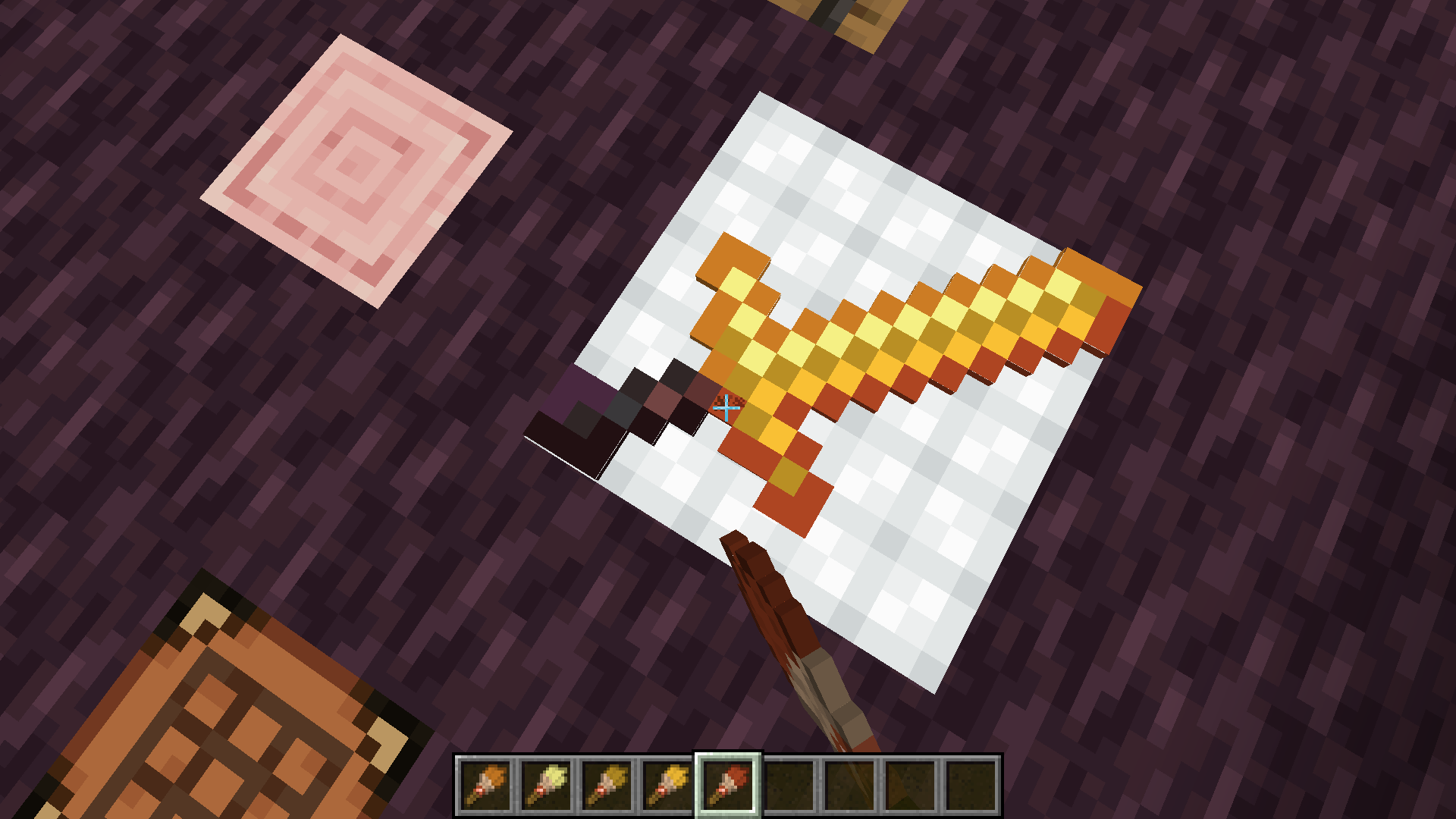
Using a painted brush to paint a texture
Finishing painting the texture.

Once you're satisfied with the updated texture, just right click with an empty hand to retrieve your tool!
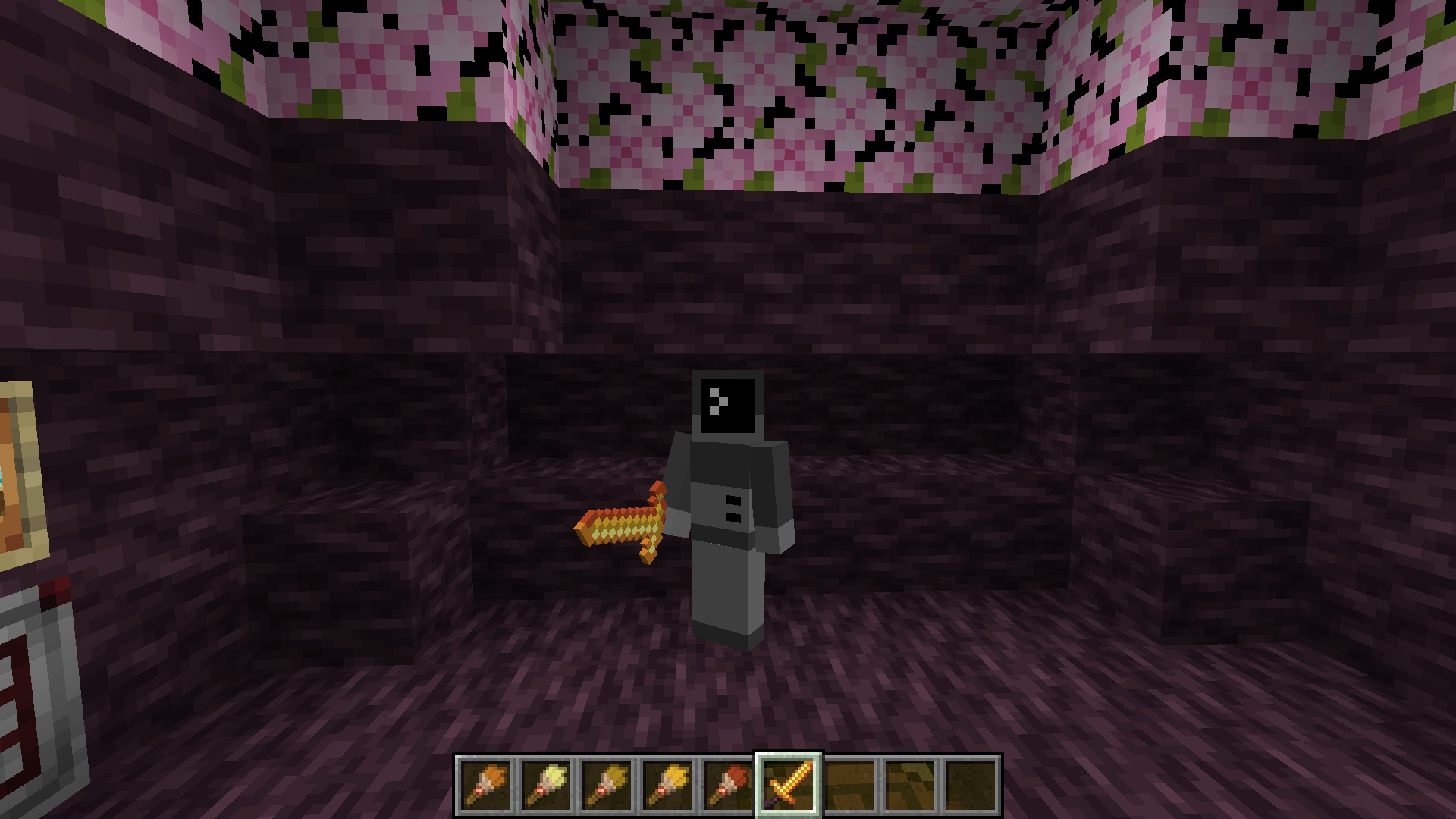
The final item being held in hand

If you want to remove the texture from a tool, place it on the glamour table and right click with a wet sponge. The custom texture will be removed from your item.

Items that can have glamours applied include:

  • All pickaxes, axes, shovels, hoes, and swords.
  • Maces

Texture Helper Tool

With some help from Arubik, I've put together a webapp to help create items compatible with this resource pack. This tool can either generate a give command for an item with exact RGB values for each pixel, or reduce the colors in the texture to those obtainable by dyes and generate a paint-by-number template to create the texture in survival.
The tool can be accessed here: https://dqwertyc.github.io/glamour-table/
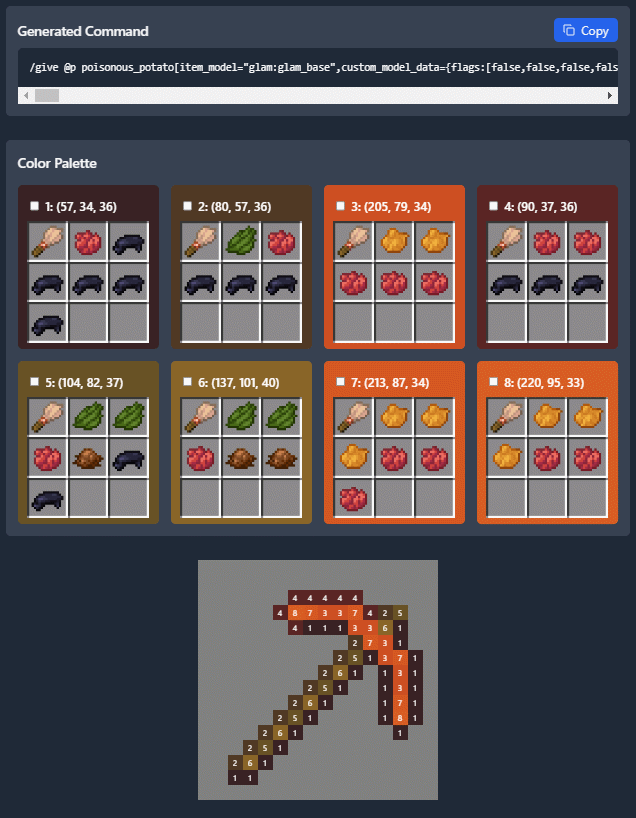
The Glamour Table Helper

👥 Team & Contributors

dqwertyc.dev
dqwertyc.devOwner

⚙️ Compatibility

Environment
🖥️ Server-side
Loaders
datapackfabricforgeneoforgequilt
Minecraft Versions
1.21.91.21.10

🔗 Links

Modrinth Page