Logo
MINECRAFTBIBLE
Items
Items

All game items

Blocks
Blocks

Building blocks

Mobs
Mobs

Creatures & monsters

Biomes
Biomes

World biomes

Structures
Structures

Generated structures

Recipes
Recipes

Crafting guides

Advancements
Advancements

Achievements

Loot Tables
Loot Tables

Drop rates

Tags
Tags

Item groupings

All Versions
View all data →
Capes
Cape ArchiveNEW

Browse rare Minecon capes, OptiFine capes, and custom capes from players worldwide

Browse

Player Database
Player DatabasePopular

Search any player

Skin Browser
Skin Browser

Browse & download skins

Cape Gallery
Cape GalleryNEW

Minecon & OptiFine capes

Seed Vault
Seed Vault

Curated seeds

Learn

Guides
GuidesNew

Tutorials & tips

Blog
Blog

News & updates

Community

Community Hub
Community HubHub

Posts, discussions & more

All Versions
View community →
Seed Analyzer
Seed Analyzer

World seed analysis

Loot Explorer
Loot Explorer

Drop rates

Crafting Calculator
Crafting Calculator

Material planning

Enchant Calculator
Enchant Calculator

Probability math

Redstone Lab
Redstone Lab

Signal timing

Trading Profit
Trading Profit

Villager ROI

All Versions
View all tools →
Mods
Mods

Browse all mods

Plugins
Plugins

Server plugins

Resource Packs
Resource Packs

Textures & sounds

Shaders
Shaders

Visual enhancements

Datapacks
Datapacks

World logic

Scanner
Mod Intelligence

Scan & analyze any mod

All Versions
View all mods →
Loading...
IntroductionIntroductionVersion HistoryVersion HistoryGuidesGuidesBlog & NewsBlog & News
ItemsItemsBlocksBlocksMobsMobsRecipesRecipesBiomesBiomesStructuresStructuresAdvancementsAdvancementsLoot TablesLoot TablesTagsTags
ModsModsPluginsPluginsResource PacksResource PacksShadersShadersDatapacksDatapacks

MinecraftBible

The Ultimate Wiki

Logo
MINECRAFTBIBLE

The ultimate Minecraft reference. Every item, block, mob, and recipe documented with precision.

Community

  • Skin Browser
  • Cape Gallery
  • Seed Vault
  • Blog
  • Guides

Database

  • Items
  • Blocks
  • Mobs
  • Recipes
  • Biomes
  • Structures

Tools

  • Seed Analyzer
  • Mod Intelligence
  • Crafting Calculator
  • Enchant Calculator

Mods & Packs

  • Mods
  • Plugins
  • Resource Packs
  • Shaders
  • Datapacks

Site & Legal

  • About
  • Authors
  • Editorial Policy
  • Corrections
  • Contact
  • Privacy Policy
  • Terms of Service
  • DMCA
  • Sitemap

© 2026 MinecraftBible. Not affiliated with Mojang or Microsoft.

PrivacyTermsContact
[BUB] Gender
ModMIT

[BUB] Gender

GenderBub adds male and female genders to mobs with breeding control, sterility, visual icons, and item restrictions. Everything in the mod can be customized.
185
Downloads
8
Followers
2 months ago
Updated
📦
12
Versions
game-mechanicsmobsforgeneoforge
Download Latestv2.0.3View on Modrinth

📖About [BUB] Gender

Showcase
Resource Pack
Source Code
Documentation

  • Random gender: male or female on spawn with configurable chance (0-50% each)
  • Sterility: infertile mobs can't breed, chance auto-calculated from gender settings
  • Visual icons: gender icon above mobs and HUD when holding scanner
  • Breeding control: block same-gender breeding, disable sterile breeding, or allow all
  • Item restrictions: prevent specific items on certain genders (e.g., milking male cows)
  • Villager support: villagers get genders, preserved when curing zombie villagers
  • Modded mob support: auto-scan or manually add any modded animal to config
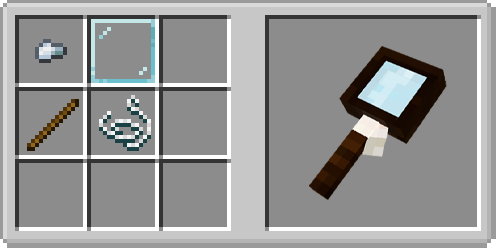
craft Main hand — shows gender in HUD on hover
Offhand — HUD + floating icon above mobs within radius

Command: /give @s genderbub:magnifying_glass

Fabric?

I made a test port, but the result didn't satisfy me. No plans for a Fabric version at the moment. I'm looking into it, but I'm not making any promises. I don't want to give false hope.

Modpack?

Yes, you can use this mod in your modpacks. The mod is specifically designed to be customizable so you can use it in your own modpacks. The mod automatically scans animals on first launch or with the /bub server scan command, but some mobs may be missed. If a modded animal doesn't get a gender, add its ID manually to the enabledMobs list in the config

Translations: English, Русский, Українська, Deutsch, Español, Français, 日本語, 한국어, 简体中文, 繁體中文
(Commands: English only)


👥 Team & Contributors

be_bub
be_bubOwner

⚙️ Compatibility

Environment
✅ Client & Server
Loaders
forgeneoforge
Minecraft Versions
1.21.1

🔗 Links

Modrinth Page