Logo
MINECRAFTBIBLE
Items
Items

All game items

Blocks
Blocks

Building blocks

Mobs
Mobs

Creatures & monsters

Biomes
Biomes

World biomes

Structures
Structures

Generated structures

Recipes
Recipes

Crafting guides

Advancements
Advancements

Achievements

Loot Tables
Loot Tables

Drop rates

Tags
Tags

Item groupings

All Versions
View all data →
Capes
Cape ArchiveNEW

Browse rare Minecon capes, OptiFine capes, and custom capes from players worldwide

Browse

Player Database
Player DatabasePopular

Search any player

Skin Browser
Skin Browser

Browse & download skins

Cape Gallery
Cape GalleryNEW

Minecon & OptiFine capes

Seed Vault
Seed Vault

Curated seeds

Learn

Guides
GuidesNew

Tutorials & tips

Blog
Blog

News & updates

Community

Community Hub
Community HubHub

Posts, discussions & more

All Versions
View community →
Seed Analyzer
Seed Analyzer

World seed analysis

Loot Explorer
Loot Explorer

Drop rates

Crafting Calculator
Crafting Calculator

Material planning

Enchant Calculator
Enchant Calculator

Probability math

Redstone Lab
Redstone Lab

Signal timing

Trading Profit
Trading Profit

Villager ROI

All Versions
View all tools →
Mods
Mods

Browse all mods

Plugins
Plugins

Server plugins

Resource Packs
Resource Packs

Textures & sounds

Shaders
Shaders

Visual enhancements

Datapacks
Datapacks

World logic

Scanner
Mod Intelligence

Scan & analyze any mod

All Versions
View all mods →
Loading...
IntroductionIntroductionVersion HistoryVersion HistoryGuidesGuidesBlog & NewsBlog & News
ItemsItemsBlocksBlocksMobsMobsRecipesRecipesBiomesBiomesStructuresStructuresAdvancementsAdvancementsLoot TablesLoot TablesTagsTags
ModsModsPluginsPluginsResource PacksResource PacksShadersShadersDatapacksDatapacks

MinecraftBible

The Ultimate Wiki

Logo
MINECRAFTBIBLE

The ultimate Minecraft reference. Every item, block, mob, and recipe documented with precision.

Community

  • Skin Browser
  • Cape Gallery
  • Seed Vault
  • Blog
  • Guides

Database

  • Items
  • Blocks
  • Mobs
  • Recipes
  • Biomes
  • Structures

Tools

  • Seed Analyzer
  • Mod Intelligence
  • Crafting Calculator
  • Enchant Calculator

Mods & Packs

  • Mods
  • Plugins
  • Resource Packs
  • Shaders
  • Datapacks

Site & Legal

  • About
  • Authors
  • Editorial Policy
  • Corrections
  • Contact
  • Privacy Policy
  • Terms of Service
  • DMCA
  • Sitemap

© 2026 MinecraftBible. Not affiliated with Mojang or Microsoft.

PrivacyTermsContact
Friends For Life
ModLicenseRef-All-Rights-Reserved

Friends For Life

Take your pets on your next adventure with this QoL mod!

79.3K
Downloads
50
Followers
4 months ago
Updated
📦
8
Versions
mobsutilityfabricneoforge
Download Latestv1.2.1View on Modrinth

📖About Friends For Life

Title image reading "Friends for Life" with a paw print on the left.

Bring your pets along for the journey with Friends For Life!

Never worry about losing a pet again. Once a pet is equipped with a Friendship Collar, it becomes invulnerable and fully protected.

Use the Ocarina to instantly summon your pet to your side, across dimensions, or play it again to send them back home safely.

Pets will wander around their home area instead of sitting in one spot, giving your base a more lively and natural feel!

Have a big pack of animals? The Pet Roster helps you keep track of every companion you’ve bonded with. View them all in one place, manage their settings, and stay organized no matter how many pets you have.

Decorative image of paw prints going in a line.

How it works

Friends For Life introduces 3 unique items, the Collar, Ocarina, and Roster.

The Collar
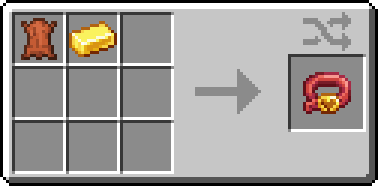
Image showing the crafting recipe for the Collar item. It requires 1 Leather and 1 Gold Bar.

The Collar can be put on your tamed pet to make them invincible!

Once your pet is equipped with a collar, they become a Forever Pet, and will no longer take any damage from any source outside of creative/the void. If your Forever Pet does somehow perish, they will always come when you call them!

Sneak+Right-Click while holding the Collar to register a home point to the block you're looking at. When the collar is put on a pet, the pet's home will be set to that location! Whenever you send it home using the Ocarina or the Roster, it will return to that location. It will also wander around the location you set.

Your pet will now be registered in the Roster, and can have an Ocarina bound to it to teleport it to your location.

The Ocarina

Gif showing the crafting recipe for the Ocarina item. It requires a line of 3 Terracotta of any color. The gif shows all 17 color options.

The Ocarina is a magical item that allows you to call your Forever Pets. Sneak+Right-Click a Forever Pet with the Ocarina to bind the Ocarina to it. Now, whenever you play the Ocarina, your Forever Pet will be summoned to your side! They will follow you as normal.

You can send your Forever Pet back home, either to the default Home location, set by the Roster, or the position set by their Collar. To do so, Sneak+Right-Click while holding the Ocarina.

Using different Terracotta blocks, you can choose from 17 different color options!

The Roster

Image showing the in-game Roster menu that the mod adds.
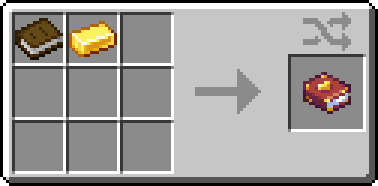
Roster crafting recipe that requires 1 Gold Bar and 1 Book.

The Roster is a book that lists all of your Forever Pets. You can use the roster to view stats and summon them or send them home. The Roster includes the location of your pet, as well as its home location. You can open the Roster with a keybind (default: P).

Sneak+Right-Click while holding the Roster on a block will set the default Home location for all your Forever Pets. If your Pets don't have their own unique home, they will be sent here. If the Home location isn't set, they will be sent to your respawn point.

NOTE: If your Home location isn't set and you haven't set your respawn point, your pets will be sent to spawn.

Decorative image of paw prints going in a line.

Compatability

This mod is designed to be compatible with modded pets, specifically tameable animals, but this isn't a guarantee all modded pets will work.

Planned Updates

  • Adding 1.21.10 support

Decorative image of paw prints going in a line.

Questions? Comments? Feedback? Join us on Discord!

Support The Good Wizard on Ko-Fi!

Special Credits

Mondonater — Sound design

Kit Aielgeth — Ocarina colors, testing

Shosai — Testing

Mama Native — Testing

V1G1L4NT3 — Testing

Special thanks to Tokimi and CozyStudios

👥 Team & Contributors

TheGoodWizard
TheGoodWizardOwner
gooberexe
gooberexe
Artist
jjorge
jjorge
Member

⚙️ Compatibility

Environment
✅ Client & Server
Loaders
fabricneoforge
Minecraft Versions
1.21.1

🔗 Links

Modrinth Page