Logo
MINECRAFTBIBLE
Items
Items

All game items

Blocks
Blocks

Building blocks

Mobs
Mobs

Creatures & monsters

Biomes
Biomes

World biomes

Structures
Structures

Generated structures

Recipes
Recipes

Crafting guides

Advancements
Advancements

Achievements

Loot Tables
Loot Tables

Drop rates

Tags
Tags

Item groupings

All Versions
View all data →
Capes
Cape ArchiveNEW

Browse rare Minecon capes, OptiFine capes, and custom capes from players worldwide

Browse

Player Database
Player DatabasePopular

Search any player

Skin Browser
Skin Browser

Browse & download skins

Cape Gallery
Cape GalleryNEW

Minecon & OptiFine capes

Seed Vault
Seed Vault

Curated seeds

Learn

Guides
GuidesNew

Tutorials & tips

Blog
Blog

News & updates

Community

Community Hub
Community HubHub

Posts, discussions & more

All Versions
View community →
Seed Analyzer
Seed Analyzer

World seed analysis

Loot Explorer
Loot Explorer

Drop rates

Crafting Calculator
Crafting Calculator

Material planning

Enchant Calculator
Enchant Calculator

Probability math

Redstone Lab
Redstone Lab

Signal timing

Trading Profit
Trading Profit

Villager ROI

All Versions
View all tools →
Mods
Mods

Browse all mods

Plugins
Plugins

Server plugins

Resource Packs
Resource Packs

Textures & sounds

Shaders
Shaders

Visual enhancements

Datapacks
Datapacks

World logic

Scanner
Mod Intelligence

Scan & analyze any mod

All Versions
View all mods →
Loading...
IntroductionIntroductionVersion HistoryVersion HistoryGuidesGuidesBlog & NewsBlog & News
ItemsItemsBlocksBlocksMobsMobsRecipesRecipesBiomesBiomesStructuresStructuresAdvancementsAdvancementsLoot TablesLoot TablesTagsTags
ModsModsPluginsPluginsResource PacksResource PacksShadersShadersDatapacksDatapacks

MinecraftBible

The Ultimate Wiki

Logo
MINECRAFTBIBLE

The ultimate Minecraft reference. Every item, block, mob, and recipe documented with precision.

Community

  • Skin Browser
  • Cape Gallery
  • Seed Vault
  • Blog
  • Guides

Database

  • Items
  • Blocks
  • Mobs
  • Recipes
  • Biomes
  • Structures

Tools

  • Seed Analyzer
  • Mod Intelligence
  • Crafting Calculator
  • Enchant Calculator

Mods & Packs

  • Mods
  • Plugins
  • Resource Packs
  • Shaders
  • Datapacks

Site & Legal

  • About
  • Authors
  • Editorial Policy
  • Corrections
  • Contact
  • Privacy Policy
  • Terms of Service
  • DMCA
  • Sitemap

© 2026 MinecraftBible. Not affiliated with Mojang or Microsoft.

PrivacyTermsContact
FPS hud
ModGPL-3.0-only

FPS hud

High precision FPS displaying mod with a customizable HUD

21.6K
Downloads
10
Followers
5 months ago
Updated
📦
7
Versions
game-mechanicsutilityfabricquilt
Download Latestv1.1.2+1.21.9-1.21.11View on Modrinth

📖About FPS hud

FPShud,

a mod that displays FPS with high precision on a customizable HUD

Mod features:

  • Main FPS is the main FPS value, regulated by the Main Update Interval
  • Avererage FPS is the average FPS value from all the values took in Average Update Interval
  • Max FPS is the maximum FPS value from all the values took in Min Update Interval
  • Min FPS is the minimum FPS value from all the values took in Max Update Interval

DefaultSettings
FPShud with default settings

HUD Features:

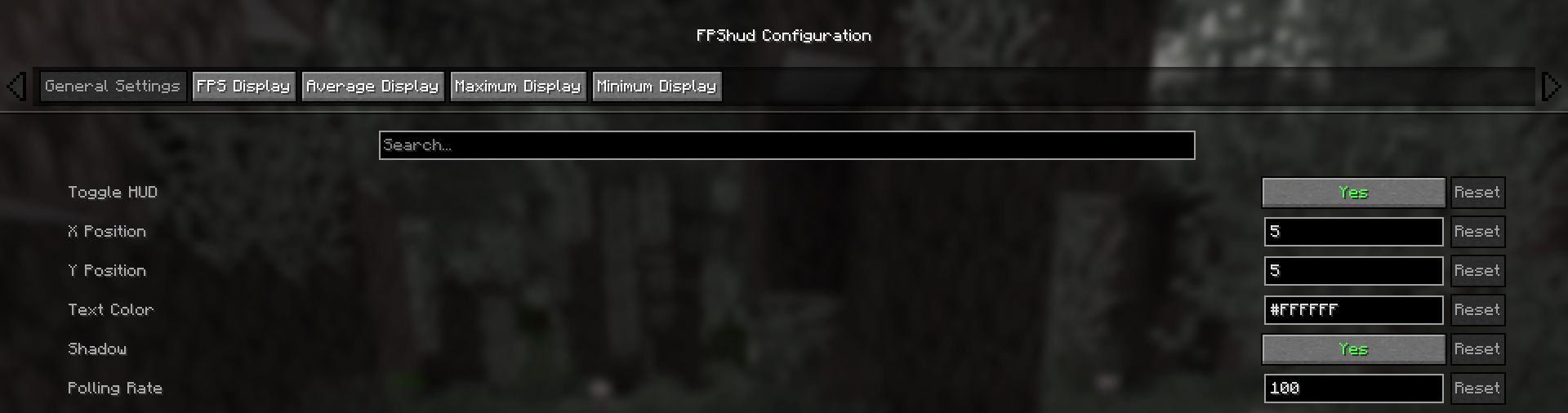
  • General Settings:

    • Toggle HUD toggles the entire HUD
    • X Position changes the X position of the HUD on the screen
    • Y Position changes the Y position of the HUD on the screen
    • Text Color changes the color of the entire HUD
    • Shadow enables or disables the text shadow on the HUD
    • Polling Rate indicates how frequently the mod should poll FPS
  • FPS Display, Average Display, Maximum Display, Minimum display

    Those settings can be changed for every one of the 4 fields:

    • Show FPS toggles the FPS field
    • FPS Position indicates the position of the field (first, second, third, fourth)
    • FPS Precision indicates how many points of precision the field have
    • Before FPS Text changes the text displayed before the specific field FPS value
    • After FPS Text changes the text displayed after the specific field FPS value

ModMenu config:

  • GUI config is accessible from the ModMenu mods list

    The config screen is divided into 5 categories:

    • General Settings:

    ModMenu-General

    • FPS Display, Average Display, Maximum Display, Minimum display:
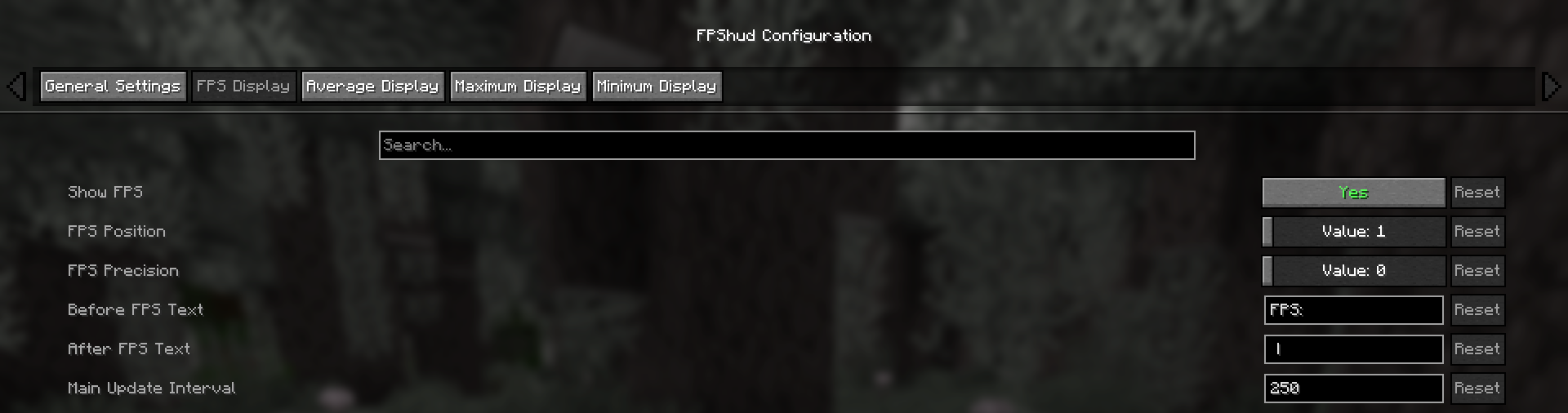
    ModMenu-Displays

Why FPShud?

Highly precise:

FPShud uses time elapsed from frame to frame for the FPS value calculation;
This method of sampling elevates precision and customization, permitting millisecond precise calculations and FPS displaying

FPShud works with a Polling Rate algorithm; samples are taken every frame, then smoothen every poll-time and finally processed to make them match the required
Main Update Interval, Average Update Interval, Maximum Update Interval and Minimum Update Interval requirements

For those reasons, it is not recommended to set Polling Rate and Update Interval to low values because results may appear very fluctuating

Highly customizable:

You can customize the HUD to match every style:

CustomSettings
only showing Avr and Max, modified 'Before Text', changed 'Text Color', removed 'Shadow', changed 'Precision' and modified 'Update Intervals'

Other:

If you are using ModMenu install ClothConfigAPI to access the config screen

Don't want ModMenu? The config file is accessible and editable in your config directory, changes apply after a game restart

Settings will be saved in your config folder and updated at runtime

The mod is client side (works on multiplayer)

Links:

  • GitHub page
  • Modrinth page
  • Changelogs
  • Report an issue

👥 Team & Contributors

Flavio6561
Flavio6561Owner

⚙️ Compatibility

Environment
💻 Client-side
Loaders
fabricquilt
Minecraft Versions
1.21.91.21.101.21.11

🔗 Links

Modrinth Page