
Logo
MINECRAFTBIBLE
Items
Items

All game items

Blocks
Blocks

Building blocks

Mobs
Mobs

Creatures & monsters

Biomes
Biomes

World biomes

Structures
Structures

Generated structures

Recipes
Recipes

Crafting guides

Advancements
Advancements

Achievements

Loot Tables
Loot Tables

Drop rates

Tags
Tags

Item groupings

All Versions
View all data →
Capes
Cape ArchiveNEW

Browse rare Minecon capes, OptiFine capes, and custom capes from players worldwide

Browse

Player Database
Player DatabasePopular

Search any player

Skin Browser
Skin Browser

Browse & download skins

Cape Gallery
Cape GalleryNEW

Minecon & OptiFine capes

Seed Vault
Seed Vault

Curated seeds

Learn

Guides
GuidesNew

Tutorials & tips

Blog
Blog

News & updates

Community

Community Hub
Community HubHub

Posts, discussions & more

All Versions
View community →
Seed Analyzer
Seed Analyzer

World seed analysis

Loot Explorer
Loot Explorer

Drop rates

Crafting Calculator
Crafting Calculator

Material planning

Enchant Calculator
Enchant Calculator

Probability math

Redstone Lab
Redstone Lab

Signal timing

Trading Profit
Trading Profit

Villager ROI

All Versions
View all tools →
Mods
Mods

Browse all mods

Plugins
Plugins

Server plugins

Resource Packs
Resource Packs

Textures & sounds

Shaders
Shaders

Visual enhancements

Datapacks
Datapacks

World logic

Scanner
Mod Intelligence

Scan & analyze any mod

All Versions
View all mods →
Loading...
IntroductionIntroductionVersion HistoryVersion HistoryGuidesGuidesBlog & NewsBlog & News
ItemsItemsBlocksBlocksMobsMobsRecipesRecipesBiomesBiomesStructuresStructuresAdvancementsAdvancementsLoot TablesLoot TablesTagsTags
ModsModsPluginsPluginsResource PacksResource PacksShadersShadersDatapacksDatapacks

MinecraftBible

The Ultimate Wiki

Logo
MINECRAFTBIBLE

The ultimate Minecraft reference. Every item, block, mob, and recipe documented with precision.

Community

  • Player Database
  • Skin Browser
  • Cape Gallery
  • Community Hub
  • Seed Vault

Database

  • Items
  • Blocks
  • Mobs
  • Recipes
  • Biomes
  • Structures

Tools

  • Seed Analyzer
  • Mod Intelligence
  • Crafting Calculator
  • Enchant Calculator

Mods & Packs

  • Mods
  • Plugins
  • Resource Packs
  • Shaders
  • Datapacks

© 2026 MinecraftBible. Not affiliated with Mojang or Microsoft.

PrivacyTermsContact
For Vanilla Flowers
ModLicenseRef-All-Rights-Reserved

For Vanilla Flowers

Place up to 4 flowers in the same block and some in vines

6.3K
Downloads
43
Followers
4 months ago
Updated
📦
4
Versions
decorationgame-mechanicsutilitydatapackfabricforgeneoforgequilt
Download Latestv2.0View on Modrinth

📖About For Vanilla Flowers

banner

Description

For Vanilla Flowers is a vanilla friendly datapack/mod that makes possible placing up to 4 of any one tall flowers together in the same block, attach flowers in vines, and more. Also including some Bedrock Edition parities.

Important notes

  • May present some inconsistencies with the vine flowers in creative mode
  • Made and tested for 1.21.5+
  • Some plants that are flower pots excusive DO NOT need to be crafted
  • A bug that makes all flowers a little bit dimmer than the vanilla ones. That is a game bug and can't be fixed until mojang fix themselves [MC-260687]
  • When crafted, the flowers will turn into bat spawn eggs. However, DO NOT click with it in a monster spawner or it will be disabled (Will NOT create a bat spawner)
  • Works fine in multiplayer (only the host needs the mod)

How it works

To be able to place the flowers you need to craft them first. Just place 4 of the same flower into the crafting grid:
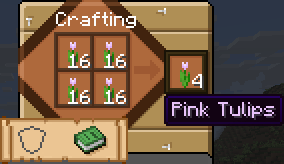
crafting

You can uncraft by placing the item in the offhand (pressing "F", default key):
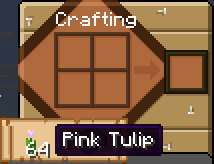
uncrafting

ITEMS THAT NEED TO BE CRAFTED BEFORE USING

FLOWERS:

  • Flower Pot
  • Dandelion
  • Poppy
  • Blue Orchid
  • Allium
  • Azure Bluet
  • Red Tulip
  • Orange Tulip
  • White Tulip
  • Pink Tulip
  • Oxeye Daisy
  • Cornflower
  • Lily of the Valley
  • Wither Rose
  • Torchflower
  • Open Eyeblossom
  • Closed Eyeblossom

FUNGI:

  • Red Mushroom
  • Brown Mushroom
  • Crimson Fungus
  • Warped Fungus

LILY PAD:

  • Cactus Flowers
  • Spore Blossoms
FLOWER POTS EXCLUSIVES (NO CRAFTING NEEDED)
  • Oak Sapling
  • Spruce Sapling
  • Birch Sapling
  • Jungle Sapling
  • Acacia Sapling
  • Dark Oak Sapling
  • Cherry Sapling
  • Fern
  • Dead Bush
  • Cactus
  • Bamboo
  • Azalea
  • Flowering Azalea
  • Crimson Roots
  • Warped Roots
  • Mangrove Propagule
  • Pale Oak Sapling

Features

All kinds of one tall flowers, mushrooms and fungi can be placed in the same block in any order:
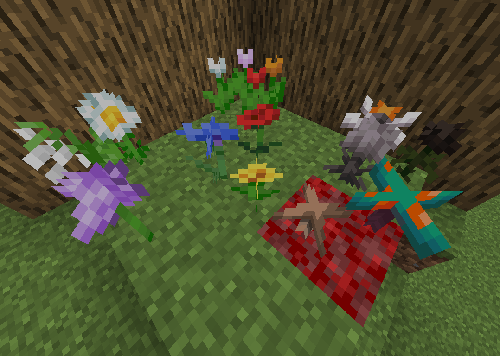
all

Flower Pots are able to place up to 4 in the same block aswell:
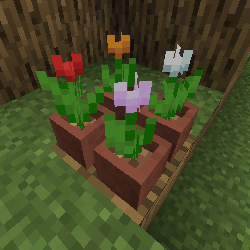
flower_pots

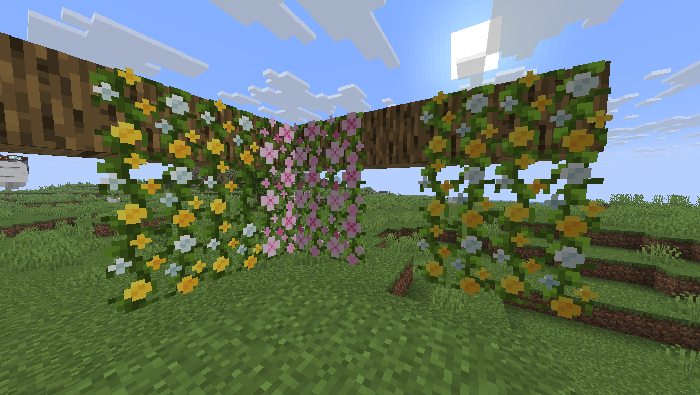
Pink Petals and Wildflowers can now be attached to vines:
vines

You can place Cactus Flowers and Spore Blossoms above Lily Pads:

lily pad

Bedrock Edition Parities

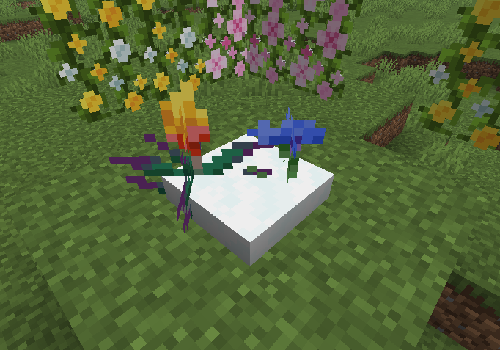
Flowers, mushrooms and fungi can be snowlogged:
snowlogged

One tall flowers can directly be bone mealed to grow more of the same kind around (excluding wither roses and torchflowers):

bone mealable

See More:

CURSEFORGE

PLANET MINECRAFT

👥 Team & Contributors

Rochedo
RochedoOwner

⚙️ Compatibility

Environment
🖥️ Server-side
Loaders
datapackfabricforgeneoforgequilt
Minecraft Versions
1.21.51.21.61.21.71.21.81.21.91.21.101.21.11

🔗 Links

Modrinth Page