Fixed Levels
Adds configuration options for experience levels. Set a flat amount of EXP required to reach each level or customize an EXP curve.
📖About Fixed Levels
Fixed Levels
A fork of Linear Levels
Are you annoyed at how much EXP it costs to enchant gear at an anvil? To enchant something that costs 1 level, at level 1, you'll spend a lot less EXP than if you were at level 30. That's because it costs a certain number of levels to enchant, instead of EXP. So, to combat this, I prefer to make all levels require the same EXP, that way, I don't feel robbed when spending levels naming a Netherite Sword at level 100.
With curve mode off, you can set a specific amount of EXP required for every level. Or, with curve mode on, you can customize a curve that suits your preference if you want.
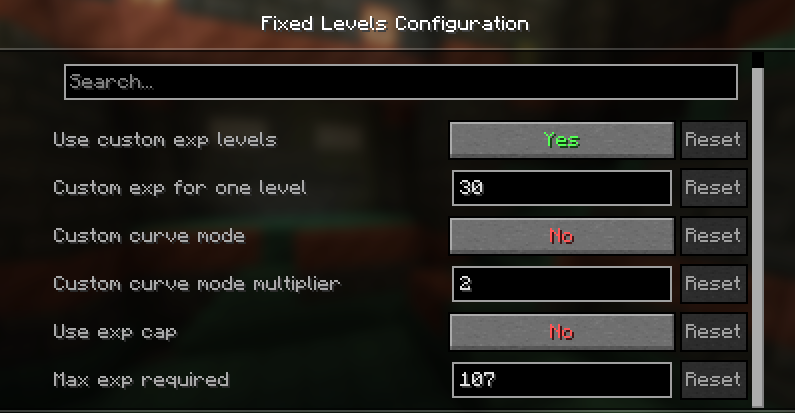
You can also set a max limit on how much exp is required for the next level when using vanilla or custom curve mode. By default, this is turned off, but is set for 107 exp, which is how much it takes to go from level 29 to level 30. You can adjust this however you want. When enabled, and using vanilla or custom curve, exp required will not exceed the max.
Go ahead, name that sword when you're level 100 and not feel cheated out of hard-earned EXP.
How to configure
Fixed Levels is required on the server. However, it can also be installed on the client, in which case mods like EXP Counter will show the correct amount of EXP per level.
By default the base experience to reach each new level takes 30 EXP. But you can set it to whatever you want.
New! With version 1.1, you can now use commands to query and set config options. Perfect for server OPs!
Get the current config options (no permissions required)
/fixedlevels query [curveMode|baseXPForOneLevel|curveModeMultiplier]
Set config options. Requires permission level 4
/fixedlevels set [curveMode|baseXPForOneLevel|curveModeMultiplier] value
If installed on the client, you can use Mod Menu to configure the settings in single player. On your dedicated server, modify the fixed-levels.json5 file or level 4 OPs can use the above commands.
Curve mode uses a configurable calculation to apply a curve to level up instead of just a flat EXP per level.
{
    // Enables custom exp levels. Disable to use vanilla calculations.
    "useCustomExpLevels": true,
    // Curve mode calculation is XPToNextLevel = (baseXPForOneLevel + (experienceLevel * curveModeMultiplier)).
    "curveMode": false,
    // The amount of exp to go from level 0 to level 1. If curve mode is off, this amount is for every level.
    "baseXPForOneLevel": 30,
    // The multiplier used in the curve mode calculation.
    "curveModeMultiplier": 2,
    // When enabled, limits the amount of exp needed for the next level for vanilla and custom curve mode.
    "useExpCap": false,
    // This sets the max amount of exp needed for the next level if using vanilla or custom curve mode.
    "maxExpForNextLevel": 107
}
If Mod Menu and Cloth Config API is installed and Fixed Levels is installed on your client, you can modify the settings in the GUI.