Logo
MINECRAFTBIBLE
Items
Items

All game items

Blocks
Blocks

Building blocks

Mobs
Mobs

Creatures & monsters

Biomes
Biomes

World biomes

Structures
Structures

Generated structures

Recipes
Recipes

Crafting guides

Advancements
Advancements

Achievements

Loot Tables
Loot Tables

Drop rates

Tags
Tags

Item groupings

All Versions
View all data →
Capes
Cape ArchiveNEW

Browse rare Minecon capes, OptiFine capes, and custom capes from players worldwide

Browse

Player Database
Player DatabasePopular

Search any player

Skin Browser
Skin Browser

Browse & download skins

Cape Gallery
Cape GalleryNEW

Minecon & OptiFine capes

Seed Vault
Seed Vault

Curated seeds

Learn

Guides
GuidesNew

Tutorials & tips

Blog
Blog

News & updates

Community

Community Hub
Community HubHub

Posts, discussions & more

All Versions
View community →
Seed Analyzer
Seed Analyzer

World seed analysis

Loot Explorer
Loot Explorer

Drop rates

Crafting Calculator
Crafting Calculator

Material planning

Enchant Calculator
Enchant Calculator

Probability math

Redstone Lab
Redstone Lab

Signal timing

Trading Profit
Trading Profit

Villager ROI

All Versions
View all tools →
Mods
Mods

Browse all mods

Plugins
Plugins

Server plugins

Resource Packs
Resource Packs

Textures & sounds

Shaders
Shaders

Visual enhancements

Datapacks
Datapacks

World logic

Scanner
Mod Intelligence

Scan & analyze any mod

All Versions
View all mods →
Loading...
IntroductionIntroductionVersion HistoryVersion HistoryGuidesGuidesBlog & NewsBlog & News
ItemsItemsBlocksBlocksMobsMobsRecipesRecipesBiomesBiomesStructuresStructuresAdvancementsAdvancementsLoot TablesLoot TablesTagsTags
ModsModsPluginsPluginsResource PacksResource PacksShadersShadersDatapacksDatapacks

MinecraftBible

The Ultimate Wiki

Logo
MINECRAFTBIBLE

The ultimate Minecraft reference. Every item, block, mob, and recipe documented with precision.

Community

  • Skin Browser
  • Cape Gallery
  • Seed Vault
  • Blog
  • Guides

Database

  • Items
  • Blocks
  • Mobs
  • Recipes
  • Biomes
  • Structures

Tools

  • Seed Analyzer
  • Mod Intelligence
  • Crafting Calculator
  • Enchant Calculator

Mods & Packs

  • Mods
  • Plugins
  • Resource Packs
  • Shaders
  • Datapacks

Site & Legal

  • About
  • Authors
  • Editorial Policy
  • Corrections
  • Contact
  • Privacy Policy
  • Terms of Service
  • DMCA
  • Sitemap

© 2026 MinecraftBible. Not affiliated with Mojang or Microsoft.

PrivacyTermsContact
Entris
ModMIT

Entris

More Exciting Enchanting

3.8K
Downloads
52
Followers
1 years ago
Updated
📦
16
Versions
game-mechanicsminigamefabricforgeneoforgequilt
Download Latestvneoforge-1.21.4-0.3.0View on Modrinth

📖About Entris

Make Enchanting Fun!

Open an enchanting table, to interface with the new Enchanting Table GUI. Use Lapis, bookshelves, and experience just like usual, but now your skill in Tetris will determine how many enchantments you get on your items
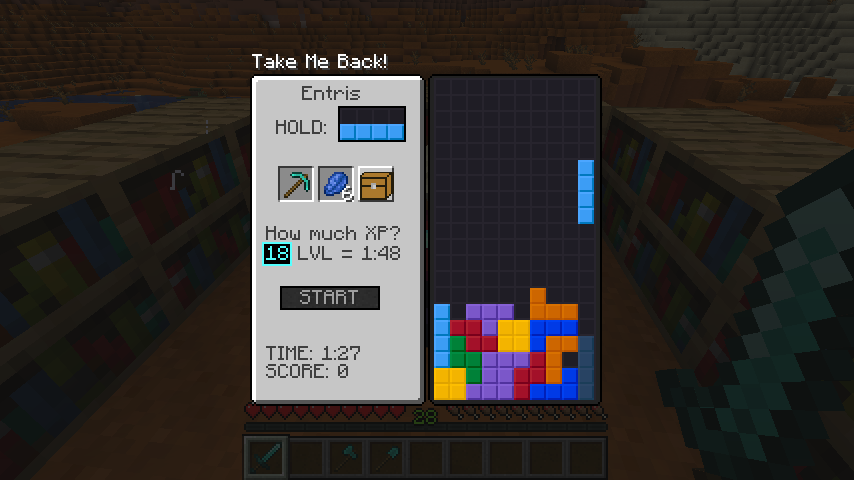
Tetris in an enchanting table

Choosing How Many Levels

Use your Keyboard to type in a numerical number of level for the level of enchants, and lose levels/30 lapis and experience per trial, where you get six seconds per level of power used. Additionally, to use the maximum 30 levels, 3 levels removed on beginning the game, you must have 15 book shelves near the enchanting table.

Buy your enchantments! 1000 points per enchantment level

Once all requirements are met, you can press [Start] and play Tetris. The points you collected can be used 1000 / enchantment to add to your item
Only unenchanted items can be enchanted.
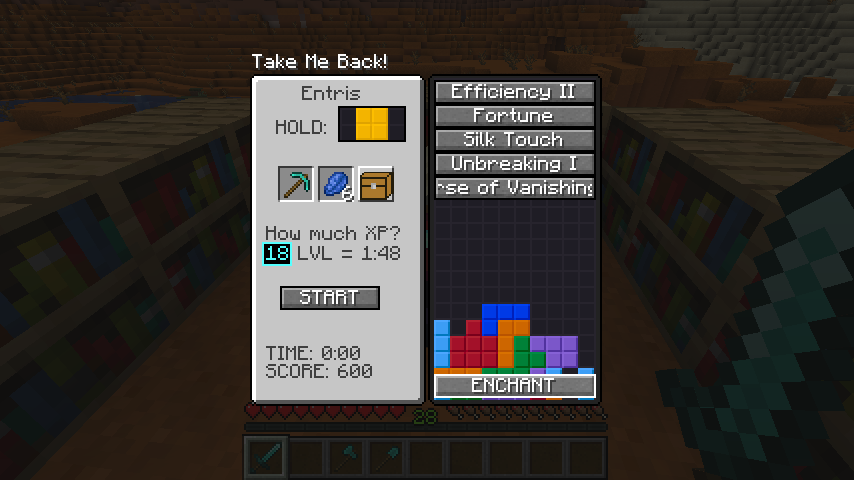
Buying Enchantments

Roman numerals increase after pressing the enchantment

Roman numerals on the end of the button title are increased when clicked, and then once all enchantments wanted are clicked, you press Enchant!
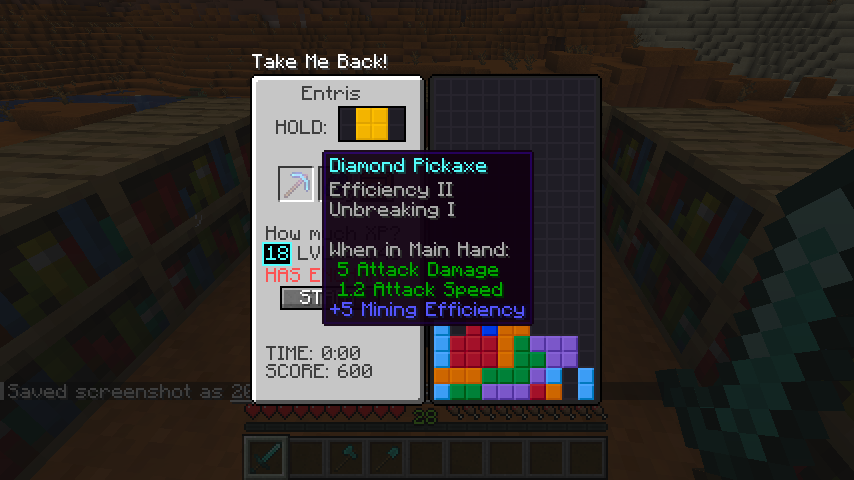
After Buying

Change your keybindings from the default!
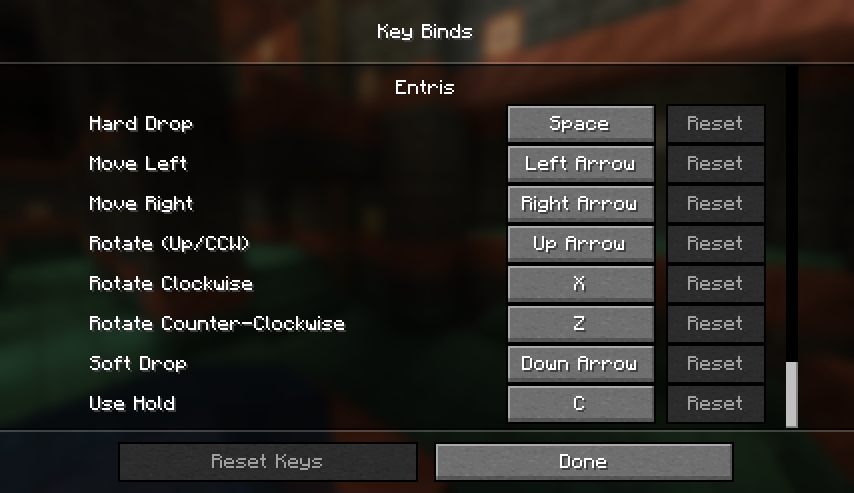
Keybinds

👥 Team & Contributors

Slainlight
SlainlightOwner

⚙️ Compatibility

Environment
✅ Client & Server
Loaders
fabricforgeneoforgequilt
Minecraft Versions
1.21.21.21.31.21.4

🔗 Links

Modrinth Page