
MINECRAFTBIBLE
Loading...


A server side Fabric mod providing useful features to Simple Voice Chat groups.
A server side Fabric mod providing useful features to Simple Voice Chat groups.
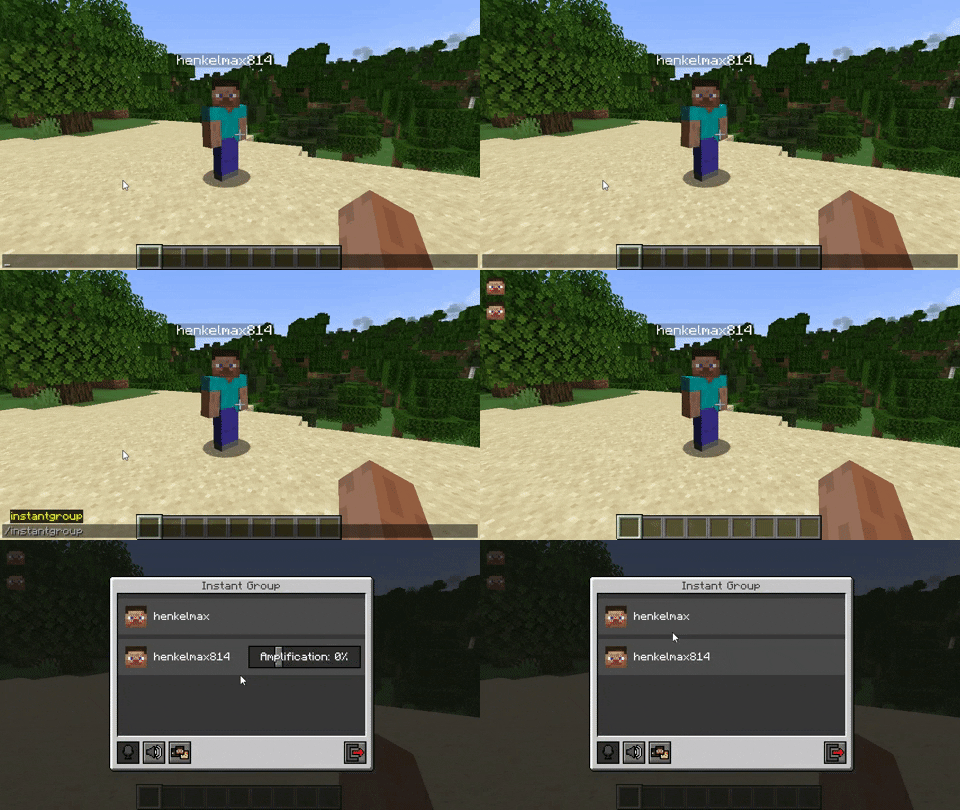
The command /instantgroup automatically adds every player nearby to a group,
if they are not already in a group.
The default range of this is 128 blocks.
Alternatively you can provide the range as the first argument of the command: /instantgroup 256.
Players that join the server will get a quick summary of all active voice chat groups.
The command /persistentgroup creates a group that will not be deleted when all players leave it or the server
restarts.
Usage:
/persistentgroup list - Lists all persistent groups
/persistentgroup remove <name> - Deletes the group with the given name
/persistentgroup remove <id> - Deletes the group with the given ID (For internal use only)
/persistentgroup add <name> [<normal|open|isolated>] [<hidden>] [<password>] - Creates a persistent group
Players can be automatically added to a group when they join the server.
Note: This feature is only available for persistent groups.
Usage:
/autojoingroup set <group-name> [password] - Sets your auto join group
/autojoingroup set <id> [password] - Sets your auto join group (For internal use only)
/autojoingroup remove - Removes your auto join group
Players can be automatically added to the same group when they join the server.
Note: This feature is only available for persistent groups.
Usage:
/autojoingroup global set <group-name> [password] - Sets the global auto join group
/autojoingroup global set <id> [password] - Sets the global auto join group (For internal use only)
/autojoingroup global remove - Removes the global auto join group
/autojoingroup global force <true|false> - Forces global auto join. If disabled the players auto join group takes priority
Players can be forced to join a group.
Usage:
/forcejoingroup <player> - Forces the player to join your group
If force_group_type is enabled in the config, players won't be able to create groups with a different type.
All created groups will be of the type specified in the config.
This will be useful for servers that used the global open_groups config option in older versions of Simple Voice Chat.
Note: Forced group types will only be applied to groups that are created with the GUI in Simple Voice Chat.
It does not apply to any of the commands provided by this mod.
If you don't want regular players to be able to use these commands,
you can set the permission levels in the config to a higher value.
Possible config values are OFF, NORMAL, OPEN and ISOLATED.
The config file is located at config/enhancedgroups/enhancedgroups.properties.
| Name | Default Value | Description |
|---|---|---|
default_instant_group_range |
128 |
The default range for the /instantgroup command if no range was provided |
instant_group_name |
Instant Group |
The name of the instant group |
instant_group_command_permission_type |
EVERYONE |
The default permission level of the /instantgroup command EVERYONE - Every player can use this command OPS - Operators can use this command NOONE - The command can't be used by anyone |
persistent_group_command_permission_type |
OPS |
The default permission level of the /persistentgroup command EVERYONE - Every player can use this command OPS - Operators can use this command NOONE - The command can't be used by anyone |
auto_join_group_command_permission_type |
EVERYONE |
The default permission level of the /autojoingroup command EVERYONE - Every player can use this command OPS - Operators can use this command NOONE - The command can't be used by anyone |
auto_join_group_global_command_permission_type |
OPS |
The default permission level of the /autojoingroup global command EVERYONE - Every player can use this command OPS - Operators can use this command NOONE - The command can't be used by anyone |
force_join_group_command_permission_type |
OPS |
The default permission level of the /forcejoingroup command EVERYONE - Every player can use this command OPS - Operators can use this command NOONE - The command can't be used by anyone |
group_summary |
true |
If a summary of all groups should be shown when a player joins the server |
force_group_type |
OFF |
If the group type should be forced to a specific type OFF - No forced group type NORMAL - Forced group type: Normal OPEN - Forced group type: Open ISOLATED - Forced group type: Isolated |
This mod supports the fabric-permissions-api.
The default permission type of each node is defined in the config.
| Permission Node | Description |
|---|---|
enhancedgroups.instantgroup |
The permission node to be able to execute the /instantgroup commands |
enhancedgroups.persistentgroup |
The permission node to be able to execute the /persistentgroup commands |
enhancedgroups.autojoingroup |
The permission node to be able to execute the /autojoingroup commands |
enhancedgroups.autojoingroup.global |
The permission node to be able to execute the /autojoingroup global commands |
enhancedgroups.forcejoingroup |
The permission node to be able to execute the /forcejoingroup commands |