Logo
MINECRAFTBIBLE
Items
Items

All game items

Blocks
Blocks

Building blocks

Mobs
Mobs

Creatures & monsters

Biomes
Biomes

World biomes

Structures
Structures

Generated structures

Recipes
Recipes

Crafting guides

Advancements
Advancements

Achievements

Loot Tables
Loot Tables

Drop rates

Tags
Tags

Item groupings

All Versions
View all data →
Capes
Cape ArchiveNEW

Browse rare Minecon capes, OptiFine capes, and custom capes from players worldwide

Browse

Player Database
Player DatabasePopular

Search any player

Skin Browser
Skin Browser

Browse & download skins

Cape Gallery
Cape GalleryNEW

Minecon & OptiFine capes

Seed Vault
Seed Vault

Curated seeds

Learn

Guides
GuidesNew

Tutorials & tips

Blog
Blog

News & updates

Community

Community Hub
Community HubHub

Posts, discussions & more

All Versions
View community →
Seed Analyzer
Seed Analyzer

World seed analysis

Loot Explorer
Loot Explorer

Drop rates

Crafting Calculator
Crafting Calculator

Material planning

Enchant Calculator
Enchant Calculator

Probability math

Redstone Lab
Redstone Lab

Signal timing

Trading Profit
Trading Profit

Villager ROI

All Versions
View all tools →
Mods
Mods

Browse all mods

Plugins
Plugins

Server plugins

Resource Packs
Resource Packs

Textures & sounds

Shaders
Shaders

Visual enhancements

Datapacks
Datapacks

World logic

Scanner
Mod Intelligence

Scan & analyze any mod

All Versions
View all mods →
Loading...
IntroductionIntroductionVersion HistoryVersion HistoryGuidesGuidesBlog & NewsBlog & News
ItemsItemsBlocksBlocksMobsMobsRecipesRecipesBiomesBiomesStructuresStructuresAdvancementsAdvancementsLoot TablesLoot TablesTagsTags
ModsModsPluginsPluginsResource PacksResource PacksShadersShadersDatapacksDatapacks

MinecraftBible

The Ultimate Wiki

Logo
MINECRAFTBIBLE

The ultimate Minecraft reference. Every item, block, mob, and recipe documented with precision.

Community

  • Skin Browser
  • Cape Gallery
  • Seed Vault
  • Blog
  • Guides

Database

  • Items
  • Blocks
  • Mobs
  • Recipes
  • Biomes
  • Structures

Tools

  • Seed Analyzer
  • Mod Intelligence
  • Crafting Calculator
  • Enchant Calculator

Mods & Packs

  • Mods
  • Plugins
  • Resource Packs
  • Shaders
  • Datapacks

Site & Legal

  • About
  • Authors
  • Editorial Policy
  • Corrections
  • Contact
  • Privacy Policy
  • Terms of Service
  • DMCA
  • Sitemap

© 2026 MinecraftBible. Not affiliated with Mojang or Microsoft.

PrivacyTermsContact
Emoji Type
ModGPL-3.0-or-later

Emoji Type

Type Minecraft emojis and symbols with simple shortcodes.

2.3M
Downloads
808
Followers
4 months ago
Updated
📦
30
Versions
socialutilityfabricforgeneoforgequilt
Download Latestv3.0.0-1.21.10-neoforgeView on Modrinth

📖About Emoji Type

🙂 Emoji Type

Type Minecraft emojis and symbols with simple shortcodes.

Emoji Type allows you to instantly insert 200+ emojis into your game using intuitive keywords. Type :skull: and get ☠️ instantly. Works in chat, signs, books, anvils - everywhere text appears. No resource packs or texture changes needed.


🚀 Key Features

  • Seamless Integration: Works in chat, signs, books, and even anvils.
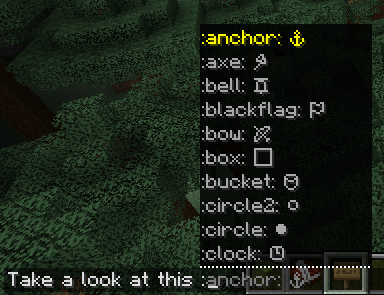
  • Smart Autocomplete: Type a colon (:) in chat to see a real-time list of suggestions.
  • Vanilla Compatible: Emojis are standard Unicode. Other players can see your emojis even if they don't have the mod installed!
  • Emoji Pack: Create, edit your own emoji packs via a built-in visual editor.

Bundled Emoji Packs

Pack Description Examples
Minecraft Essentials Tools, weapons, and status icons. ⚔️ ⛏️ 🏹 ☀️ ❄️
Text Art (Kaomoji) Classic ASCII and Japanese emoticons. ¯\_(ツ)_/¯ (╯°□°)╯
Letter Emojis Stylized circled alphabets. ⓐ Ⓑ ⓒ Ⓓ

🛠️ How to Use

  1. Install: Drop the mod into your mods folder (Client-side only!).
  2. Trigger: Press : in any text field.
  3. Search: Start typing (e.g., :sw...) and use your arrow keys or mouse to select.
  4. Anywhere Else: On signs or anvils, simply type the full code (e.g., :heart:) and watch it transform.

Customizing: Access the config via Mod Menu (Fabric) or the Mods setting (NeoForge) to enable/disable emoji packs or build your own from scratch!


❓ Frequently Asked Questions

Do I need this on my server?

Nope! It’s 100% client-side. It won’t do anything if installed on a server.

Can my friends see the emojis?

Yes! Since these are native Unicode characters, anyone on a modern Minecraft client can see them perfectly.

How do I share my custom packs?

Just send the .yaml file found in config/emojitype/emoji_packs/. Your friends can just drop it in their folder and they're good to go.

Why no autocomplete on signs?

Minecraft’s sign and anvil interfaces are a bit more restrictive than chat. For now, just type the full keyword (like :check:) and it will convert automatically.

🖼️ Gallery

Chat Suggestions Config Screen Emoji Packs

View more images in the Modrinth's gallery...

👥 Team & Contributors

cyborgcabbage
cyborgcabbage
Original Creator
Norbiros
NorbirosOwner

⚙️ Compatibility

Environment
💻 Client-side
Loaders
fabricforgeneoforgequilt
Minecraft Versions
1.21.91.21.101.21.11

🔗 Links

Modrinth Page