Logo
MINECRAFTBIBLE
Items
Items

All game items

Blocks
Blocks

Building blocks

Mobs
Mobs

Creatures & monsters

Biomes
Biomes

World biomes

Structures
Structures

Generated structures

Recipes
Recipes

Crafting guides

Advancements
Advancements

Achievements

Loot Tables
Loot Tables

Drop rates

Tags
Tags

Item groupings

All Versions
View all data →
Capes
Cape ArchiveNEW

Browse rare Minecon capes, OptiFine capes, and custom capes from players worldwide

Browse

Player Database
Player DatabasePopular

Search any player

Skin Browser
Skin Browser

Browse & download skins

Cape Gallery
Cape GalleryNEW

Minecon & OptiFine capes

Seed Vault
Seed Vault

Curated seeds

Learn

Guides
GuidesNew

Tutorials & tips

Blog
Blog

News & updates

Community

Community Hub
Community HubHub

Posts, discussions & more

All Versions
View community →
Seed Analyzer
Seed Analyzer

World seed analysis

Loot Explorer
Loot Explorer

Drop rates

Crafting Calculator
Crafting Calculator

Material planning

Enchant Calculator
Enchant Calculator

Probability math

Redstone Lab
Redstone Lab

Signal timing

Trading Profit
Trading Profit

Villager ROI

All Versions
View all tools →
Mods
Mods

Browse all mods

Plugins
Plugins

Server plugins

Resource Packs
Resource Packs

Textures & sounds

Shaders
Shaders

Visual enhancements

Datapacks
Datapacks

World logic

Scanner
Mod Intelligence

Scan & analyze any mod

All Versions
View all mods →
Loading...
IntroductionIntroductionVersion HistoryVersion HistoryGuidesGuidesBlog & NewsBlog & News
ItemsItemsBlocksBlocksMobsMobsRecipesRecipesBiomesBiomesStructuresStructuresAdvancementsAdvancementsLoot TablesLoot TablesTagsTags
ModsModsPluginsPluginsResource PacksResource PacksShadersShadersDatapacksDatapacks

MinecraftBible

The Ultimate Wiki

Logo
MINECRAFTBIBLE

The ultimate Minecraft reference. Every item, block, mob, and recipe documented with precision.

Community

  • Skin Browser
  • Cape Gallery
  • Seed Vault
  • Blog
  • Guides

Database

  • Items
  • Blocks
  • Mobs
  • Recipes
  • Biomes
  • Structures

Tools

  • Seed Analyzer
  • Mod Intelligence
  • Crafting Calculator
  • Enchant Calculator

Mods & Packs

  • Mods
  • Plugins
  • Resource Packs
  • Shaders
  • Datapacks

Site & Legal

  • About
  • Authors
  • Editorial Policy
  • Corrections
  • Contact
  • Privacy Policy
  • Terms of Service
  • DMCA
  • Sitemap

© 2026 MinecraftBible. Not affiliated with Mojang or Microsoft.

PrivacyTermsContact
Effects After Death
ModLicenseRef-Free-Use-With-Attribution-and-Redistribution-Restrictions

Effects After Death

Keep all Effects after death. Extremely configurable server-side mod/datapack

594
Downloads
6
Followers
5 months ago
Updated
📦
6
Versions
game-mechanicsmanagementutilitydatapackfabricforgeneoforgequilt
Download Latestv1.1+modView on Modrinth

📖About Effects After Death

Effects after Death 💀🧪

Effects After Death is a highly configurable Minecraft datapack/mod that allows all minecraft effects to persist after a player's death.
Designed for maximum flexibility, it supports both global and per-player customization to suit various gameplay styles and server rules.

Ideal for RPG style servers, challenge modes, or progression based gameplay, Effects After Death.

Fully server side!

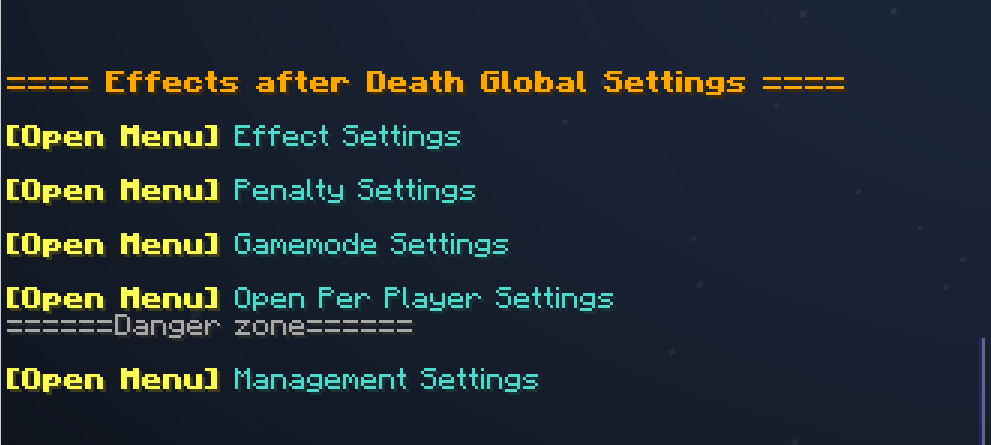
⚙️ Settings Menu — Effects After Death

Open Settings with /trigger EffectsOnDeath.settings

Category Description
🧪 Effect Settings Toggle individual effects on or off
⚖️ Penalty Settings Modify penalties applied upon death
🎮 Gamemode Settings Choose which gamemodes are affected
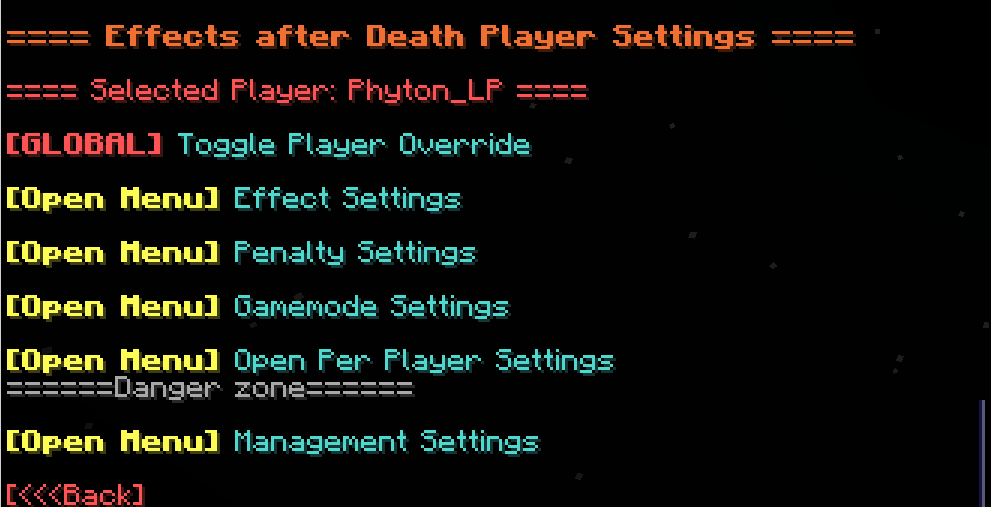
👤 Per-Player Settings Set individual player configurations
🧹 Management Settings Reset, clean up, or uninstall datapack
Image

Menu

---

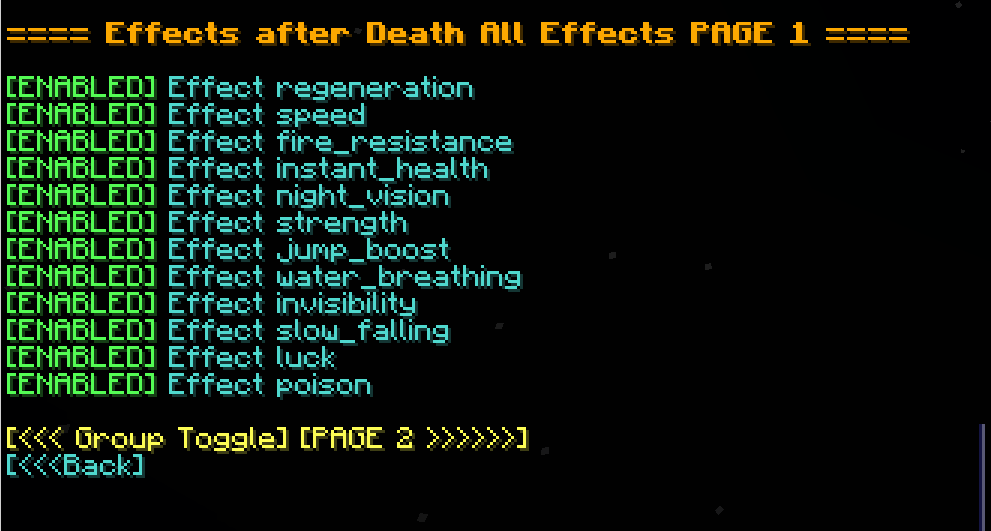
🧪 Effect Settings

  • Multi-page system for organizing effects
  • Group Toggle Page: Turn multiple effects on/off at once
  • Infinite Effects: Enable/disable keeping effects with infinite duration
  • Individual Effects: Enable/disable each effect in minecraft separately
  • Image

Effect Settings


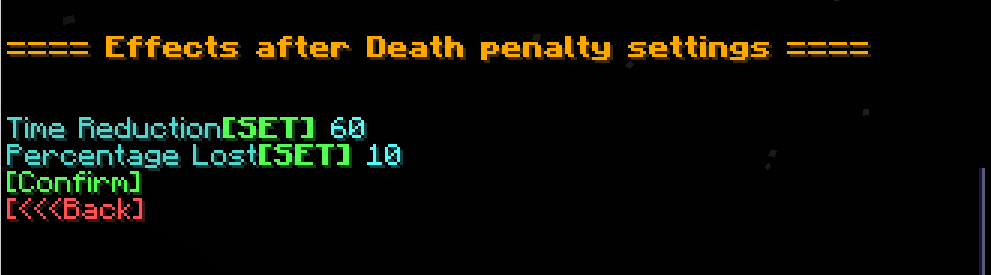
⚖️ Penalty Settings

Option Description
⏱️ Time Reduction Fixed number of seconds lost on death
📉 Percentage Lost Percentage of time lost on death
Image

Penalty

---

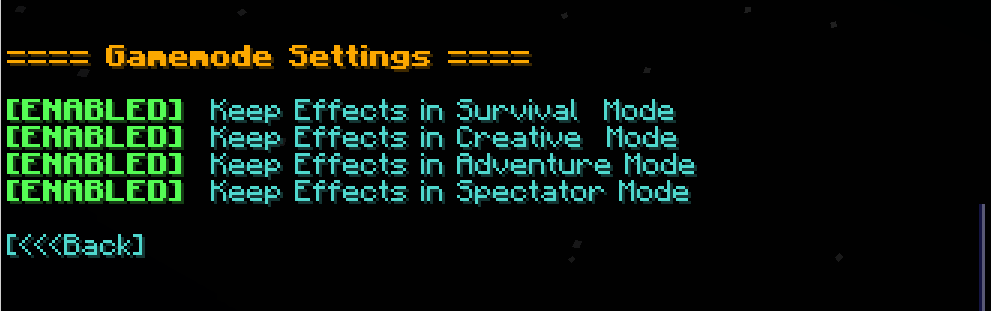
🎮 Gamemode Settings

  • Enable/disable effect retention in specific gamemodes (e.g., survival, creative, spectator) Image

Gamemode Settings

---

👤 Per-Player Settings

  • Customize which players are affected by each setting
  • Give Players individual rule sets! Image

Player Settings

---

🧹 Management Settings

Option Description
🔄 Reset to Defaults Restore all effect and group settings to default
👥 Reset Players Remove all per-player overrides
❌ Uninstall Fully remove all related data and scoreboards

👥 Team & Contributors

Phyton
PhytonOwner

⚙️ Compatibility

Environment
🖥️ Server-side
Loaders
datapackfabricforgeneoforgequilt
Minecraft Versions
1.211.21.11.21.21.21.31.21.41.21.51.21.61.21.7+4 more

🔗 Links

Modrinth Page