Logo
MINECRAFTBIBLE
Items
Items

All game items

Blocks
Blocks

Building blocks

Mobs
Mobs

Creatures & monsters

Biomes
Biomes

World biomes

Structures
Structures

Generated structures

Recipes
Recipes

Crafting guides

Advancements
Advancements

Achievements

Loot Tables
Loot Tables

Drop rates

Tags
Tags

Item groupings

All Versions
View all data →
Capes
Cape ArchiveNEW

Browse rare Minecon capes, OptiFine capes, and custom capes from players worldwide

Browse

Player Database
Player DatabasePopular

Search any player

Skin Browser
Skin Browser

Browse & download skins

Cape Gallery
Cape GalleryNEW

Minecon & OptiFine capes

Seed Vault
Seed Vault

Curated seeds

Learn

Guides
GuidesNew

Tutorials & tips

Blog
Blog

News & updates

Community

Community Hub
Community HubHub

Posts, discussions & more

All Versions
View community →
Seed Analyzer
Seed Analyzer

World seed analysis

Loot Explorer
Loot Explorer

Drop rates

Crafting Calculator
Crafting Calculator

Material planning

Enchant Calculator
Enchant Calculator

Probability math

Redstone Lab
Redstone Lab

Signal timing

Trading Profit
Trading Profit

Villager ROI

All Versions
View all tools →
Mods
Mods

Browse all mods

Plugins
Plugins

Server plugins

Resource Packs
Resource Packs

Textures & sounds

Shaders
Shaders

Visual enhancements

Datapacks
Datapacks

World logic

Scanner
Mod Intelligence

Scan & analyze any mod

All Versions
View all mods →
Loading...
IntroductionIntroductionVersion HistoryVersion HistoryGuidesGuidesBlog & NewsBlog & News
ItemsItemsBlocksBlocksMobsMobsRecipesRecipesBiomesBiomesStructuresStructuresAdvancementsAdvancementsLoot TablesLoot TablesTagsTags
ModsModsPluginsPluginsResource PacksResource PacksShadersShadersDatapacksDatapacks

MinecraftBible

The Ultimate Wiki

Logo
MINECRAFTBIBLE

The ultimate Minecraft reference. Every item, block, mob, and recipe documented with precision.

Community

  • Skin Browser
  • Cape Gallery
  • Seed Vault
  • Blog
  • Guides

Database

  • Items
  • Blocks
  • Mobs
  • Recipes
  • Biomes
  • Structures

Tools

  • Seed Analyzer
  • Mod Intelligence
  • Crafting Calculator
  • Enchant Calculator

Mods & Packs

  • Mods
  • Plugins
  • Resource Packs
  • Shaders
  • Datapacks

Site & Legal

  • About
  • Authors
  • Editorial Policy
  • Corrections
  • Contact
  • Privacy Policy
  • Terms of Service
  • DMCA
  • Sitemap

© 2026 MinecraftBible. Not affiliated with Mojang or Microsoft.

PrivacyTermsContact
Echo Wireless Redstone
ModLicenseRef-Dash-MCL-ND-1.0

Echo Wireless Redstone

Sculk-Powered Wireless Redstone!

1.2K
Downloads
9
Followers
4 months ago
Updated
📦
12
Versions
game-mechanicstechnologyutilitydatapackfabricforgeneoforgequilt
Download Latestv1.4+modView on Modrinth

📖About Echo Wireless Redstone

⚠️ IMPORTANT: USAGE GUIDELINES
If you're planning to use this on a server or modpack,
please refer to:
https://gamedash43.github.io/dash-mcl-licenses/#usage

Title Text "Echo Redstone"

🎥Video Overview

Watch the video for a full demo covering setup, linking, and wireless redstone functionality using Echo Redstone components.

📜How to Use

1. Crafting & Frequency

  • Unique Frequency ID:
    • Each crafted echo horn gets a unique frequency ID.
    • Only components sharing the same ID will interact.
    • Check Frequency:
      • Hold shift and use the echo horn, or shift right-click an emitter/receiver.

2. Component Setup

  • Repeaters Required:
    • Place receivers and emitters on repeaters.

3. Linking & Activation

  • Linking a Receiver:
    • Place the receiver on a repeater and right-click it with the echo horn.
  • Using an Emitter:
    • Place the emitter on a repeater and right-click with the echo horn.
    • Emitters need experience orbs to broadcast.
    • Longer repeater delays increase the cooldown between activations.
  • Receiver Update:
    • Trigger a block update (e.g., place redstone dust in front) to ensure proper function.

4. Creating a Mimic (V1.2+)

  • Mimic Echo Horn:
    • With an emitter set to the desired frequency and an echo shard in your inventory, shift right-click the emitter using a different echo horn.
    • This produces a mimic echo horn that shares the frequency ID but displays "mimic" instead of the original mob name.

🛠️Crafting Recipes

Echo Horn Recipe:
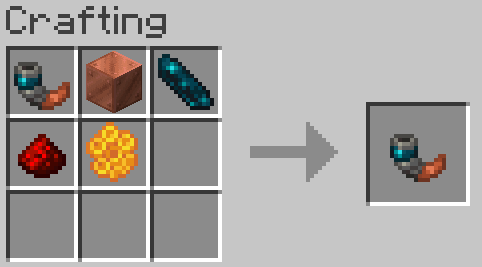
Crafting Recipe

  • Use any copper block (oxidized or waxed) to craft the echo horn. If crafting with a waxed copper block honeycomb can be omitted.
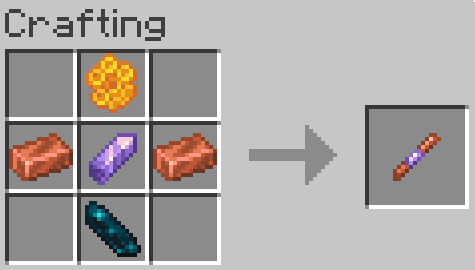
Redstone Echo Receiver:

Crafting Recipe

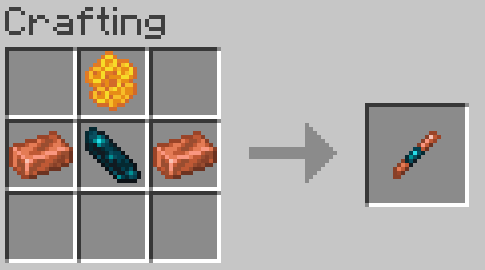
Redstone Echo Emitter:

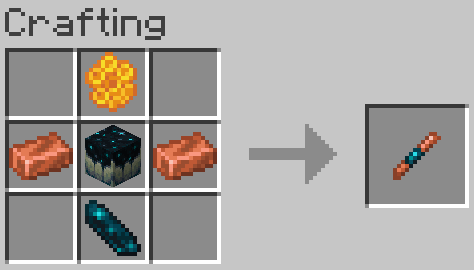
Crafting Recipe

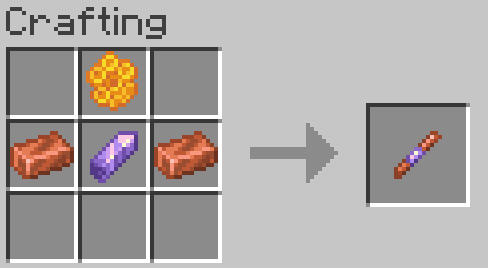
Legacy Recipes (Outdated):

Crafting RecipeCrafting Recipe

❓FAQ

Something is wrong/Nothing is happening Due to the complexity of this datapack, if something isn’t working correctly, join the Discord to ask for help. Is this datapack Multiplayer friendly? *Yes, there are over 2 billion possible frequency ID slots, making it virtually impossible to encounter ID conflicts, even on a multiplayer server.

*This is only the case in version V1.1, as version V1.0 has a bug that limits it to roughly 128 channels if you are on V1.0 update to the V1.0 FIXED version.

How does this datapack impact performance? This datapack does not include any unnecessary ticking functions for items. However, since redstone datapacks require block checks, there is a slight performance impact. No noticeable TPS drops were observed until after 1,500 receivers/emitters. How do I report a bug? Join the Discord and either DM me or post a message in the reports channel. How do I update this datapack from an older version Just run the command "/function dash.wsred:update" (if there are receivers and emitters in unloaded areas, you might need to run it more than once). How do I uninstall this datapack? Just run the command "/function dash.wsred:uninstall" (if there are receivers and emitters in unloaded areas, you might need to run it more than once).

👥 Team & Contributors

okdashi
okdashiOwner

⚙️ Compatibility

Environment
🖥️ Server-side
Loaders
datapackfabricforgeneoforgequilt
Minecraft Versions
1.21.91.21.101.21.11

🔗 Links

Modrinth Page