
MINECRAFTBIBLE
Loading...


A client-side core that serves as the shared foundation for all Easeon modules.
A client-side core that serves as the shared foundation for all Easeon modules, freely available for any mod to reference and use.
package com.example;

import com.easeon.cs.core.api.EaseonFeatureEnumLike;
import com.easeon.cs.core.config.model.*;

public enum FeatureExample implements EaseonFeatureEnumLike {
    // ✅ Toggle Example: Enable or disable the minimap
    SHOW_MINIMAP("featuredemo.show_minimap",
            new ToggleConfig() {{ Enabled = true; }}),

    // ✅ Slider Example: Adjust screen brightness (1–10)
    SCREEN_BRIGHTNESS("featuredemo.screen_brightness",
            new SliderConfig() {{ Enabled = true; Value = 5; }}, 1, 10) {
        @Override public String getValueFormat() { return "featuredemo.screen_brightness.format"; }
    },

    // ✅ Hotkey Example: Toggle fullscreen with a shortcut
    TOGGLE_FULLSCREEN("featuredemo.toggle_fullscreen",
            new HotkeyConfig() {{ Enabled = true; Key = 70; Mod = 2; }}); // Example: Ctrl + F

    private final String title;
    private final Object defaultConfig;
    private final int min, max;

    FeatureExample(String title, Object defaultConfig) { this(title, defaultConfig, 0, 0); }
    FeatureExample(String title, Object defaultConfig, int min, int max) {
        this.title = title; this.defaultConfig = defaultConfig; this.min = min; this.max = max;
    }

    @Override public String id() { return name(); }
    @Override public String title() { return title; }
    @Override public Object getDefaultConfig() { return defaultConfig; }
    @Override public int getMin() { return min; }
    @Override public int getMax() { return max; }
}
package com.example;

import com.easeon.cs.core.EaseonClientCore;
import net.fabricmc.api.ClientModInitializer;

public class TemplateModClient implements ClientModInitializer {
    @Override
    public void onInitializeClient() {
         EaseonClientCore
            .init("feature-demo", "feature.demo.config.json")
                .category("UI", "featuredemo.ui")
                .section("GENERAL", "featuredemo.ui.general")
                    .slider(FeatureExample.SCREEN_BRIGHTNESS)
                .section("CONTROL", "featuredemo.ui.control")
                    .toggle(FeatureExample.SHOW_MINIMAP)
                    .hotkey(FeatureExample.TOGGLE_FULLSCREEN)
            .build();
    }
}
   var config = EaseonClientCore.getSliderConfig(FeatureExample.SCREEN_BRIGHTNESS);
   if (!config.Enabled) return;
   System.out.println(config.value);
   // Open settings screen directly
   EaseonClientCore.openSettingsScreen();

   // Or manually open the screen returned by getSettingsScreen()
   MinecraftClient.getInstance().setScreen(EaseonClientCore.getSettingsScreen());
{
  "featuredemo.ui": "Feature Demo",
  "featuredemo.ui.general": "General",
  "featuredemo.ui.control": "Control",

  "featuredemo.screen_brightness": "Screen Brightness",
  "featuredemo.screen_brightness.format": "Brightness: %.0f",
  "featuredemo.show_minimap": "Show Minimap",
  "featuredemo.toggle_fullscreen": "Toggle Fullscreen"
}
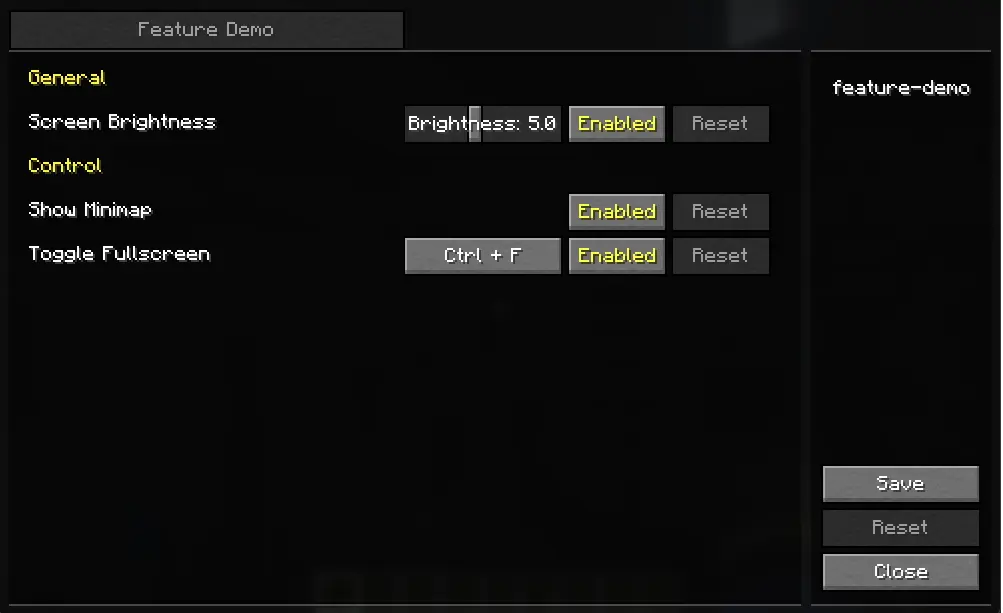
Looking for more lightweight and practical mods in the same style?
Check out other Easeon series mods here.