


Ducky Updater: ReWork
Simple utility for update mods using Modrinth API
📖About Ducky Updater: ReWork









Ducky Updater: ReWork
Simple utility for update mods using Modrinth API
Support
·
Report Bug
·
Request Feature
About The Project
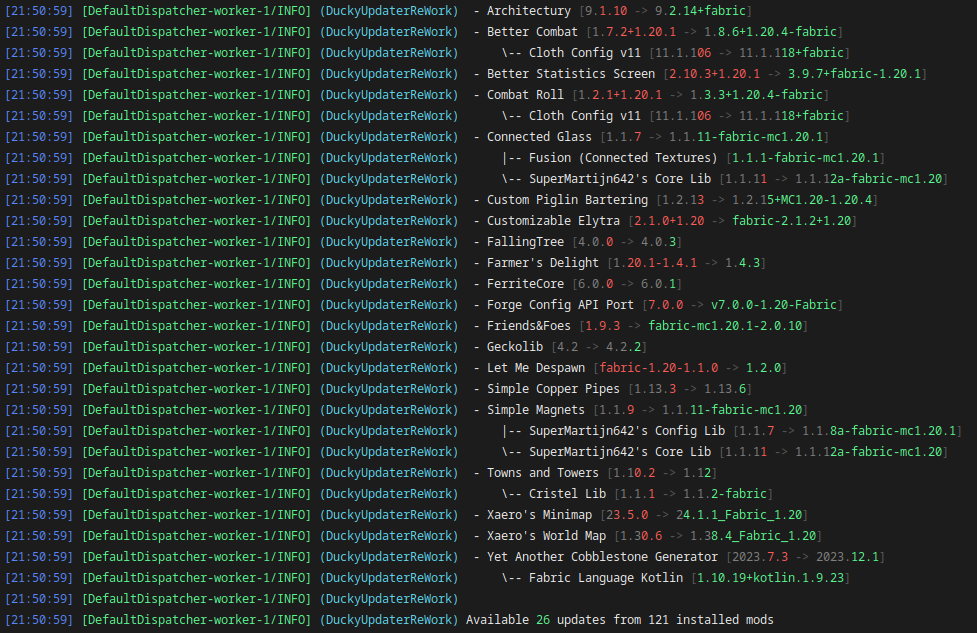
Mod that give possibility to update mods without using third-party launchers
ReWorked version of old Ducky Updater that has many issues, legacy code and bad performance
Built With





Usage
Commands and permissions
Client| Command | OP | Permission | Description |
|---|---|---|---|
/durw-client check datapack |
❌ | none |
Check for datapack updates |
/durw-client check fabric |
❌ | none |
Check for fabirc updates |
/durw-client clear-cache |
❌ | none |
Clear database aka cache |
/durw-client ignore by datapack-list |
❌ | none |
List ignored datapacks |
/durw-client ignore by fabric-list |
❌ | none |
List ignored fabric mods |
/durw-client ignore by mod-id <modId> <ignore> |
❌ | none |
Ignore mod updates by mod id |
/durw-client ignore by fabric-id <projectId> <ignore> |
❌ | none |
Ignore mod updates by fabric id |
/durw-client ignore by datapack-id <projectId> <ignore> |
❌ | none |
Ignore mod updates by datapack file name |
/durw-client update fabric-all |
❌ | none |
Update all fabric mods |
/durw-client update datapack-all |
❌ | none |
Update all datapacks |
/durw-client update by mod-ids <modIds> |
❌ | none |
Update specific fabric mod(s) by mod ids |
/durw-client update by fabric-ids <projectIds> |
❌ | none |
Update specific fabric mod(s) by project ids |
/durw-client update by datapack-ids <projectIds> |
❌ | none |
Update specific datapack(s) by project ids |
/durw-client config download-mode <mode> |
❌ | none |
Setup downloading mod |
/durw-client config file-action <action> |
❌ | none |
Setup file action |
/durw-client config check-update-on-boot <check> |
❌ | none |
Setup update checking on boot |
| Command | OP | Permission | Description |
|---|---|---|---|
/durw-server check datapack |
✅ | none |
Check for datapack updates |
/durw-server check fabric |
✅ | none |
Check for fabirc updates |
/durw-server clear-cache |
✅ | none |
Clear database aka cache |
/durw-server ignore by datapack-list |
✅ | none |
List ignored datapacks |
/durw-server ignore by fabric-list |
✅ | none |
List ignored fabric mods |
/durw-server ignore by mod-id <modId> <ignore> |
✅ | none |
Ignore mod updates by mod id |
/durw-server ignore by fabric-id <projectId> <ignore> |
✅ | none |
Ignore mod updates by fabric id |
/durw-server ignore by datapack-id <projectId> <ignore> |
✅ | none |
Ignore mod updates by datapack file name |
/durw-server update fabric-all |
✅ | none |
Update all fabric mods |
/durw-server update datapack-all |
✅ | none |
Update all datapacks |
/durw-server update by mod-ids <modIds> |
✅ | none |
Update specific fabric mod(s) by mod ids |
/durw-server update by fabric-ids <projectIds> |
✅ | none |
Update specific fabric mod(s) by project ids |
/durw-server update by datapack-ids <projectIds> |
✅ | none |
Update specific datapack(s) by project ids |
/durw-server config download-mode <mode> |
✅ | none |
Setup downloading mod |
/durw-server config file-action <action> |
✅ | none |
Setup file action |
/durw-server config check-update-on-boot <check> |
✅ | none |
Setup update checking on boot |
| Command | OP | Permission | Description |
|---|---|---|---|
/durw-client check |
❌ | none |
Check for updates |
/durw-client ignore by mod-id <modId> <ignore> |
❌ | none |
Ignore mod updates by mod id |
/durw-client ignore by project-id <projectId> <ignore> |
❌ | none |
Ignore mod updates by project id |
/durw-client update all |
❌ | none |
Update all mods |
/durw-client update by mod-ids <modIds> |
❌ | none |
Update specific mod(s) by mod ids |
/durw-client update by project-ids <projectIds> |
❌ | none |
Update specific mod(s) by project ids |
/durw-client config download-mode <mode> |
❌ | none |
Setup downloading mod |
/durw-client config file-action <action> |
❌ | none |
Setup file action |
/durw-client config check-update-on-boot <check> |
❌ | none |
Setup update checking on boot |
| Command | OP | Permission | Description |
|---|---|---|---|
/durw-server check |
✅ | none |
Check for updates |
/durw-server ignore by mod-id <modId> <ignore> |
✅ | none |
Ignore mod updates by mod id |
/durw-server ignore by project-id <projectId> <ignore> |
✅ | none |
Ignore mod updates by project id |
/durw-server update all |
✅ | none |
Update all mods |
/durw-server update by mod-ids <modIds> |
✅ | none |
Update specific mod(s) by mod ids |
/durw-server update by project-ids <projectIds> |
✅ | none |
Update specific mod(s) by project ids |
/durw-server config download-mode <mode> |
✅ | none |
Setup downloading mod |
/durw-server config file-action <action> |
✅ | none |
Setup file action |
/durw-server config check-update-on-boot <check> |
✅ | none |
Setup update checking on boot |
{
  // Check updates on every server/client boot
  "checkUpdatesOnBoot": true,
  // Download Modes
  // PARALLEL -> Download and work with multiplied files at the same time (Default)
  // SEQUENTIALLY -> Download and work with file one by one (Recommended for bad network)
  "downloadMode": "PARALLEL",
  // File Action
  // ARCHIVE -> Making a ZIP file with the old version of all updated mods (Default)
  // DELETE -> Delete all old files (Best for server's that have small disk, use on own risk)
  // DISABLE -> Add to end of old files suffix .disable
  "fileAction": "ARCHIVE"
}
Contributing
Contributions are what make the open source community such an amazing place to learn, inspire, and create. Any
contributions you make are greatly appreciated.
If you have a suggestion that would make this better, please fork the repo and create a pull request. You can also
simply open an issue with the tag "enhancement".
Don't forget to give the project a star! Thanks again!
- Fork the Project
- Create your Feature Branch (
git checkout -b feature/AmazingFeature) - Commit your Changes (
git commit -m 'Add some AmazingFeature') - Push to the Branch (
git push origin feature/AmazingFeature) - Open a Pull Request
License
Distributed under the MIT License. See LICENSE for more information.