Logo
MINECRAFTBIBLE
Items
Items

All game items

Blocks
Blocks

Building blocks

Mobs
Mobs

Creatures & monsters

Biomes
Biomes

World biomes

Structures
Structures

Generated structures

Recipes
Recipes

Crafting guides

Advancements
Advancements

Achievements

Loot Tables
Loot Tables

Drop rates

Tags
Tags

Item groupings

All Versions
View all data →
Capes
Cape ArchiveNEW

Browse rare Minecon capes, OptiFine capes, and custom capes from players worldwide

Browse

Player Database
Player DatabasePopular

Search any player

Skin Browser
Skin Browser

Browse & download skins

Cape Gallery
Cape GalleryNEW

Minecon & OptiFine capes

Seed Vault
Seed Vault

Curated seeds

Learn

Guides
GuidesNew

Tutorials & tips

Blog
Blog

News & updates

Community

Community Hub
Community HubHub

Posts, discussions & more

All Versions
View community →
Seed Analyzer
Seed Analyzer

World seed analysis

Loot Explorer
Loot Explorer

Drop rates

Crafting Calculator
Crafting Calculator

Material planning

Enchant Calculator
Enchant Calculator

Probability math

Redstone Lab
Redstone Lab

Signal timing

Trading Profit
Trading Profit

Villager ROI

All Versions
View all tools →
Mods
Mods

Browse all mods

Plugins
Plugins

Server plugins

Resource Packs
Resource Packs

Textures & sounds

Shaders
Shaders

Visual enhancements

Datapacks
Datapacks

World logic

Scanner
Mod Intelligence

Scan & analyze any mod

All Versions
View all mods →
Loading...
IntroductionIntroductionVersion HistoryVersion HistoryGuidesGuidesBlog & NewsBlog & News
ItemsItemsBlocksBlocksMobsMobsRecipesRecipesBiomesBiomesStructuresStructuresAdvancementsAdvancementsLoot TablesLoot TablesTagsTags
ModsModsPluginsPluginsResource PacksResource PacksShadersShadersDatapacksDatapacks

MinecraftBible

The Ultimate Wiki

Logo
MINECRAFTBIBLE

The ultimate Minecraft reference. Every item, block, mob, and recipe documented with precision.

Community

  • Skin Browser
  • Cape Gallery
  • Seed Vault
  • Blog
  • Guides

Database

  • Items
  • Blocks
  • Mobs
  • Recipes
  • Biomes
  • Structures

Tools

  • Seed Analyzer
  • Mod Intelligence
  • Crafting Calculator
  • Enchant Calculator

Mods & Packs

  • Mods
  • Plugins
  • Resource Packs
  • Shaders
  • Datapacks

Site & Legal

  • About
  • Authors
  • Editorial Policy
  • Corrections
  • Contact
  • Privacy Policy
  • Terms of Service
  • DMCA
  • Sitemap

© 2026 MinecraftBible. Not affiliated with Mojang or Microsoft.

PrivacyTermsContact
Drinking Flask
ModMIT

Drinking Flask

Potions & stews don't stack? Put them all in a flask!

8.3K
Downloads
21
Followers
5 months ago
Updated
📦
10
Versions
equipmentfoodstoragefabricquilt
Download Latestv3.0.2+mc1.21.1View on Modrinth

📖About Drinking Flask

The Drinking Flask is an item that can store up to 16 drinks. When you drink from the flask, the effects of a random drink from inside will be applied.
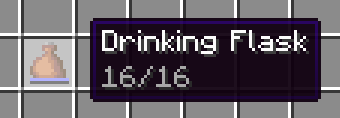
Drinking flask in inventory with tooltip "16/16"

Useful for carrying many potions or stews, or playing Russian roulette!

The Phantom Drinking Flask is more expensive, but you can view its contents. Drinking from it still applies a random drink though.
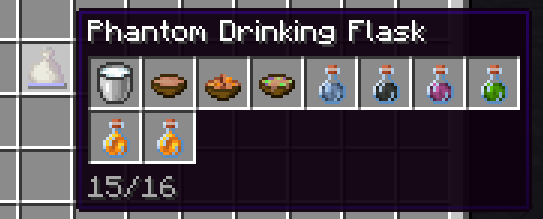
Phantom drinking flask in inventory displaying various drink items in tooltip

Usage

To add a drink to the flask, you can either:

  • Hold the flask in your main hand and a drink in your offhand, then use (default: right click)
  • Left click a drink on the flask in the inventory
  • Left click the flask on a drink in the inventory

The behavior is similar to a bundle.

For balancing, potions take up 2 of the 16 slots each (configurable through datapack).

More information

Drinks include:

  • Potions
  • Water Bottle
  • Milk
  • Honey Bottle
  • Soups & Stews

When you pour the drink into a bundle, you get the container back immediately even though it displays in the phantom tooltip.

Recipes

Drinking Flask
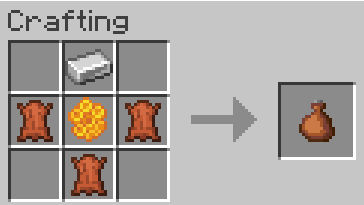
Three leather, one honeycomb, one iron ingot

You can use leather or rabbit hide interchangeably.

Phantom Drinking Flask
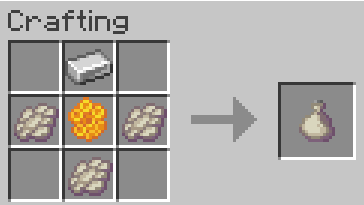
Three phantom membrane, one honeycomb, one iron ingot

Compatability

1.20.1 (outdated)

Compatability has been reworked in 2.0.0. Support for other mods must be done explicitly in either this mod or the other mod, through tags and optionally an API. If you're a developer or datapacker, see the wiki page for more information.

1.21.1

Compatability needs to be added manually by adding the mod item to one of the following tags, or defining a new remainder tag and recipe. See the mod data for examples.

  • #drinkingflask:can_pour_into_flask (no remainder set)
  • #drinkingflask:remainder/bottle (glass bottle)
  • #drinkingflask:remainder/bowl (bowl)
  • #drinkingflask:remainder/bucket (bucket)

Current supported mods

  • Create
  • Farmer's Delight
  • My Nether's Delight
  • Brewin' and Chewin'
  • Enderscape

If there's a mod you'd like support for, feel free to open a github isue or PR

1.21.6+

Most mods should work out-of-the-box, as long as the drink has a minecraft:consumable component with the drink animation. Items can also be flask-enabled by adding them to the #drinkingflask:can_pour_into_flask tag. Remainders are determined by looking at the minecraft:use_remainder component or the recipe remainder if absent.

👥 Team & Contributors

ThePotatoArchivist
ThePotatoArchivistOwner

⚙️ Compatibility

Environment
✅ Client & Server
Loaders
fabricquilt
Minecraft Versions
1.211.21.1

🔗 Links

Modrinth Page