
MINECRAFTBIBLE
Loading...

Manager for the access to dimensions.
For older versions of the mod, check the wiki.
This Mod adds, that access to dimensions can be granted or locked.
If a dimension is locked, you can stand in the portal to this dimension, but don't change to this dimension.
If a dimension is granted, you can stand in the portal to this dimension and change to this dimension.
Since Minecraft 1.19.1 the Mod is needed on the server and client side.
For 1.19 and before, the Mod is only needed on the server side, but can also be used on the client side.
You need a server to play with friends? You don't know how to set up one? Just rent an already configured server!

Click on the picture above, select a plan (with recommended at least 6 GB),
use my code agent to get 25% off your first month and enjoy playing with your friends!
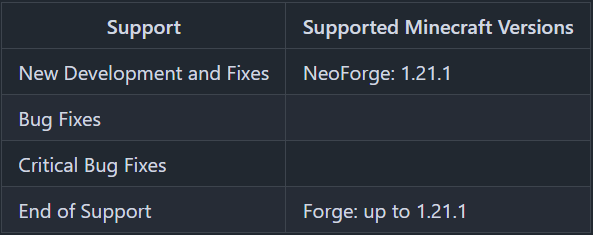
Minecraft versions, for which the mod is not released, are not supported.
You can find a text version here.
There is a general flag, a whitelist and a blacklist, to manage which players have access to a dimension.
For every dimension can be set, if the dimension access is granted or locked.
If a player is not on the white- or blacklist for the dimension, this flag is used to define, if the player can teleport to the dimension or not.
For non player entities, this flag is used to define, if they can teleport to the dimension or not.
The whitelist is only active, if the dimension access is locked.
Players on the whitelist, can teleport to the dimension, even if the dimension access is locked.
If the dimension access is locked and the whitelist is active, only players and no other entities can teleport to the dimension.
The blacklist is only active, if the dimension access is granted.
Players on the blacklist, cannot teleport to the dimension, even if the dimension access is granted.
The config file can be found in the "serverconfig" folder in the "world" folder and is named "dimension_access_manager-server.toml". The name of the world folder is set for servers in the "server.properties" file and for clients it is the name of the world/save game in the world list, and it can be found in the "saves" folder in the ".minecraft" folder.
Thanks for the logo to Muse31.
You can use this mod in non-commercial modpacks without asking.
You can find more mods from me on CurseForge and Modrinth.
