Logo
MINECRAFTBIBLE
Items
Items

All game items

Blocks
Blocks

Building blocks

Mobs
Mobs

Creatures & monsters

Biomes
Biomes

World biomes

Structures
Structures

Generated structures

Recipes
Recipes

Crafting guides

Advancements
Advancements

Achievements

Loot Tables
Loot Tables

Drop rates

Tags
Tags

Item groupings

All Versions
View all data →
Capes
Cape ArchiveNEW

Browse rare Minecon capes, OptiFine capes, and custom capes from players worldwide

Browse

Player Database
Player DatabasePopular

Search any player

Skin Browser
Skin Browser

Browse & download skins

Cape Gallery
Cape GalleryNEW

Minecon & OptiFine capes

Seed Vault
Seed Vault

Curated seeds

Learn

Guides
GuidesNew

Tutorials & tips

Blog
Blog

News & updates

Community

Community Hub
Community HubHub

Posts, discussions & more

All Versions
View community →
Seed Analyzer
Seed Analyzer

World seed analysis

Loot Explorer
Loot Explorer

Drop rates

Crafting Calculator
Crafting Calculator

Material planning

Enchant Calculator
Enchant Calculator

Probability math

Redstone Lab
Redstone Lab

Signal timing

Trading Profit
Trading Profit

Villager ROI

All Versions
View all tools →
Mods
Mods

Browse all mods

Plugins
Plugins

Server plugins

Resource Packs
Resource Packs

Textures & sounds

Shaders
Shaders

Visual enhancements

Datapacks
Datapacks

World logic

Scanner
Mod Intelligence

Scan & analyze any mod

All Versions
View all mods →
Loading...
IntroductionIntroductionVersion HistoryVersion HistoryGuidesGuidesBlog & NewsBlog & News
ItemsItemsBlocksBlocksMobsMobsRecipesRecipesBiomesBiomesStructuresStructuresAdvancementsAdvancementsLoot TablesLoot TablesTagsTags
ModsModsPluginsPluginsResource PacksResource PacksShadersShadersDatapacksDatapacks

MinecraftBible

The Ultimate Wiki

Logo
MINECRAFTBIBLE

The ultimate Minecraft reference. Every item, block, mob, and recipe documented with precision.

Community

  • Skin Browser
  • Cape Gallery
  • Seed Vault
  • Blog
  • Guides

Database

  • Items
  • Blocks
  • Mobs
  • Recipes
  • Biomes
  • Structures

Tools

  • Seed Analyzer
  • Mod Intelligence
  • Crafting Calculator
  • Enchant Calculator

Mods & Packs

  • Mods
  • Plugins
  • Resource Packs
  • Shaders
  • Datapacks

Site & Legal

  • About
  • Authors
  • Editorial Policy
  • Corrections
  • Contact
  • Privacy Policy
  • Terms of Service
  • DMCA
  • Sitemap

© 2026 MinecraftBible. Not affiliated with Mojang or Microsoft.

PrivacyTermsContact
Delete Worlds To Trash
ModMPL-2.0

Delete Worlds To Trash

Deleted worlds are gone forever, right? Not anymore! Simply restore them from your recycle bin.

1.0M
Downloads
202
Followers
5 months ago
Updated
📦
23
Versions
utilityfabricforgeneoforge
Download Latestv21.11.0View on Modrinth

📖About Delete Worlds To Trash


📖 About:

Delete Worlds To Trash makes it so that when deleting a Minecraft world it is moved to the recycle bin/trash instead of being nuked out of existence. Gives you a chance to reconsider, and after all you never know when it might come in handy later on!

📷 Media:
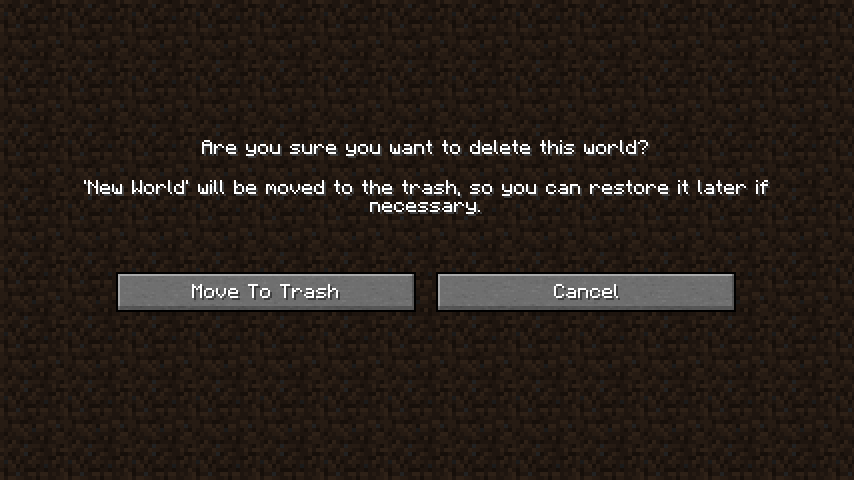
    
New screen for deleting worlds     
 

💡 FAQ:

Q: Does this support all operating systems?
A: Moving an item to the recycle bin/trash varies a lot between operating systems, so this is indeed not guaranteed to work on all systems. This mod has been tested to work on Windows and Mac. Other Gnome based Unix systems should work, too (1.18+ only). If your Linux system is not supported, running apt-get install libgnome2-0 in terminal for installing the necessary components might just do the trick. If your system is not supported, worlds will be deleted using the vanilla method, meaning they're gone forever.

Q: How can I tell whether my operating system is supported?
A: The delete world screen will tell you! If it gives you the option to move a world to the recycle bin/trash everything is supported. If you only see the vanilla delete world screen you're out of luck unfortunately.

🏆 Credits:

Developing Delete Worlds To Trash was helped and inspired by:

  • K3nchikka00 for suggesting this feature on Reddit


    Reddit 


👥 Team & Contributors

LunaPixelStudios
LunaPixelStudios
Studio
Fuzs
FuzsOwner

⚙️ Compatibility

Environment
💻 Client-side
Loaders
fabricforgeneoforge
Minecraft Versions
1.21.11

🔗 Links

Modrinth Page