Customizable Elevators
Build an elevator from your own blocks! There is support for doors and rope.
📖About Customizable Elevators
Search for important errors and bugs for survival, help with translations is required (currently only Russian, English, Polish and Russian Pre-Reform).
⚙️ Installation
For the datapack to WORK, you need to install the MIDWUT(click) core datapack!
📖 About
With this data pack, you can turn ordinary blocks into a working elevator! All elevator elements consist of your blocks.
Features:
- Clone movement of blocks and teleportation of entities in/above/below the elevator;
- Handling all possible errors during the creation and operation of the elevator;
- The elevator speed is adjustable;
- Support for your texts on buttons(signs);
🧊 Blocks & Crafts
New block — Elevator Station
The player will receive a recipe in the recipe book if they receive a copper ingot or redstone.
- There is a screenshot of the recipe in the gallery.
- Recipe visualization on the misode generator website: Click
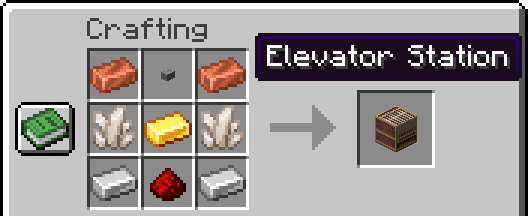
It's a container block with elevator configuration tools inside.
There is an elevator speed setting and a display of the current speed. On the technical side, speed is a delay in ticks between movements (1 sec = 20 ticks), so it is impossible to set the exact speed in some ranges. The formula for converting the delay in ticks to blocks per second: 20/(delay)
Old Lodestone recipe has been returned
Now a netherite ingot is used in crafting, as in version 1.21.4 and earlier.
This is due to the fact that the Lodestone is used as a winch, and I decided to return the more expensive craft.
🧰 Tools
General Usage Information
Selectors set points that select areas. The points are placed by right-clicking. The color of the second point is darker.
The button and stop setter select one block by right-clicking. Button and Door setters requires the copied floor ID by holding down Sprint key and right-clicking on the block with the stop set.
Any point can be removed by holding down Sneak key and right-clicking on the block.
Elevator Selector
Places global two green points, selects elevator cabin. There is a height limit for points: not reaching the bedrock and not close to the world ceiling.
Rope Selector
Places two purple points, selects elevator rope(s). Each of the ropes must consist of one block along its entire length. The first point is fixed to the roof of the elevator, the second to the winch(Lodestone). I note that block entity are not supported.
Floor Selection Button
Places one yellow point, only inside the elevator cabin. Modifies the sign so that the front side becomes clickable.
Stop Setter
Places blue points, one for each Y coordinate. For other tools, the floor ID will need to be copied from these blocks.
Call Buttons
Places golden points, needs to copy the floor ID. Modifies the sign so that the front side becomes clickable.
Doors Selector
It has two types of door placement - for elevator and floor.
For the elevator door, two red points are placed inside the cabin, selects the door.
For the floor door, you need to copy the floor ID, then two gray dots are placed, selects the door.
I note that block entity are not supported.
🏗️ Elevator Elements
Elevator Cabin
The cabin moves by moving blocks.
- When moving up, entities inside the cabin and on the roof are teleported up;
- When moving down, entities inside the cabin and below the cabin are teleported down.
If a block is detected in the direction of movement, the elevator will stop and tell the players in the elevator about it.
Rope
When the elevator is moving, the correctness of the cable blocks on the roof of the elevator with the blocks saved is checked. The elevator will stop and tell you an error if an incompleteness or an incorrect cable block is detected.
Doors
Any doors are checked for the absence of an block entity before opening, and then they will open. When closing, the absence of any block or mob in place of the doors is checked.
The doors will open in the following situations:
- The elevator arrived on the floor;
- The player pressed the elevator call button if the elevator is already on the floor with the doors closed;
- The player inside the elevator pressed the door open button.
The doors will try to close after 15 seconds, but if the doors cannot close, the closing will be repeated after 3 seconds.
Buttons
The elevator call buttons send a signal to the non-moving elevator with the floor ID and the elevator ID. The value is encoded using the formula: {(eID * 1000) + (height + 400)}0
If you specify a number in the first line of the sign, it will be considered the floor number, then you can write any text in the other three lines. Otherwise, the contents of the sign will be replaced with the text with the height of the floor.
The floor selection button stores only the elevator ID. When player clicks on it, the player is shown a list of floors and a door opening button. The doors can only be opened when the elevator is not moving. The value of the floor buttons is calculated using the same formula as for call buttons, but at the end the number is 1: {(eID * 1000) + (height + 400)}1. The elevator will not receive a signal if the player presses the floor button outside the elevator cabin.
🧩 Add-ons & Technical info
Entities
By default, the elevator can only move all vanilla living entities, but this is configurable.
- Add the
ignore.customizable_elevatorstag to the living entity and the elevator will ignore it. - For living entities from mods, you need to add the entity ID to the
#customizable_elevators:livingentity_type tag. - For non-living entities, you need to add the entity ID to the
#customizable_elevators:not_livingentity_type tag and also add thenotice.customizable_elevatorsmob tag.
Height limit for points
If you need elevator support in your dimension, you need to add the #customizable_elevators:dimension_for_y_check function tag with your function to handle your dimension in your datapack.
Example:
# function from dimension_for_y_check tag
execute if dimension <dimension_id> run return run function <custom_path>/dimension_for_elevator/<dimension>


# <dimension> function
## The #y main_score score stores the Y coordinate of point
## Do not change these functions, they contain a ready-made error message. If you need to, then create your own functions, don't forget about the `return fail` command

execute if score #y main_score matches ..-60 run return run function customizable_elevators:zzz/block/elevator_station/selector/raycast/dimension/below
execute if score #y main_score matches 317.. run return run function customizable_elevators:zzz/block/elevator_station/selector/raycast/dimension/above
return 1
If you need to change the limits for vanilla dimensions, then you also need to add the #customizable_elevators:redefining_validation_for_vanilla_dimension function tag with your function, use the command in it:data modify storage midwut:main dimension append value {id:"<dimension_id>"}
🔗 Links
You can leave a comment on the PMC page!

Russian discord server of datapackers / Русский дискорд сервер датапакеров
Если вы датапакер, ищите адекватной помощи, полезных ресурсов и возможности поделиться проектами, то вам на СвинСоюз: Датапаки!
Это сервер-ответвление от изначального заброшенного сервера ZeroCaty "СвинСоюз". Сейчас мы не имеем к нему никакого отношения.