Logo
MINECRAFTBIBLE
Items
Items

All game items

Blocks
Blocks

Building blocks

Mobs
Mobs

Creatures & monsters

Biomes
Biomes

World biomes

Structures
Structures

Generated structures

Recipes
Recipes

Crafting guides

Advancements
Advancements

Achievements

Loot Tables
Loot Tables

Drop rates

Tags
Tags

Item groupings

All Versions
View all data →
Capes
Cape ArchiveNEW

Browse rare Minecon capes, OptiFine capes, and custom capes from players worldwide

Browse

Player Database
Player DatabasePopular

Search any player

Skin Browser
Skin Browser

Browse & download skins

Cape Gallery
Cape GalleryNEW

Minecon & OptiFine capes

Seed Vault
Seed Vault

Curated seeds

Learn

Guides
GuidesNew

Tutorials & tips

Blog
Blog

News & updates

Community

Community Hub
Community HubHub

Posts, discussions & more

All Versions
View community →
Seed Analyzer
Seed Analyzer

World seed analysis

Loot Explorer
Loot Explorer

Drop rates

Crafting Calculator
Crafting Calculator

Material planning

Enchant Calculator
Enchant Calculator

Probability math

Redstone Lab
Redstone Lab

Signal timing

Trading Profit
Trading Profit

Villager ROI

All Versions
View all tools →
Mods
Mods

Browse all mods

Plugins
Plugins

Server plugins

Resource Packs
Resource Packs

Textures & sounds

Shaders
Shaders

Visual enhancements

Datapacks
Datapacks

World logic

Scanner
Mod Intelligence

Scan & analyze any mod

All Versions
View all mods →
Loading...
IntroductionIntroductionVersion HistoryVersion HistoryGuidesGuidesBlog & NewsBlog & News
ItemsItemsBlocksBlocksMobsMobsRecipesRecipesBiomesBiomesStructuresStructuresAdvancementsAdvancementsLoot TablesLoot TablesTagsTags
ModsModsPluginsPluginsResource PacksResource PacksShadersShadersDatapacksDatapacks

MinecraftBible

The Ultimate Wiki

Logo
MINECRAFTBIBLE

The ultimate Minecraft reference. Every item, block, mob, and recipe documented with precision.

Community

  • Skin Browser
  • Cape Gallery
  • Seed Vault
  • Blog
  • Guides

Database

  • Items
  • Blocks
  • Mobs
  • Recipes
  • Biomes
  • Structures

Tools

  • Seed Analyzer
  • Mod Intelligence
  • Crafting Calculator
  • Enchant Calculator

Mods & Packs

  • Mods
  • Plugins
  • Resource Packs
  • Shaders
  • Datapacks

Site & Legal

  • About
  • Authors
  • Editorial Policy
  • Corrections
  • Contact
  • Privacy Policy
  • Terms of Service
  • DMCA
  • Sitemap

© 2026 MinecraftBible. Not affiliated with Mojang or Microsoft.

PrivacyTermsContact
Custom Elytra DataPack
ModCC-BY-NC-ND-4.0

Custom Elytra DataPack

Show off any Elytra skin you want without having the cape. Just rename it in an anvil. Optifine NOT needed!

5.0K
Downloads
12
Followers
7 months ago
Updated
📦
8
Versions
decorationequipmentgame-mechanicsdatapackfabricforgeneoforgequilt
Download Latestv1.1+modView on Modrinth

📖About Custom Elytra DataPack

Show off any Elytra skin you want without having the cape. Just rename it in an anvil.

Optfine is NOT needed!

This Pack allows you to use any Elytra texture you want by renaming the item in an anvil.

Download:

Both DataPack (this) AND ResourcePack are necesary to use this Pack.
Download the DataPack into your world's datapacks folder and the ResourcePack into your resourcepacks folder.

Use:

Take any Elytra and rename it with any of the available options below.
It's very important you spell it identically.

Options available:
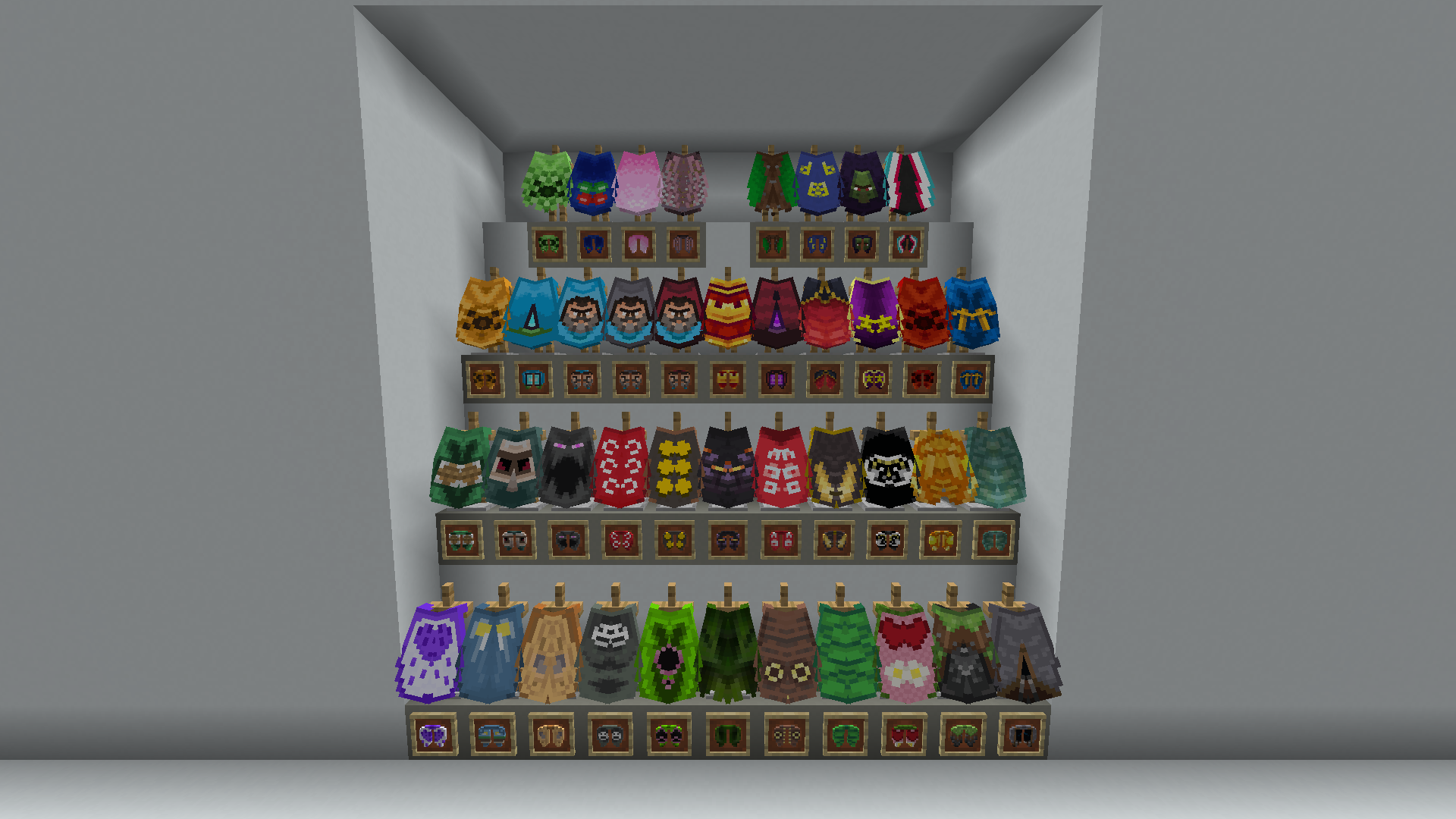
Elytra options ordered as the list below.

  • Anniversary 15
  • Birthday
  • Cherry Blossom
  • Cobalt
  • Common
  • dB
  • Experience
  • Followers
  • Founders
  • Home
  • Jack Black Blue
  • Jack Black Gray
  • Jack Black Red
  • MCC 15
  • Menace
  • Migration
  • Millonth Customer
  • Minecon 2011
  • Minecon 2012
  • Minecon 2013
  • Minecon 2015
  • Minecon 2016
  • Mojang
  • Mojang Classic
  • Mojang Office
  • Mojang Studios
  • Mojira
  • Oxeye
  • Pan
  • Prismarine
  • Purple Heart
  • Realms
  • Scrolls
  • Snowman
  • Spade
  • Test
  • Translator
  • Turtle
  • Valentine
  • Vanilla
  • Yearn

Back to normal:

You can turn back to normal a renamed Elytra by deleting its name in an anvil.

Default Elytra texture:

You can use the normal grayish Elytra texture by renaming it Default.
This will display its original texture even if you have a cape equipped.
Default Elytra skin with cape equipped.

👥 Team & Contributors

XAVI333
XAVI333Owner

⚙️ Compatibility

Environment
🖥️ Server-side
Loaders
datapackfabricforgeneoforgequilt
Minecraft Versions
1.21.91.21.101.21.11

🔗 Links

Modrinth Page