


Aspects
Aspects is an Origins inspired modification that adds unique Aspects with upsides, downsides and abilities
📖About Aspects

Aspects — Strike the deal, reveal your potential
Harvest the creatures of this world to become something more.
Unlock powerful abilities by absorbing the essence of creatures and choosing your Aspect. Whether you want to soar like an Elytrian or become one with the darkness like a Rascal, this mod lets you rewrite your nature.
Features
Aspects
Each Aspect grants:
- Aspect Effects (passive traits)
- Focus Powers (active abilities you can trigger with unique Focus items)
| Aspect | Effect(s) | Focus Ability(s) |
|---|---|---|
| Human | Aspect has nothing new or interesting | What you expected something here too? |
| Merling | - Can breathe underwater, but cannot on land. - Much faster in water, but slower on land - Does more damage with Tridents |
- Highlight nearby wet mobs and players |
| Enderian | - Water is harmful - Has more health and reach, but is 3 blocks tall - Enderpearls do no self-harm |
- Teleport some distance forwards |
| Shulk | - Has less health, reach, damage, but is 1 block tall - Self-repairing shell to absorb small damage instances |
- Store and Retrieve a Chest or Barrel - Camouflage as a fake block |
| Feline | - Slightly smaller with less health, but faster - In combat speeds up even more - Water slows them down |
- High jump into the air |
| Infernal | - Water is harmful - Immune to fire damage - Does more damage when on fire - Cooks food passively |
- Set self on fire |
| Elytrian | - Starts with a unique Elytra - Elytra flight gives more damage - Can control descending speed - Takes double fall damage |
- Launch into the air |
| Honey Bee | - Starts with a unique Elytra - Smaller with less health, but has natural armor - Elytra cannot be damaged, but flies slower with grace |
- Store potion effects from flowers - Create unique Honey Bottles with stored potion effects |
| Rascal | - Much smaller, around 1.2 Blocks, but has less health - Less attack reach, more block reach - Stronger and faster in the dark, but reverse in the light |
- Teleport down to below underground cave |
| Rotten | - Cannot drown, but is vulnerable to Smite - Weaker in sunlight and when unprovoked - Much slower in water, but has natural armor |
- Summon multiple Zombified Piglin for protection |
| Arachnid | - Vulnerable to Bane of Arthropods and has less health - Jumps higher and can land safely from higher distances - Can climb almost any surface as if it was a ladder - Can also climb across ceilings - Gains resistance while inside cobwebs |
- Create/remove a set of cobwebs on themselves - Launch self from scaled walls in a viewing direction |
... and potentially more in future updates!
Essence System
Harness the Essences of mobs to forge a new Aspect:
- Each mob has up to 3 Essences (like
Aquatic,Fire,Undead, etc.) - Use the Evergrowing Blade to collect them by killing or using the weapon on passive mobs
- Store them in a held Essence Cage in the Off Hand
- Automatically combines specific Essences to awaken an Aspect
Essence Combinations can also just be a singular Essences, like Human below.
Essences add up to 120 total regardless of amount of Essence Types.
So 1 Essence type means it takes 120 to create an aspect, 2 types means its a 60/60 split, 3 means 40/40/40 split, etc...
Humanoid→ HumanAquatic→ MerlingVoid+Humanoid→ EnderianBug+Plant→ Honey Bee- ...
(Full combination list available in-game)
Items & Tools
All recipes are unlocked from the start so check your recipe guide!
List of Custom Items- Evergrowing Blade – Gather Essences by killing mobs or from passive mobs without killing. It also increases in power via kills
- Essence Cage – Store Essences awaken into an Awakened Essence Cage once a valid Essence Combination is stored
- Awakened Essence Cage – Use to become the stored Aspect from the Essence Combination
- Focuses – Enables Aspect-specific active abilities
- Relics – Aspect specific Faded and Shattered trophy items earnable via gameplay
In-Game Documentation
Access from the Pause Menu → Aspects Menu
Includes:
- List of Aspects and their information
- Essence usage guide
- List of all Essence Types
- List of all Custom Items
- List of all Custom Enchantments
- Modification Configuration
Endorsed Addons
- Filcher's Limbo - Aspects addon adding a new Aspect capable of going into a new dimension to "safely" store anything you desire.
- Reclaimed - Aspects addon adding 7 new Aspects that didn't make the cut to the original modification.
Extra Credit
- Maskedwatercress | Instagram
They've provided us with updated and extended wing designs for the Elytrian which look incredible and we are very thankful for their contribution. Please check out their other works!
FAQ
Why is there a missing Resource Pack?
Likely due to the downloaded Datapack version. You need to download the bundled Resource Pack from the same download location where you got the Datapack.
The download for it can be found always on the version page directly, not on the main page of this modification.
Below is an example what the Datapack (top) and Resource Pack (bottom) downloads look like on Modrinth: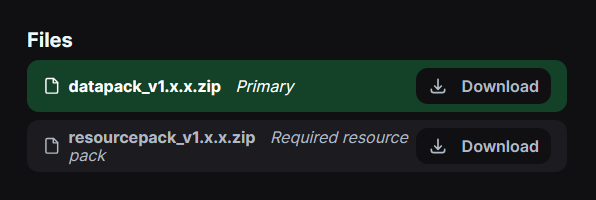
My Mods button is overlapping the Aspects button in the Pause Menu!
This issue can be the fault of the Mod Menu (Fabric) mod itself. Make sure that in the Mod Menu settings the Game Menu option is NOT set to insert, if it is, set it to anything else.
How to change my Aspect after the first one?
First craft an Essence Cage and an Evergrowing Blade, then use the crafted items to capture essences from mobs (how to use them is described on the item itself or the in-game wiki). After you store enough essences for an Aspect, it will become an Awakened Essence Cage and is ready to be used to change your Aspect!
Are there any alternatives for changing my Aspect?
There is, but it requires commands and OP permissions. There is a debug command /function aspects:debug/repick_aspect that allows the person executing that command to repick their Aspect again. If you want another player to repick instead without giving them OP permissions, you can start the command with this instead:/execute as <player_name> at @s run function aspects:debug/repick_aspect.
Can I add an Aspect myself?
While this datapack allows addons to be made to add more, it isn't beginner friendly and requires decent knowledge of Minecraft's Datapack system and commands.
A guide is currently not being made, but you can reference the Endorsed Addons above for how it can be done.