Logo
MINECRAFTBIBLE
Items
Items

All game items

Blocks
Blocks

Building blocks

Mobs
Mobs

Creatures & monsters

Biomes
Biomes

World biomes

Structures
Structures

Generated structures

Recipes
Recipes

Crafting guides

Advancements
Advancements

Achievements

Loot Tables
Loot Tables

Drop rates

Tags
Tags

Item groupings

All Versions
View all data →
Capes
Cape ArchiveNEW

Browse rare Minecon capes, OptiFine capes, and custom capes from players worldwide

Browse

Player Database
Player DatabasePopular

Search any player

Skin Browser
Skin Browser

Browse & download skins

Cape Gallery
Cape GalleryNEW

Minecon & OptiFine capes

Seed Vault
Seed Vault

Curated seeds

Learn

Guides
GuidesNew

Tutorials & tips

Blog
Blog

News & updates

Community

Community Hub
Community HubHub

Posts, discussions & more

All Versions
View community →
Seed Analyzer
Seed Analyzer

World seed analysis

Loot Explorer
Loot Explorer

Drop rates

Crafting Calculator
Crafting Calculator

Material planning

Enchant Calculator
Enchant Calculator

Probability math

Redstone Lab
Redstone Lab

Signal timing

Trading Profit
Trading Profit

Villager ROI

All Versions
View all tools →
Mods
Mods

Browse all mods

Plugins
Plugins

Server plugins

Resource Packs
Resource Packs

Textures & sounds

Shaders
Shaders

Visual enhancements

Datapacks
Datapacks

World logic

Scanner
Mod Intelligence

Scan & analyze any mod

All Versions
View all mods →
Loading...
IntroductionIntroductionVersion HistoryVersion HistoryGuidesGuidesBlog & NewsBlog & News
ItemsItemsBlocksBlocksMobsMobsRecipesRecipesBiomesBiomesStructuresStructuresAdvancementsAdvancementsLoot TablesLoot TablesTagsTags
ModsModsPluginsPluginsResource PacksResource PacksShadersShadersDatapacksDatapacks

MinecraftBible

The Ultimate Wiki

Logo
MINECRAFTBIBLE

The ultimate Minecraft reference. Every item, block, mob, and recipe documented with precision.

Community

  • Skin Browser
  • Cape Gallery
  • Seed Vault
  • Blog
  • Guides

Database

  • Items
  • Blocks
  • Mobs
  • Recipes
  • Biomes
  • Structures

Tools

  • Seed Analyzer
  • Mod Intelligence
  • Crafting Calculator
  • Enchant Calculator

Mods & Packs

  • Mods
  • Plugins
  • Resource Packs
  • Shaders
  • Datapacks

Site & Legal

  • About
  • Authors
  • Editorial Policy
  • Corrections
  • Contact
  • Privacy Policy
  • Terms of Service
  • DMCA
  • Sitemap

© 2026 MinecraftBible. Not affiliated with Mojang or Microsoft.

PrivacyTermsContact
Command Debug Service
ModMIT

Command Debug Service

This is a mod that provides a method to execute and debug Minecraft commands by external programs. It is used to be a command debug connect kit between Minecraft and external programs.

2.2K
Downloads
15
Followers
1 years ago
Updated
📦
25
Versions
managementutilityfabricquilt
Download Latestv4.1.1View on Modrinth

📖About Command Debug Service

Command Debug Service

follows
latestVersion
mcVersion
modDownloads

Introduction

This mod is a subproject of Command Debug DevKit. It is designed for optimized Minecraft command coding and debugging by connect to external editor or IDE. This Command Debug DevKit project is replacement of Minecraft Command Studio with more lightweight file size and better scalability, therefore, it is more suitable for develops to carry out secondary development.

Card

Setup

  1. Install Minecraft with Fabric/Quilt Loader and Fabric API/Quilted Fabric API for your Minecraft version.
  2. Download the mod.
  3. Put the mod into your mods folder.

Usage

  1. My most recommanded approach is to use the IntelliJ IDEA Plugin with this mod. So before using this mod, you should install IntelliJ IDEA Community or Ultimate, or install other JetBrains IDE except Rider. Then download the plugin from my GitHub Releases or JetBrains Marketplace.

    Plugin
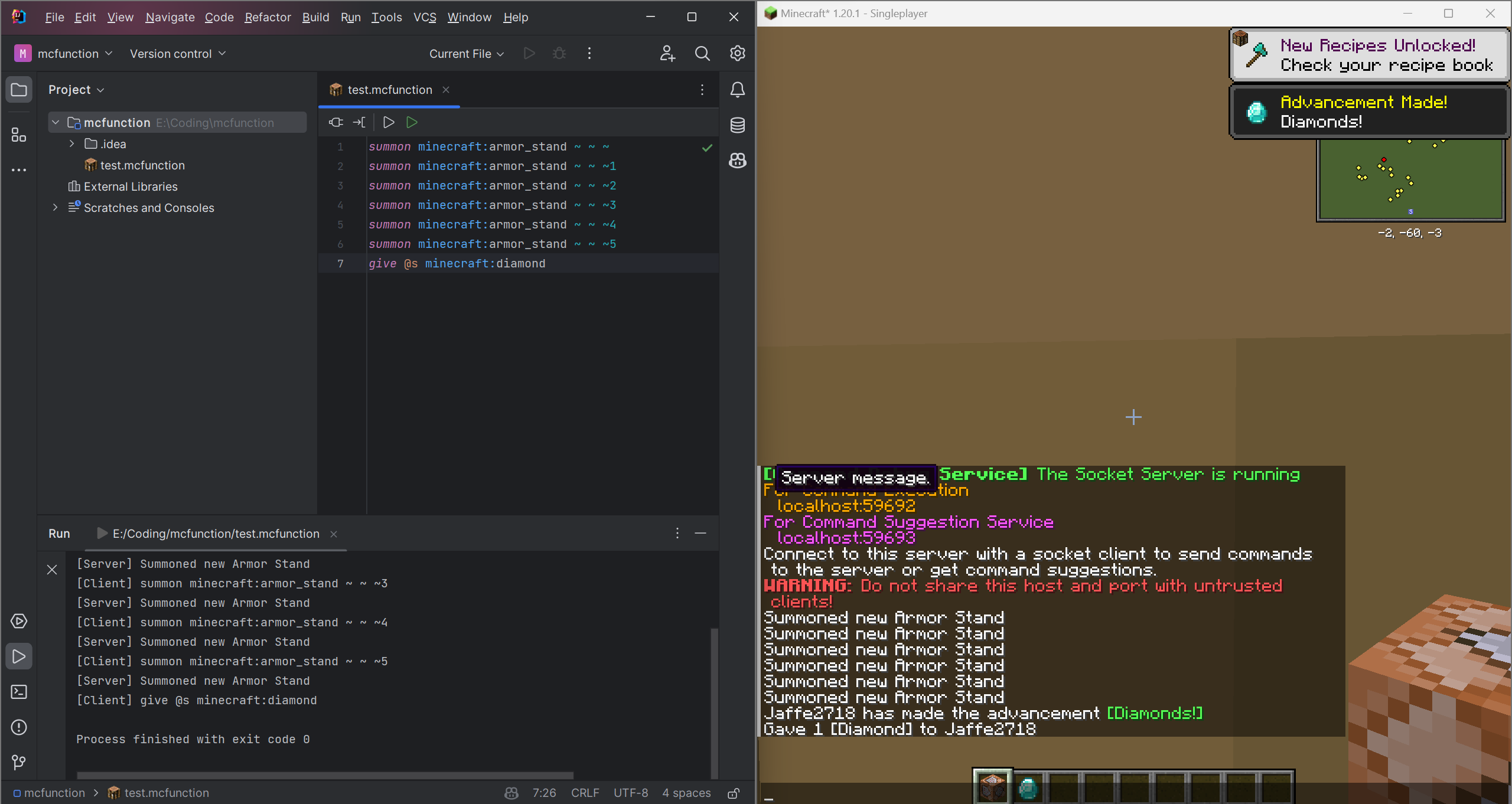
  2. Start your IDE, create or open a project, then create or open a file with suffix .mcfunction.

  3. Start your Minecraft game and join a world. The mod will create two socket server and show the host and port information in the game chat.
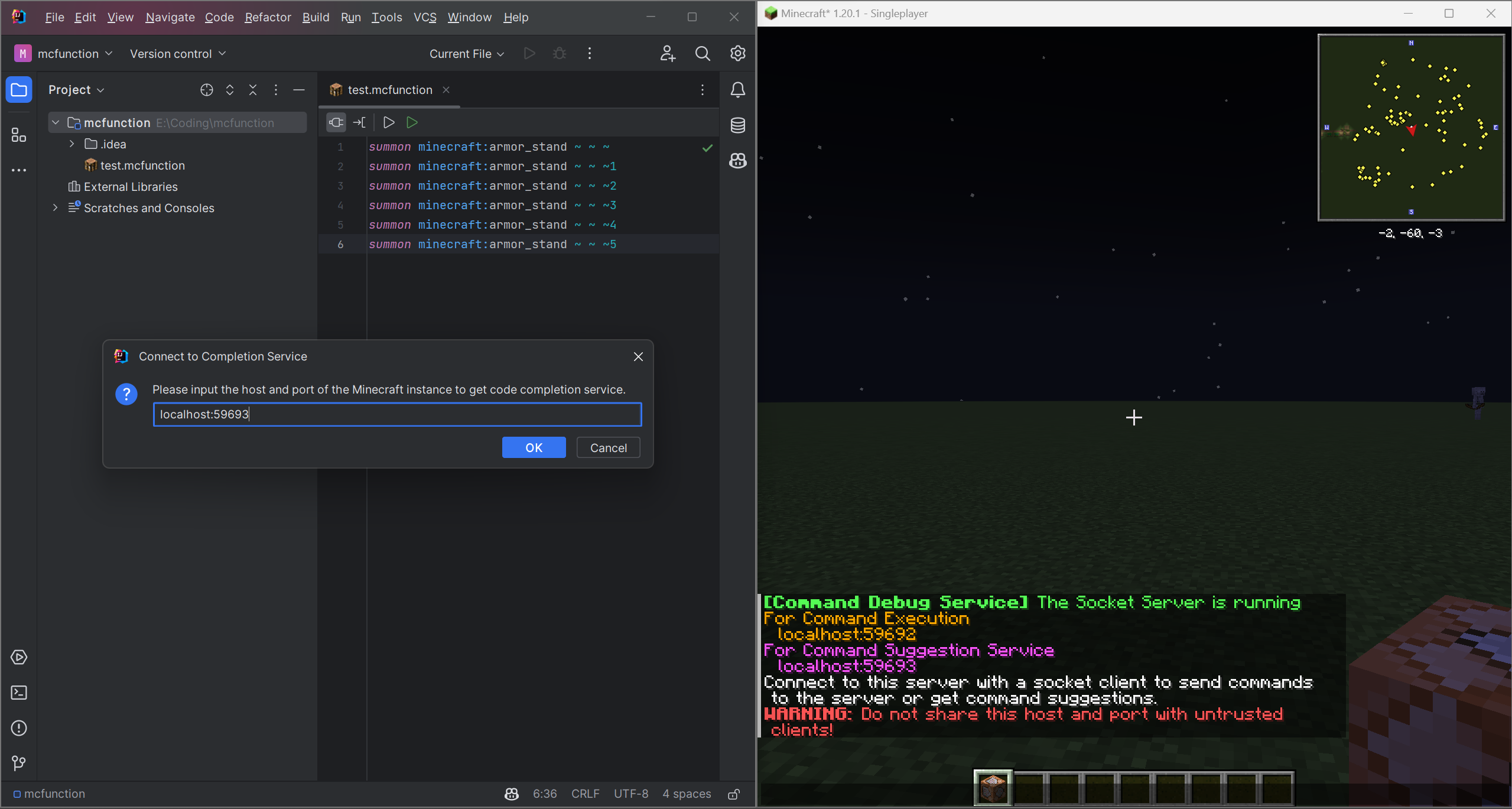
    i1

  4. Connect to these two socket servers by entering the host and port which shown in the game chat. Then you can use the code completion and code execution service.
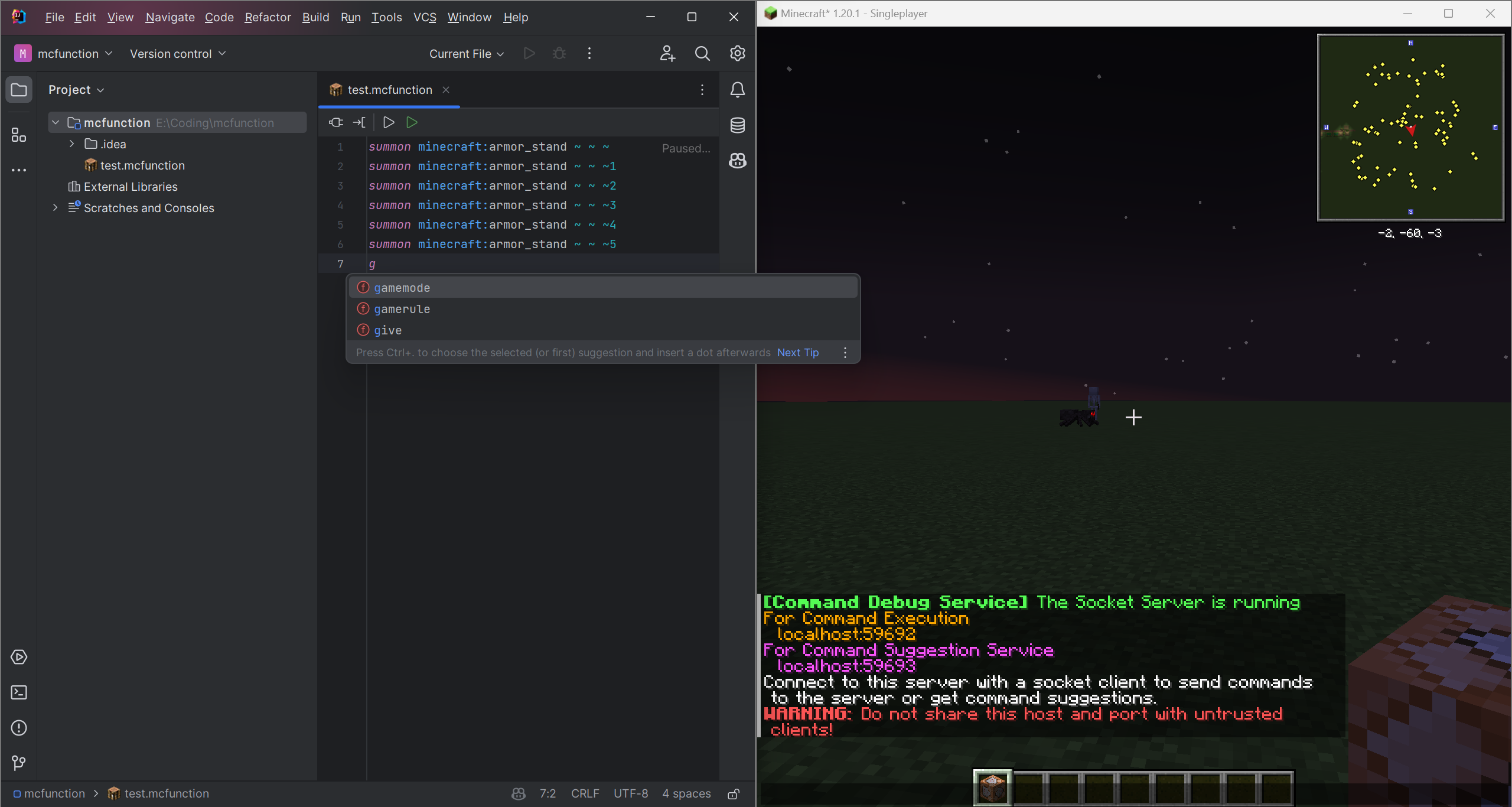
    i2
    i3

Info

This project is licensed under the MIT License.
You can use this project for any purpose for free.
See the LICENSE file for details.
Currently, this project is still in development. If you have any idea or suggestion, please open an issue or pull request.
And the plugin is only for IntelliJ Platform IDEs, if you want to use other IDEs such as Eclipse and VSCode, you can create a plugin for it and pull request to this project.
What's more, the mod is only for Fabric and Quilt currently, you can rewrite it for Forge or other mod loaders and pull request to this project.
I will be very grateful if you can help me to improve this project.

For more infomation, please visit Command Debug DevKit

👥 Team & Contributors

Jaffe2718
Jaffe2718Owner

⚙️ Compatibility

Environment
🖥️ Server-side
Loaders
fabricquilt
Minecraft Versions
1.21.5

🔗 Links

Modrinth Page