CME is Bad
A mod for debugging Concurrent Modification Exceptions and Index Out of Bounds Exceptions.
📖About CME is Bad
Abstract
Players and modpack developers sometimes find the game crashed with ConcurrentModificationExceptions (CME) and IndexOutOfBoundsExceptions (IOOBE), which only give stacktrace of current thread and are hard to trace which mod causes them. Here's one of the crashes which is caused by SimpleReloadInstance in 1.20.1 Forge:
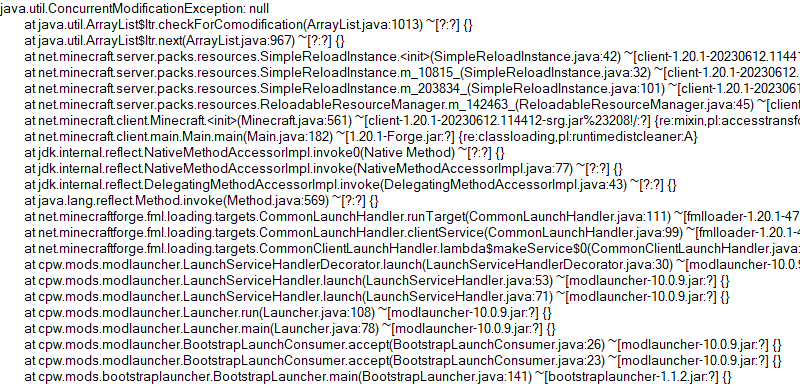
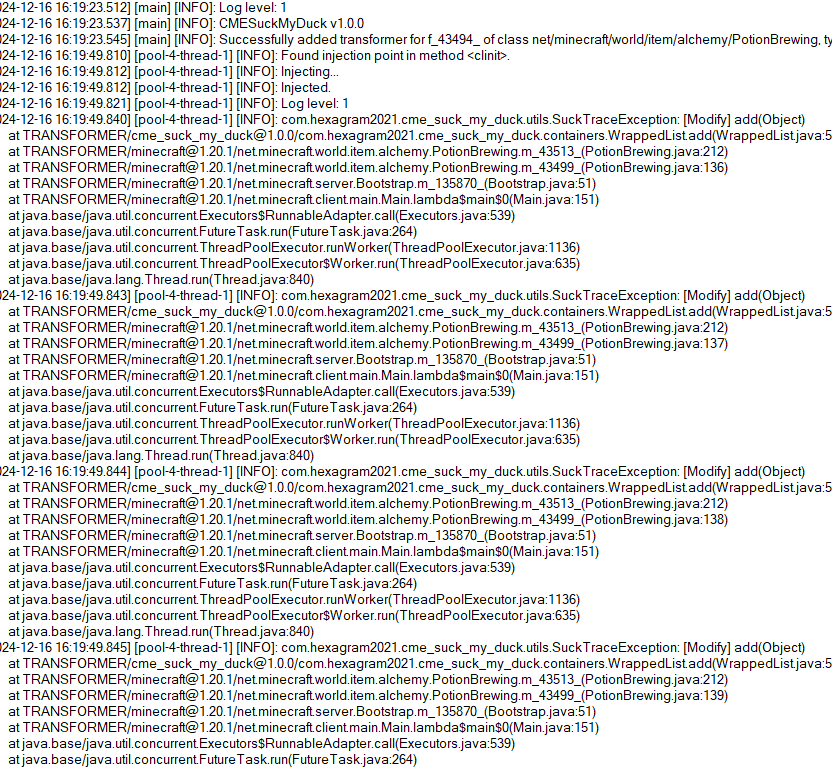
So this is what the mod is developed for. Players who install this mod and add javaagent to JVM Argument correctly will receive a full log for modification history of a certain collection:
Usage
First, add this jar to mods folder.
Second, edit your Java Virtual Machine Argument in your launcher. Add -javaagent:mods/CMESuckMyDuck-<version>.jar=<class full name>;<field name>;<type>;<phase>.
Finally, run the game, play and wait until the crash happens.
Usage for Other Java Projects
This mod can not only be used for Minecraft debugging, but also be utilized to debug other java projects. Similar to Minecraft. The only different step is that you should add gson and asm jar to classpath (-cp) before javaagent, and add our CMESuckMyDuck-<version>.jar to classpath after javaagent.
Arguments
A full name of the class, which has a container that you would like to monitor. Use \ instead of . (a.k.a. the internal name of class).
A field name of the container in target class, which you would like to monitor. For Forge, use SRG name. For Fabric, use intermediary name. For NeoForge, use official name.
Currently, we only support three containers: List, Set, Map. This argument indicates the type of monitored container.
static or nonstatic. This argument indicates the container is a static field or non-static field.
How to get and
Let's start with an example.
First, take a look at the stacktrace of CME/IOOBE:
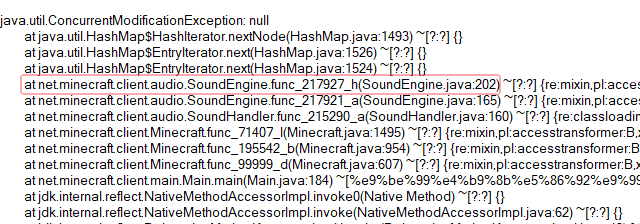
Second, read the source code of SoundEngine and confirm which container is facing this issue:
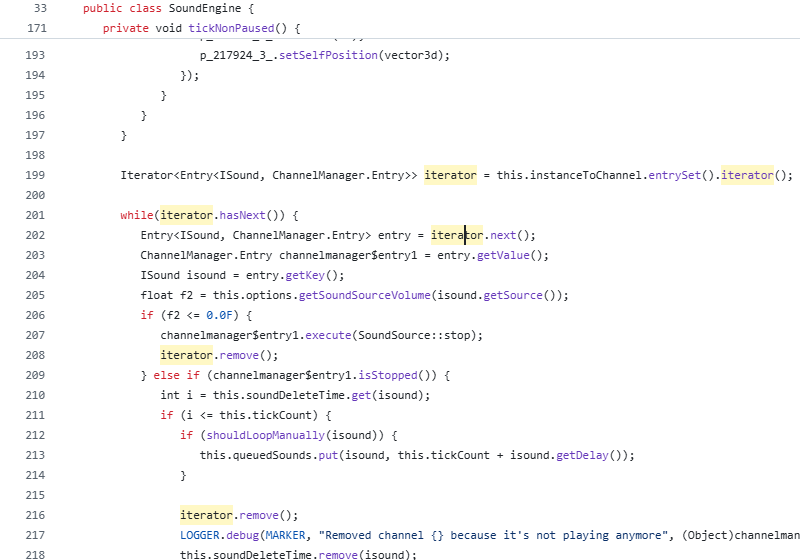
Now we know we should monitor map field_217942_m (instanceToChannel in SoundEngine). Keep going.
Third, install this mod, and add "-javaagent:mods/CMESuckMyDuck-1.0.0.jar=net/minecraft/client/audio/SoundEngine;field_217942_m;Map;nonstatic" to Java Virtual Machine Argument. Relaunch the game and wait for the next crash.
Finally, open CMESuckMyDuck.log file and you will see which thread and which mod has concurrently modified the container.
Examples (JVM Arguments)
ConcurrentModificationException from SoundEngine in Forge 1.16.5 Environment
-javaagent:mods/CMESuckMyDuck-1.0.0.jar=net/minecraft/client/audio/SoundEngine;field_217942_m;Map;nonstatic
ConcurrentModificationException from PotionBrewing in Forge 1.20.1 Environment
-javaagent:mods/CMESuckMyDuck-1.0.0.jar=net/minecraft/world/item/alchemy/PotionBrewing;f_43494_;List;static
ArrayIndexOutOfBoundsException from Zeta mod
-javaagent:CMESuckMyDuck-1.0.0.jar=org/violetmoon/zetaimplforge/event/ForgeZetaEventBus;convertedHandlers;Map;nonstatic
Other options
Log Level
Use system property -Dcme_suck_my_duck.log_level=<level> to set custom log level.
Default 1, which means no debug message will be logged.
Users can set it to 0 to output debug message, which is not recommended - query functions like Map#get, Set#containsAll will also be logged when set to 0, and make the file very very long.
ASM API Version (v1.0.2+)
In order to maintain compatibility with the latest version of Minecraft, this mod is compiled with asm version 9.7. For older versions of Minecraft (such as 1.12.2), API level operations such as ASM_9 cannot be applied, so players need to use -Dcme_suck_my_duck.asm_api_version=<version> to modify the ASM API version compatibility. For example, game version 1.12.2: -Dcme_suck_my_duck.asm_api_version=5.
File Max Entries (v1.0.3+)
Since we notice that when crash happens, the last few operations in the log are much more important than the previous ones. So our mod adopts a paging strategy after v1.0.3, and only the last two pages are retained at the end. The number of logs output on each page (that is, the number of operation call stacks) is fixed, and the default value is 500. Players can use -Dcme_suck_my_duck.file_max_entries=<size> to modify the maximum number of elements on the page.
Whitelist of Constructor (v1.0.3+)
Sometimes a container in a certain class is used in many places (eg. CompoundTag#tags). Directly using this mod will cause the log to be too long or the valid content to be replaced by subsequent operations. Therefore, players can specify an additional constructor whitelist to monitor the corresponding container in the corresponding class of a specific module. The default is empty, that is, there is no whitelist. Players can use -Dcme_suck_my_duck.whitelist_constructor_stacktrace=<str> to specify it. If any line in the stack trace where the container is constructed includes the content of the whitelist string, the container will be monitored - otherwise, the container will not be monitored, which greatly simplifies the log output information.
Transform to Thread Safe (v1.0.4+)
Use system property -Dcme_suck_my_duck.transform_to_thread_safe=true to transform the field into a thread-safe container.
This is NOT recommended unless you like slowness and don't want to fix the problem.
Inject method (v1.0.4+)
Use system property -Dcme_suck_my_duck.inject_method=true to switch to inject mode.
If set, you should use -javaagent:CMESuckMyDuck-<version>.jar=<class full name>;<method name> and whenever this method is called, you will receive a stack trace in log files.
Ignore threads (v1.0.5+)
Use system property -Dcme_suck_my_duck.ignore_threads=<thread name1>;<thread name2>;<thread name3>;... to ignore some thread that is expected to modify the given container (or call the given method). For example, -Dcme_suck_my_duck.ignore_threads="Server thread".
Stop logging early (v1.0.7+)
Use system property -Dcme_suck_my_duck.stop_logging_if_exception_created=false to stop logging if critical error occurs.
Trace ID Updater (v1.0.8+)
Use system property -Dcme_suck_my_duck.trace_id_updater=<class full name>;<method name> to update trace ID when calling the given method. This might be useful in inject mode.
Monitoring Local Variables (v1.1.0+)
Use system property -Dcme_suck_my_duck.local_var_index=<index> to monitor local variable at given index in the given method.
If set, you should use -javaagent:CMESuckMyDuck-<version>.jar=<class full name>;<method name>;<type>. By the way, the index can be reused by different local variables. So you might have to use -Dcme_suck_my_duck.match_local_index=<ordinal> to specify the ordinal of ASTORE operation to indicate which local variable to monitor.
Conclusion
I like eating peking duck. It's so delicious!