MINECRAFTBIBLE
Loading...

There, I fixed Minecraft for you. Various optional tweaks to improve Minecraft Quality of Life.



Good news everyone, I've found the secrets to fixing your Minecraft experience. I've bundled them in this mod.
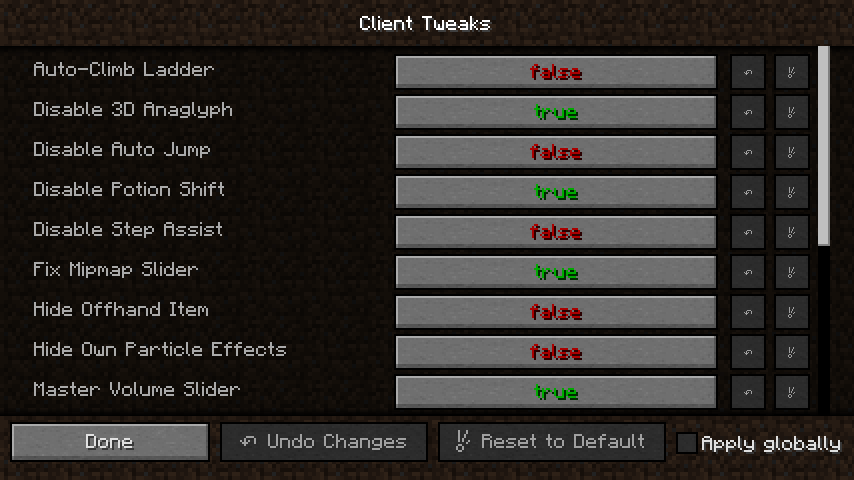
This mod adds a bunch of optional tweaks to improve the Quality of Life during gameplay. Tweaks can be individually enabled or disabled and configured. Many of the tweaks are disabled by default, so make sure to enable the features you want for the most bestest experience possible.
This mod is available for NeoForge, Fabric and Forge. It requires Balm, which must be installed alongside the mod.

This option will refuse to place a torch if you're holding a block in your main hand. Because there's no way you intended to place a torch in that case. Something was just standing in the way of the spot you wanted to place that block in but the torch was fitting since it's smaller. Fixed it for ya.
You know that feeling when you're tired, try to open the chest but misclicked the block next to it? And of course you still had a torch in your offhand. And of course it placed it. And now you have to break it again. Ugh. This option only allows torches to be placed when your main hand is not empty. This can be enabled additionally to the above.
This option prevents you from placing a torch from your offhand when you have food in your hand.
This option completely disables placing torches from your offhand. Useful if you only carry a torch in your offhand for things like dynamic lighting.
This is the option I consider best, but it changes vanilla behaviour too much to be the default. This will only allow placing torches from the offhand when you're holding a tool. No more accidental torch placement, ever again.
This option is useful when using dynamic lights such as OptiFine. The last torch in your offhand will not be placeable, so you always have a light to carry around with you secured.
This option prevents you from shooting fireworks when you're wearing an Elytra and not currently flying.
This option will make your own potion effect particles a lot less obtrusive for your client. Other players will see them normally. No more annoying particles blocking your view.
Will prevent the item in your offhand from rendering, in case you hate seeing the torch you're carrying on the left. This can be toggled by a keybind too, in case you only hate seeing your offhand item sometimes.
Will prevent shields from being rendered in your offhand unless you're holding a weapon. Specifically, it needs to be a sword or an axe with an attack damage value greater than 1.5 hearts. No, that wooden stick you're holding isn't a weapon.
I often make really long ladders down to my mine, and it's a pain having to hold down a key the whole time while climbing back up. With this tweak on, you will continue to climb upwards as long as you look upwards while on a ladder. That means you can type in chat and do other things without instantly falling back down and losing all of your progress on the long journey.
Prevents the inventory from being shifted to the right when potion effects are active. You probably never noticed because NEI did it in 1.7.10 and now Quark does it in 1.10.2 and then there's also a mod called No Potion Shift that does it, but in case you have none of these, you now have this!
This option adds a keybind that lets you toggle the ability to strip logs. Useful when you build using wood and have an axe-like tool in your hand a lot to prevent accidental strippings.
There's people who hate step assist, but sometimes those step-assist granting items add some other cool perks that we want. So this option lets you disable the step-assist part only. With optional keybind to toggle.
Yes, the new volume settings screen is cool. But couldn't you have kept the Master Volume slider on the main settings screen as well? After years of research I have concluded that you can, so I added it back. Saved you a click.
Made up user studies have shown that the average player will much more frequently want to turn off the music than change the master volume, so our team of highly experienced quantum programmers have also brought the music slider back to the main settings screen
This option increases the hitbox of iron fences and glass panes when you're holding a matching block, making it easier to place them against each other.
This option increases the hitbox of chains when you're holding a chain block, making it easier to place them against each other.
This option will increase the hitbox of random-offset blocks in creative mode, making it easier to break them quickly.
This option will prevent the accidental mining of certain fragile blocks like budding amethysts.