Logo
MINECRAFTBIBLE
Items
Items

All game items

Blocks
Blocks

Building blocks

Mobs
Mobs

Creatures & monsters

Biomes
Biomes

World biomes

Structures
Structures

Generated structures

Recipes
Recipes

Crafting guides

Advancements
Advancements

Achievements

Loot Tables
Loot Tables

Drop rates

Tags
Tags

Item groupings

All Versions
View all data →
Capes
Cape ArchiveNEW

Browse rare Minecon capes, OptiFine capes, and custom capes from players worldwide

Browse

Player Database
Player DatabasePopular

Search any player

Skin Browser
Skin Browser

Browse & download skins

Cape Gallery
Cape GalleryNEW

Minecon & OptiFine capes

Seed Vault
Seed Vault

Curated seeds

Learn

Guides
GuidesNew

Tutorials & tips

Blog
Blog

News & updates

Community

Community Hub
Community HubHub

Posts, discussions & more

All Versions
View community →
Seed Analyzer
Seed Analyzer

World seed analysis

Loot Explorer
Loot Explorer

Drop rates

Crafting Calculator
Crafting Calculator

Material planning

Enchant Calculator
Enchant Calculator

Probability math

Redstone Lab
Redstone Lab

Signal timing

Trading Profit
Trading Profit

Villager ROI

All Versions
View all tools →
Mods
Mods

Browse all mods

Plugins
Plugins

Server plugins

Resource Packs
Resource Packs

Textures & sounds

Shaders
Shaders

Visual enhancements

Datapacks
Datapacks

World logic

Scanner
Mod Intelligence

Scan & analyze any mod

All Versions
View all mods →
Loading...
IntroductionIntroductionVersion HistoryVersion HistoryGuidesGuidesBlog & NewsBlog & News
ItemsItemsBlocksBlocksMobsMobsRecipesRecipesBiomesBiomesStructuresStructuresAdvancementsAdvancementsLoot TablesLoot TablesTagsTags
ModsModsPluginsPluginsResource PacksResource PacksShadersShadersDatapacksDatapacks

MinecraftBible

The Ultimate Wiki

Logo
MINECRAFTBIBLE

The ultimate Minecraft reference. Every item, block, mob, and recipe documented with precision.

Community

  • Player Database
  • Skin Browser
  • Cape Gallery
  • Community Hub
  • Seed Vault

Database

  • Items
  • Blocks
  • Mobs
  • Recipes
  • Biomes
  • Structures

Tools

  • Seed Analyzer
  • Mod Intelligence
  • Crafting Calculator
  • Enchant Calculator

Mods & Packs

  • Mods
  • Plugins
  • Resource Packs
  • Shaders
  • Datapacks

© 2026 MinecraftBible. Not affiliated with Mojang or Microsoft.

PrivacyTermsContact
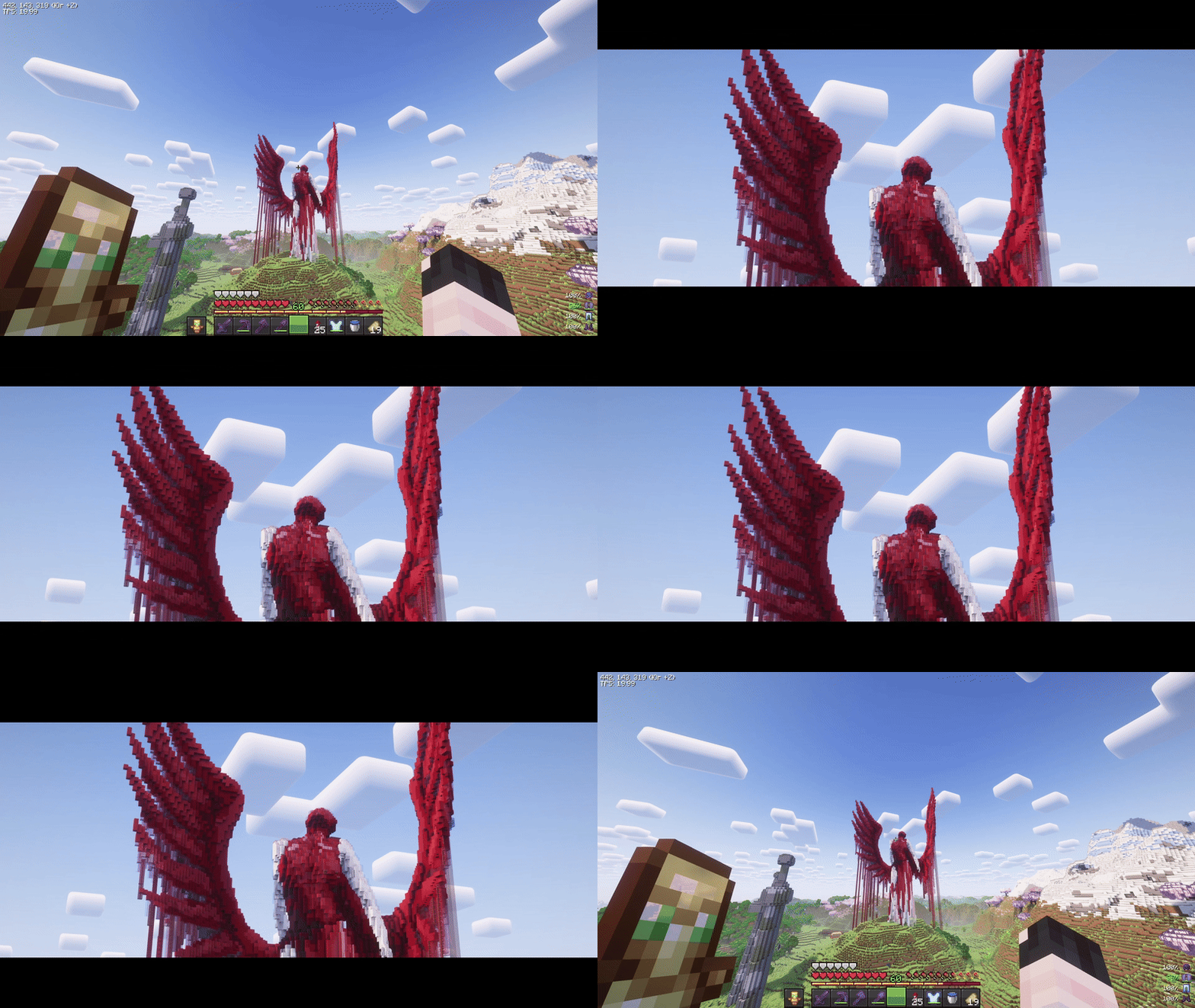
Cinematic Zoom (Fabric)
ModMIT

Cinematic Zoom (Fabric)

Smooth, cinematic zoom for Minecraft with animated black bars, per-frame easing, and optional mouse wheel control. Built for Fabric 1.21.7-1.21.11.
8.5K
Downloads
33
Followers
2 months ago
Updated
📦
3
Versions
game-mechanicsutilityfabric
Download Latestv0.9.0View on Modrinth

📖About Cinematic Zoom (Fabric)

CinematicZoom (Fabric 1.21.7-1.21.11)

Smooth, cinematic zoom for Minecraft with animated black bars, per-frame easing, and optional mouse wheel control. Built for Fabric 1.21.7-1.21.11.


Features

  • Hold-to-zoom (default key: C, rebindable).
  • Per-frame smoothing (no “steppy” 20 TPS feel).
  • Animated black bars (top & bottom, configurable height).
  • Mouse wheel adjustment while zooming (optional).
  • Hide HUD & crosshair while zooming (optional).
  • Cinematic (smooth) camera toggle while zooming (optional).
  • Multi-language: English & Russian.

Requirements

  • (Optional) Mod Menu (for in-game settings entry)
  • (Optional) Cloth Config (for a nice config screen)

Installation

  1. Install Fabric Loader & Fabric API for Minecraft 1.21.7-1.21.11.
  2. Put this mod’s JAR into your mods/ folder.
  3. (Optional) Add Mod Menu and Cloth Config for an in-game settings UI.

Usage

  • Hold the zoom key (default C) to zoom in.
  • While holding zoom, scroll the mouse wheel to fine-tune zoom level (if enabled).
  • Release the key to smoothly return to normal FOV and hide the bars.

Zoom, HUD hiding, and cinematic camera are automatically disabled in GUI screens.


Configuration

You can configure the mod in two ways:

In-game (recommended)

If Mod Menu + Cloth Config are installed:

  • Open Mods → Cinematic Zoom → Configure.

Config file

Edit (or delete to regenerate defaults):


Credits & Attribution

  • Original author & idea credit: KubePixel
    Their Forge mod for 1.20.1/1.21.1: Cinematic Zoom — https://www.curseforge.com/minecraft/mc-mods/cinematic-zoom

  • Fabric implementation (this mod): mix

This project is an independent Fabric implementation inspired by the original concept. Not affiliated with or endorsed by KubePixel.


Original concept and name credit to KubePixel. If you’re on Forge 1.20.1/1.21.1, check out their original mod here: https://www.curseforge.com/minecraft/mc-mods/cinematic-zoom.

👥 Team & Contributors

Mel1x
Mel1xOwner

⚙️ Compatibility

Environment
💻 Client-side
Loaders
fabric
Minecraft Versions
1.21.51.21.6

🔗 Links

Modrinth Page