


ChromaAnvils
Do you want color support in anvils? No worries, now you can have it!
📖About ChromaAnvils










With this simple fabric mod you can add a little color to your items with ChromaAnvils. This mod lets you style and color your items however you want, enabling you to have cool and unique items.

🟢 No mandatory client installation.
🟢 MiniMessage formating.
🟢 Permission support for server installation,.
🟢 Ability to blacklist items.
🟢 Extensive configs.

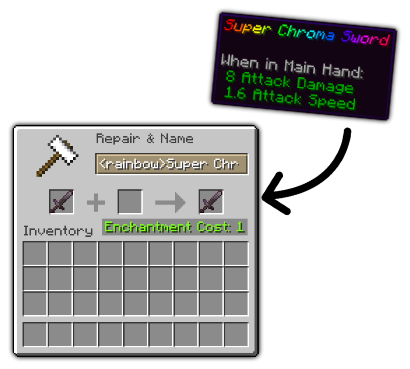
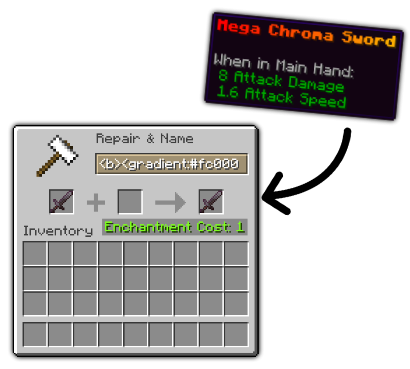

🔒 Permissions
If you have a permission plugin/mod like LuckPerms, you are required to have the permission chromaanvils.use to be able to use it. If you don't have any permission plugins/mods, all players are able to use it.
Additionally, you will also need to have the following permissions, corresponding to the formatting you want to allow:
chromaanvils.colors
chromaanvils.decorations
chromaanvils.font
chromaanvils.gradient
chromaanvils.rainbow
chromaanvils.transition
chromaanvils.reset
chromaanvils.shadow
chromaanvils.pride
chromaanvils.sprite
chromaanvils.head
✏️ Formating
Named colors: black, dark_blue, dark_green, dark_aqua, dark_red, dark_purple, gold, gray, dark_gray, blue, green, aqua, red, light_purple, yellow, or white.
You can also use the MiniMessage Viewer to "generate" the styling so that you dont have to fiddle with the tags
| Tag | Example | Description |
|---|---|---|
<named color> <hex color> |
<dark_red> <#ff0000 |
Changes the color for next part of the text |
<reset> |
<reset> |
Close all currently open tags, resetting color/decoration/etc. |
<rainbow:[!][phase]> |
<rainbow> <rainbow:!> <rainbow:2> <rainbow:!2> |
! reverses the rainbow direction and phase shifts the rainbow starting point |
<gradient:[color1]:[color...]> |
<gradient:#ff0000:#00ff00>Example</gradient> |
Transitions between colors. |
<transition:[color1]:[color...]:[phase]> |
<transition:#ffffff:#000000:0>Example</transition> |
Transitions between colors. Similar to a gradient, but everything is the same color and the phase chooses that color |
<font:[key]> |
<font:alt>Example</font> |
Allows to change the font of the text |
<[deocraion]> |
<bold> <underlined> <st> <obf> <i> <!i> |
Decorate the next part of the text. You can use ! to reverse the decoration. Look at the decoration table below for all available tags. |
<shadow:_colorNameOrHex_:[alpha_as_float]> |
<shadow:aqua:0.5> <shadow:#55FF55> |
Change your text shadow color and opacity |
<pride[:flag]> |
Happy <pride>pride month</pride>! |
Color your items with different types of pride flags ```pride, progress, trans, bi, pan, nb, lesbian, ace, agender, demisexual, genderqueer, genderfluid, intersex, aro, baker, philly, queer, gay, bigender or demigender |
<sprite[:atlas]> |
<sprite:blocks:block/stone> |
Embeds a sprite icon from a specified texture atlas directly into your item name. The atlas parameter specifies the texture atlas to use (e.g., blocks, items), followed by the sprite path. This allows you to add visual icons alongside your text. |
<head:name|uuid|texture[:outer_layer]> |
My favorite dev is <head:9f55c7c9-fecb-4baa-a65d-da2bb0aabde1>. |
Displays a player head in your item name. You can specify the player by their username, UUID, or custom texture value. The optional outer_layer parameter controls whether to show the second layer of the player skin (like hats or overlays). |
✨ Decorations tags
| Decoraions | Alias |
|---|---|
bold |
b |
italic |
em or i |
underlined |
u |
strikethrough |
st |
obfuscated |
obf |
For more information about you can refer minimessages own documentation but keep in mind that all the tags provided by minimessage doesn't work in item names