Logo
MINECRAFTBIBLE
Items
Items

All game items

Blocks
Blocks

Building blocks

Mobs
Mobs

Creatures & monsters

Biomes
Biomes

World biomes

Structures
Structures

Generated structures

Recipes
Recipes

Crafting guides

Advancements
Advancements

Achievements

Loot Tables
Loot Tables

Drop rates

Tags
Tags

Item groupings

All Versions
View all data →
Capes
Cape ArchiveNEW

Browse rare Minecon capes, OptiFine capes, and custom capes from players worldwide

Browse

Player Database
Player DatabasePopular

Search any player

Skin Browser
Skin Browser

Browse & download skins

Cape Gallery
Cape GalleryNEW

Minecon & OptiFine capes

Seed Vault
Seed Vault

Curated seeds

Learn

Guides
GuidesNew

Tutorials & tips

Blog
Blog

News & updates

Community

Community Hub
Community HubHub

Posts, discussions & more

All Versions
View community →
Seed Analyzer
Seed Analyzer

World seed analysis

Loot Explorer
Loot Explorer

Drop rates

Crafting Calculator
Crafting Calculator

Material planning

Enchant Calculator
Enchant Calculator

Probability math

Redstone Lab
Redstone Lab

Signal timing

Trading Profit
Trading Profit

Villager ROI

All Versions
View all tools →
Mods
Mods

Browse all mods

Plugins
Plugins

Server plugins

Resource Packs
Resource Packs

Textures & sounds

Shaders
Shaders

Visual enhancements

Datapacks
Datapacks

World logic

Scanner
Mod Intelligence

Scan & analyze any mod

All Versions
View all mods →
Loading...
IntroductionIntroductionVersion HistoryVersion HistoryGuidesGuidesBlog & NewsBlog & News
ItemsItemsBlocksBlocksMobsMobsRecipesRecipesBiomesBiomesStructuresStructuresAdvancementsAdvancementsLoot TablesLoot TablesTagsTags
ModsModsPluginsPluginsResource PacksResource PacksShadersShadersDatapacksDatapacks

MinecraftBible

The Ultimate Wiki

Logo
MINECRAFTBIBLE

The ultimate Minecraft reference. Every item, block, mob, and recipe documented with precision.

Community

  • Skin Browser
  • Cape Gallery
  • Seed Vault
  • Blog
  • Guides

Database

  • Items
  • Blocks
  • Mobs
  • Recipes
  • Biomes
  • Structures

Tools

  • Seed Analyzer
  • Mod Intelligence
  • Crafting Calculator
  • Enchant Calculator

Mods & Packs

  • Mods
  • Plugins
  • Resource Packs
  • Shaders
  • Datapacks

Site & Legal

  • About
  • Authors
  • Editorial Policy
  • Corrections
  • Contact
  • Privacy Policy
  • Terms of Service
  • DMCA
  • Sitemap

© 2026 MinecraftBible. Not affiliated with Mojang or Microsoft.

PrivacyTermsContact
CapeMod
ModLicenseRef-All-Rights-Reserved

CapeMod

Provides free capes and exclusive perks for creators. Visible for anyone using the mod.

28.5K
Downloads
33
Followers
4 months ago
Updated
📦
30
Versions
magicutilityfabricforgeliteloaderneoforgequilt
Download Latestv2.1.0+1.21.11View on Modrinth

📖About CapeMod

Banner

Cape Mod 1.8 - 1.21 for Forge and Fabric

Get free capes and exclusive perks for creators!

Visible for anyone using the mod.

https://capemod.net

Supported Versions:

  • Fabric: 1.17 - 1.21
  • Forge: 1.8.9, 1.12.2

How to install / use

  1. Download and install Forge or Fabric.
  2. Download and add CapeMod to your mods.
  3. Register an account and get capes at: https://capemod.net
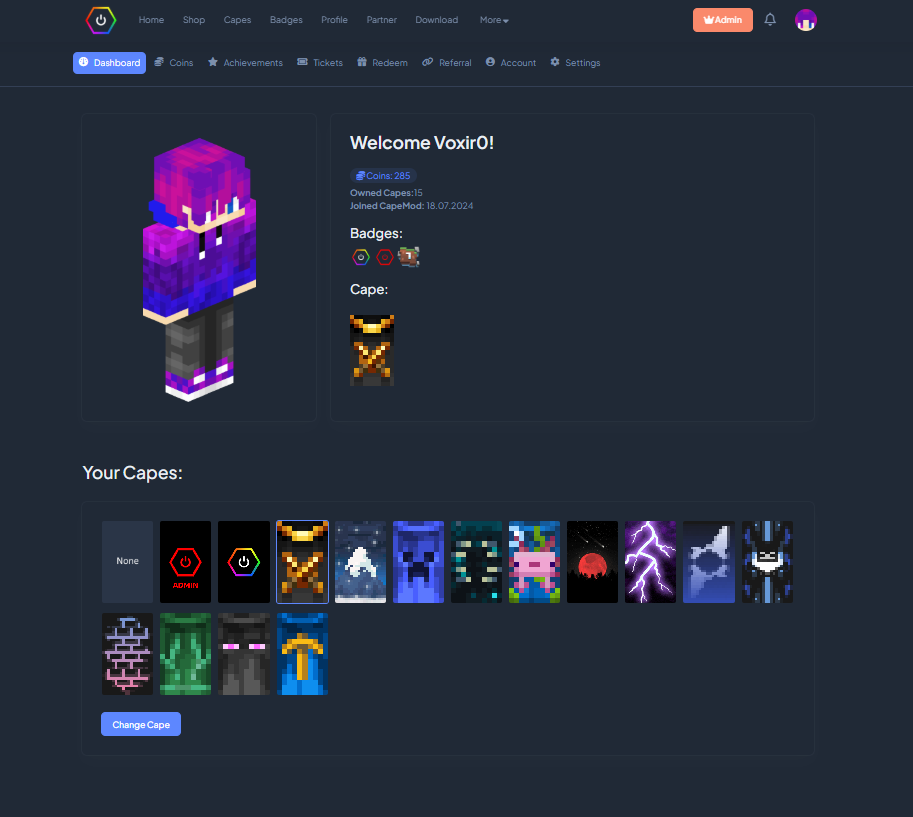
  4. Manage and equip your capes at: https://capemod.net/dashboard

Features:

  • Transparent and animated capes.
  • Free Capes: Earn stylish capes without spending real money.
  • Themes: Diffrent themes for the same cape.
  • Creator Rewards: Creators can reward their community with custom capes.
  • Earning Opportunities: Various ways to earn capes and coins, including gameplay and daily rewards.
  • Wide Version Support: Compatible with multiple Minecraft versions.

Creator Benefits:

Creators can distribute capes to their community, for example, by offering them to subscribers on Twitch or as rewards through channel points. They can design and manage their own capes, distributing them directly to their followers. Currently, capes are distributed manually via the dashboard, but we plan to automate this process so players can receive capes instantly upon subscribing.

Manage Your Cape:

You can view and manage your capes through our dashboard at https://capemod.net/. Additionally, a "Manage Cape" button is available in your skin customization settings.

FAQ:

How do I get capes?

Capes can be purchased using in-game coins, which you earn by playing on specific servers or through daily rewards. Future updates will introduce more earning methods. Note that capes cannot be purchased with real money. Certain capes, such as Twitch or YouTube capes, may require meeting specific follower or subscriber milestones.

How can I manage my cape?

Access our dashboard to view all your owned capes, where you can activate, deactivate, or change them. You can also purchase capes with your earned coins.

Who can see my capes?

Anyone with the mod installed can see your capes, regardless of their Minecraft version.

How can I apply for my own cape as a creator?

Visit our website for the application form and requirements for creating your own cape.

API:

We offer an API that allows you to retrieve information about player capes and enable creators to manage their cosmetics.

CapeMod Integration

If you want to integrate CapeMod into your mod or client, please contact us directly via [email protected]

Useful Links:

  • Website
  • Dashboard
  • Discord

Screenshots

Dashboard to manage capes, account
Dashboard to manage Capes, Account.

Support Us

Help us keep our servers running. Your support makes a difference!

Buy Me a Coffee at ko-fi.com

👥 Team & Contributors

7AGAM
7AGAMOwner

⚙️ Compatibility

Environment
💻 Client-side
Loaders
fabricforgeliteloaderneoforgequilt
Minecraft Versions
1.21.11

🔗 Links

Modrinth Page