Logo
MINECRAFTBIBLE
Items
Items

All game items

Blocks
Blocks

Building blocks

Mobs
Mobs

Creatures & monsters

Biomes
Biomes

World biomes

Structures
Structures

Generated structures

Recipes
Recipes

Crafting guides

Advancements
Advancements

Achievements

Loot Tables
Loot Tables

Drop rates

Tags
Tags

Item groupings

All Versions
View all data →
Capes
Cape ArchiveNEW

Browse rare Minecon capes, OptiFine capes, and custom capes from players worldwide

Browse

Player Database
Player DatabasePopular

Search any player

Skin Browser
Skin Browser

Browse & download skins

Cape Gallery
Cape GalleryNEW

Minecon & OptiFine capes

Seed Vault
Seed Vault

Curated seeds

Learn

Guides
GuidesNew

Tutorials & tips

Blog
Blog

News & updates

Community

Community Hub
Community HubHub

Posts, discussions & more

All Versions
View community →
Seed Analyzer
Seed Analyzer

World seed analysis

Loot Explorer
Loot Explorer

Drop rates

Crafting Calculator
Crafting Calculator

Material planning

Enchant Calculator
Enchant Calculator

Probability math

Redstone Lab
Redstone Lab

Signal timing

Trading Profit
Trading Profit

Villager ROI

All Versions
View all tools →
Mods
Mods

Browse all mods

Plugins
Plugins

Server plugins

Resource Packs
Resource Packs

Textures & sounds

Shaders
Shaders

Visual enhancements

Datapacks
Datapacks

World logic

Scanner
Mod Intelligence

Scan & analyze any mod

All Versions
View all mods →
Loading...
IntroductionIntroductionVersion HistoryVersion HistoryGuidesGuidesBlog & NewsBlog & News
ItemsItemsBlocksBlocksMobsMobsRecipesRecipesBiomesBiomesStructuresStructuresAdvancementsAdvancementsLoot TablesLoot TablesTagsTags
ModsModsPluginsPluginsResource PacksResource PacksShadersShadersDatapacksDatapacks

MinecraftBible

The Ultimate Wiki

Logo
MINECRAFTBIBLE

The ultimate Minecraft reference. Every item, block, mob, and recipe documented with precision.

Community

  • Skin Browser
  • Cape Gallery
  • Seed Vault
  • Blog
  • Guides

Database

  • Items
  • Blocks
  • Mobs
  • Recipes
  • Biomes
  • Structures

Tools

  • Seed Analyzer
  • Mod Intelligence
  • Crafting Calculator
  • Enchant Calculator

Mods & Packs

  • Mods
  • Plugins
  • Resource Packs
  • Shaders
  • Datapacks

Site & Legal

  • About
  • Authors
  • Editorial Policy
  • Corrections
  • Contact
  • Privacy Policy
  • Terms of Service
  • DMCA
  • Sitemap

© 2026 MinecraftBible. Not affiliated with Mojang or Microsoft.

PrivacyTermsContact
BzzBzzClientHelper
ModLicenseRef-All-Rights-Reserved

BzzBzzClientHelper

A client-side quality-of-life mod for Minecraft featuring waypoints, a Skyrim-style compass, fullbright, inventory/container helpers, death markers, durability warnings, an inspector HUD, and an in-game config.

34
Downloads
1
Followers
3 weeks ago
Updated
📦
4
Versions
utilityfabric
Download Latestv0.1.66+26.3-alpha.1View on Modrinth

📖About BzzBzzClientHelper

Bzz Bzz Client Helper

Bzz Bzz Client Helper is a client-side quality-of-life mod for Minecraft.
The mod adds practical convenience features without completely destroying the vanilla feel of the game.

The focus is on better navigation, faster inventory handling, and small helpful HUD features for survival, multiplayer, and longer adventures.

Features

Skyrim-like Compass

A subtle compass at the top of the screen shows cardinal directions, waypoints, and known player positions, as far as Minecraft provides this information client-side.

Waypoints

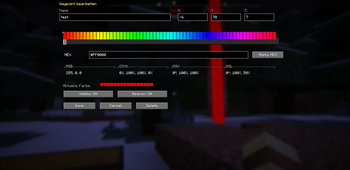
Create your own waypoints, manage them in-game, and display them in the compass or as beacon/marker indicators.

Fullbright

Enable a brighter view without having to change the video settings every time.

Inventory and Container Helpers

Sort inventories and containers faster. Additional useful buttons are included, such as Sort, Matching, and Container Search.

Container Search

Search opened containers for specific items to find things more quickly in large chests.

Locked Hotbar Slots

Lock specific hotbar slots so important items do not accidentally get moved around while sorting or transferring items.

Durability Warning

Receive a warning when tools, weapons, or armor pieces are about to break.

Death Marker

After death, a marker can be placed so you can more easily find your last death location.

Inspector HUD

Shows helpful information about blocks or entities you are looking at.

Ingame Config

Many features can be enabled or disabled directly in-game through a dedicated config screen.

Client-only

Bzz Bzz Client Helper is a client-side mod.
It does not need to be installed on the server.

Some information, such as exact player positions outside the normal server tracking distance, cannot be reliably displayed client-side only. Because of this, the mod only shows data that Minecraft actually provides to the client.

Default Keybinds

  • G — Toggle Fullbright
  • N — Create new waypoint
  • M — Open Waypoint Manager
  • O — Open Bzz Bzz Config

Additional features can be freely assigned through Minecraft’s controls menu.

Goal of the Mod

Bzz Bzz Client Helper is designed to make Minecraft more comfortable to play without feeling overloaded.
Many features are disabled by default and can be enabled as needed.

👥 Team & Contributors

evozero02
evozero02Owner

⚙️ Compatibility

Environment
💻 Client-side
Loaders
fabric
Minecraft Versions
26.3-snapshot-1

🔗 Links

Modrinth Page