Logo
MINECRAFTBIBLE
Items
Items

All game items

Blocks
Blocks

Building blocks

Mobs
Mobs

Creatures & monsters

Biomes
Biomes

World biomes

Structures
Structures

Generated structures

Recipes
Recipes

Crafting guides

Advancements
Advancements

Achievements

Loot Tables
Loot Tables

Drop rates

Tags
Tags

Item groupings

All Versions
View all data →
Capes
Cape ArchiveNEW

Browse rare Minecon capes, OptiFine capes, and custom capes from players worldwide

Browse

Player Database
Player DatabasePopular

Search any player

Skin Browser
Skin Browser

Browse & download skins

Cape Gallery
Cape GalleryNEW

Minecon & OptiFine capes

Seed Vault
Seed Vault

Curated seeds

Learn

Guides
GuidesNew

Tutorials & tips

Blog
Blog

News & updates

Community

Community Hub
Community HubHub

Posts, discussions & more

All Versions
View community →
Seed Analyzer
Seed Analyzer

World seed analysis

Loot Explorer
Loot Explorer

Drop rates

Crafting Calculator
Crafting Calculator

Material planning

Enchant Calculator
Enchant Calculator

Probability math

Redstone Lab
Redstone Lab

Signal timing

Trading Profit
Trading Profit

Villager ROI

All Versions
View all tools →
Mods
Mods

Browse all mods

Plugins
Plugins

Server plugins

Resource Packs
Resource Packs

Textures & sounds

Shaders
Shaders

Visual enhancements

Datapacks
Datapacks

World logic

Scanner
Mod Intelligence

Scan & analyze any mod

All Versions
View all mods →
Loading...
IntroductionIntroductionVersion HistoryVersion HistoryGuidesGuidesBlog & NewsBlog & News
ItemsItemsBlocksBlocksMobsMobsRecipesRecipesBiomesBiomesStructuresStructuresAdvancementsAdvancementsLoot TablesLoot TablesTagsTags
ModsModsPluginsPluginsResource PacksResource PacksShadersShadersDatapacksDatapacks

MinecraftBible

The Ultimate Wiki

Logo
MINECRAFTBIBLE

The ultimate Minecraft reference. Every item, block, mob, and recipe documented with precision.

Community

  • Player Database
  • Skin Browser
  • Cape Gallery
  • Community Hub
  • Seed Vault

Database

  • Items
  • Blocks
  • Mobs
  • Recipes
  • Biomes
  • Structures

Tools

  • Seed Analyzer
  • Mod Intelligence
  • Crafting Calculator
  • Enchant Calculator

Mods & Packs

  • Mods
  • Plugins
  • Resource Packs
  • Shaders
  • Datapacks

© 2026 MinecraftBible. Not affiliated with Mojang or Microsoft.

PrivacyTermsContact
Bundles Beyond
ModCC-BY-NC-SA-4.0

Bundles Beyond

Allows you to access every item in the bundle beyond the vanilla 12 item limit.

251.6K
Downloads
239
Followers
6 months ago
Updated
📦
30
Versions
game-mechanicsstorageutilityfabricneoforgequilt
Download Latestv1.6.0+1.21.8+fabricView on Modrinth

📖About Bundles Beyond

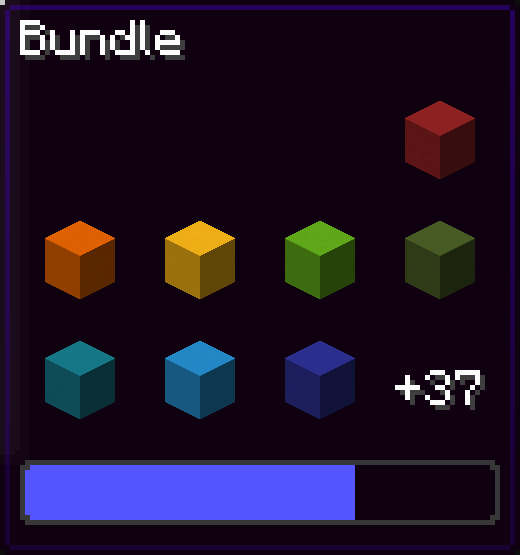
Since bundles were officially released, only up to 12 items from the bundle are accessible from the inventory without taking out other items first.
This mod removes this limit of 12 items allowing all items inside the bundle to be viewed and extracted.

Using this mod:
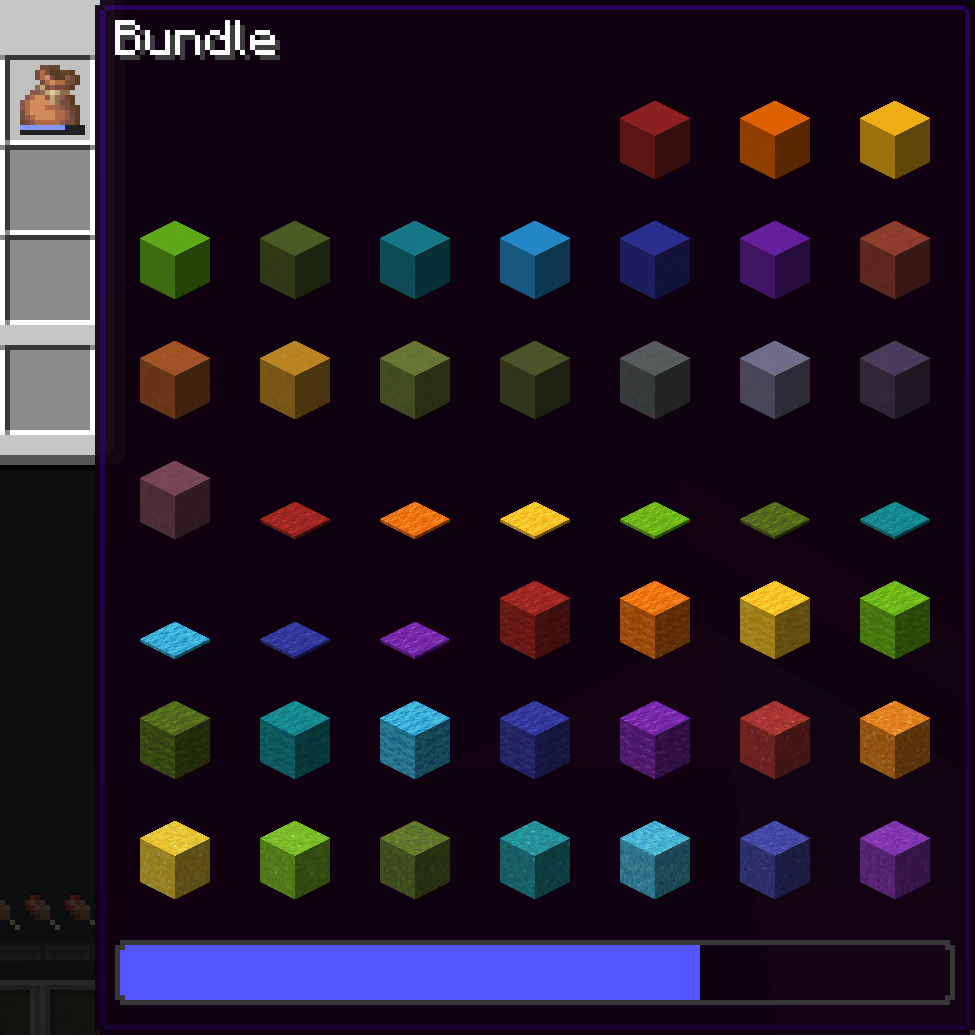
bundle with 64 colored items

Vanilla:

image of only 8 items in the bundle and a +37 to indicate that there are 37 more items in the bundle

You can navigate in the bundle's gui with the movement or arrow keys.

Press space while hovering over a bundle to put an item or take an item from the bundle!

Config screen

Open the config screen from Mod Menu in Fabric, from the Mods menu in NeoForge, or with /bundlesbeyond

Image coming here Soon™

Keybinds

There are 2 keybinds that you can find in Options > Controls:

Mod Enabled keybind

If the mod is On or Off, pressing this keybind will toggle it.

If the mod is on Hold key, holding this keybind will enable the mod.

Scroll Axis keybind

If the scroll mode is Horizontal or Vertical, pressing this keybind will toggle it.

If the scroll mode is on Hold for horizontal, holding this keybind will make the scrolling horizontal, releasing the button will make it vertical.

Same for Hold for vertical, but opposite.

Other Stuff

This mod is client side only.

In the Fabric version, this mod requires Fabric API.

You've reached the secret things-that-might-get-added part!

  • A keybind for opening the config screen
  • Changing the keybinds from the config screen

Bundles Beyond is licensed under the CC-BY-NC-SA 4.0 license.

👥 Team & Contributors

7410
7410Owner

⚙️ Compatibility

Environment
💻 Client-side
Loaders
fabricneoforgequilt
Minecraft Versions
1.21.8

🔗 Links

Modrinth Page