Logo
MINECRAFTBIBLE
Items
Items

All game items

Blocks
Blocks

Building blocks

Mobs
Mobs

Creatures & monsters

Biomes
Biomes

World biomes

Structures
Structures

Generated structures

Recipes
Recipes

Crafting guides

Advancements
Advancements

Achievements

Loot Tables
Loot Tables

Drop rates

Tags
Tags

Item groupings

All Versions
View all data →
Capes
Cape ArchiveNEW

Browse rare Minecon capes, OptiFine capes, and custom capes from players worldwide

Browse

Player Database
Player DatabasePopular

Search any player

Skin Browser
Skin Browser

Browse & download skins

Cape Gallery
Cape GalleryNEW

Minecon & OptiFine capes

Seed Vault
Seed Vault

Curated seeds

Learn

Guides
GuidesNew

Tutorials & tips

Blog
Blog

News & updates

Community

Community Hub
Community HubHub

Posts, discussions & more

All Versions
View community →
Seed Analyzer
Seed Analyzer

World seed analysis

Loot Explorer
Loot Explorer

Drop rates

Crafting Calculator
Crafting Calculator

Material planning

Enchant Calculator
Enchant Calculator

Probability math

Redstone Lab
Redstone Lab

Signal timing

Trading Profit
Trading Profit

Villager ROI

All Versions
View all tools →
Mods
Mods

Browse all mods

Plugins
Plugins

Server plugins

Resource Packs
Resource Packs

Textures & sounds

Shaders
Shaders

Visual enhancements

Datapacks
Datapacks

World logic

Scanner
Mod Intelligence

Scan & analyze any mod

All Versions
View all mods →
Loading...
IntroductionIntroductionVersion HistoryVersion HistoryGuidesGuidesBlog & NewsBlog & News
ItemsItemsBlocksBlocksMobsMobsRecipesRecipesBiomesBiomesStructuresStructuresAdvancementsAdvancementsLoot TablesLoot TablesTagsTags
ModsModsPluginsPluginsResource PacksResource PacksShadersShadersDatapacksDatapacks

MinecraftBible

The Ultimate Wiki

Logo
MINECRAFTBIBLE

The ultimate Minecraft reference. Every item, block, mob, and recipe documented with precision.

Community

  • Skin Browser
  • Cape Gallery
  • Seed Vault
  • Blog
  • Guides

Database

  • Items
  • Blocks
  • Mobs
  • Recipes
  • Biomes
  • Structures

Tools

  • Seed Analyzer
  • Mod Intelligence
  • Crafting Calculator
  • Enchant Calculator

Mods & Packs

  • Mods
  • Plugins
  • Resource Packs
  • Shaders
  • Datapacks

Site & Legal

  • About
  • Authors
  • Editorial Policy
  • Corrections
  • Contact
  • Privacy Policy
  • Terms of Service
  • DMCA
  • Sitemap

© 2026 MinecraftBible. Not affiliated with Mojang or Microsoft.

PrivacyTermsContact
Bundle Backport-ish
ModMIT

Bundle Backport-ish

A backport of bundle mechanics using the original UI

20.5K
Downloads
29
Followers
5 months ago
Updated
📦
8
Versions
equipmentstoragefabricquilt
Download Latestv1.1.5+mc1.21.1View on Modrinth

📖About Bundle Backport-ish

Bundle Backport-ish

fabric-api

An opinionated backport of the bundle scrolling and dyeing mechanics from 1.21.2. The UI is unchanged (other than showing which slot is selected), so you still can see all the items.
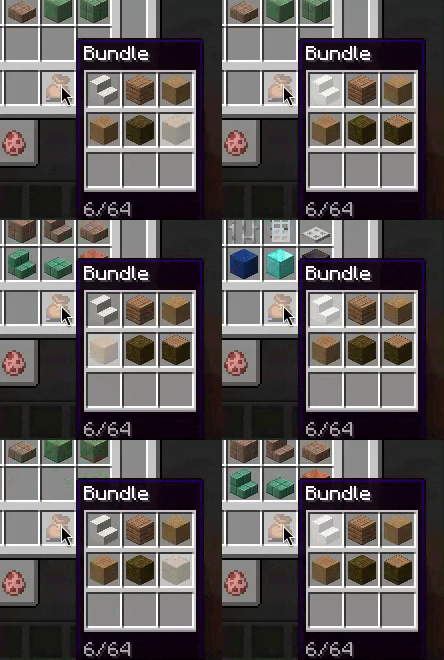
Scrolling through the slots of a bundle

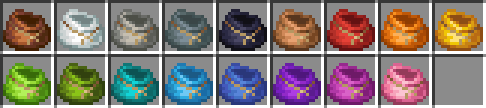
All 17 bumdle colors

Details

  • You can dye a bundle by combining it with the respective dye in a crafting grid.
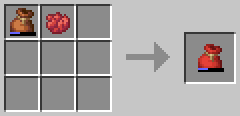
    Bundle dyeing recipe
    • It retains its items, like a shulker box.
  • You can scroll the mouse wheel to select different slots in the bundle which determines what item you pull out of it.
    • Currently, the slot stays selected when you mouse off the bundle or pass it to another player.
    • All interactions are still through right click, like in 1.21.1-.
  • The recipe is updated to only require one leather and one string, like 1.21.2.
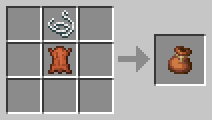
    Bundle crafting recipe
    • There is also a datapack you can enable with /datapack enable "bundle-backportish:rabbithide" or in the world creation menu which lets you craft it with either leather or rabbit hide.
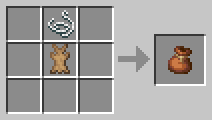
      Bundle crafting recipe using rabbit hide
  • You do not need to enable the bundles experiment, it is enabled by default and hidden.
  • Currently, right clicking a bundle in the world still dumps all the items out, although this may be changed in the future.

Compat

Contains integration with EMI to show the bundle dyeing recipes, as they are NBT crafting and wouldn't show up normally.

Works with Mouse Tweaks: scrolling will change bundle selection instead of extracting items

Also check out Backbundled if you're looking for a more accurate backport of vanilla bundles

Credits

Scrolling implementation based on Bundle Tweaks by zacharybarbanell (MIT License)


Known Bugs
  • If you make the crafting recipe for a dyed bundle but then manipulate the contents of the bundle, it will not update the result bundle. Hopefully this will be fixed in a future release.

👥 Team & Contributors

ThePotatoArchivist
ThePotatoArchivistOwner

⚙️ Compatibility

Environment
✅ Client & Server
Loaders
fabricquilt
Minecraft Versions
1.211.21.1

🔗 Links

Modrinth Page