Logo
MINECRAFTBIBLE
Items
Items

All game items

Blocks
Blocks

Building blocks

Mobs
Mobs

Creatures & monsters

Biomes
Biomes

World biomes

Structures
Structures

Generated structures

Recipes
Recipes

Crafting guides

Advancements
Advancements

Achievements

Loot Tables
Loot Tables

Drop rates

Tags
Tags

Item groupings

All Versions
View all data →
Capes
Cape ArchiveNEW

Browse rare Minecon capes, OptiFine capes, and custom capes from players worldwide

Browse

Player Database
Player DatabasePopular

Search any player

Skin Browser
Skin Browser

Browse & download skins

Cape Gallery
Cape GalleryNEW

Minecon & OptiFine capes

Seed Vault
Seed Vault

Curated seeds

Learn

Guides
GuidesNew

Tutorials & tips

Blog
Blog

News & updates

Community

Community Hub
Community HubHub

Posts, discussions & more

All Versions
View community →
Seed Analyzer
Seed Analyzer

World seed analysis

Loot Explorer
Loot Explorer

Drop rates

Crafting Calculator
Crafting Calculator

Material planning

Enchant Calculator
Enchant Calculator

Probability math

Redstone Lab
Redstone Lab

Signal timing

Trading Profit
Trading Profit

Villager ROI

All Versions
View all tools →
Mods
Mods

Browse all mods

Plugins
Plugins

Server plugins

Resource Packs
Resource Packs

Textures & sounds

Shaders
Shaders

Visual enhancements

Datapacks
Datapacks

World logic

Scanner
Mod Intelligence

Scan & analyze any mod

All Versions
View all mods →
Loading...
IntroductionIntroductionVersion HistoryVersion HistoryGuidesGuidesBlog & NewsBlog & News
ItemsItemsBlocksBlocksMobsMobsRecipesRecipesBiomesBiomesStructuresStructuresAdvancementsAdvancementsLoot TablesLoot TablesTagsTags
ModsModsPluginsPluginsResource PacksResource PacksShadersShadersDatapacksDatapacks

MinecraftBible

The Ultimate Wiki

Logo
MINECRAFTBIBLE

The ultimate Minecraft reference. Every item, block, mob, and recipe documented with precision.

Community

  • Skin Browser
  • Cape Gallery
  • Seed Vault
  • Blog
  • Guides

Database

  • Items
  • Blocks
  • Mobs
  • Recipes
  • Biomes
  • Structures

Tools

  • Seed Analyzer
  • Mod Intelligence
  • Crafting Calculator
  • Enchant Calculator

Mods & Packs

  • Mods
  • Plugins
  • Resource Packs
  • Shaders
  • Datapacks

Site & Legal

  • About
  • Authors
  • Editorial Policy
  • Corrections
  • Contact
  • Privacy Policy
  • Terms of Service
  • DMCA
  • Sitemap

© 2026 MinecraftBible. Not affiliated with Mojang or Microsoft.

PrivacyTermsContact
BlueMap Offline Player Markers (Forge/NeoForge)
ModMPL-2.0

BlueMap Offline Player Markers (Forge/NeoForge)

A BlueMap addon for Forge and NeoForge that adds marker where players last disconnected

2.6K
Downloads
1
Followers
1 years ago
Updated
📦
9
Versions
utilityforgeneoforge
Download Latestv1.4.1View on Modrinth

📖About BlueMap Offline Player Markers (Forge/NeoForge)

BlueMap Offline Player Markers (Forge)

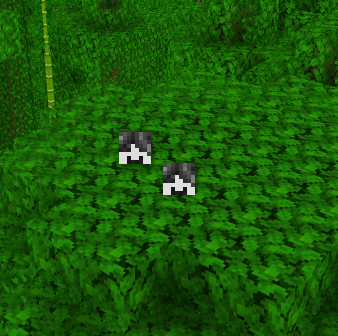
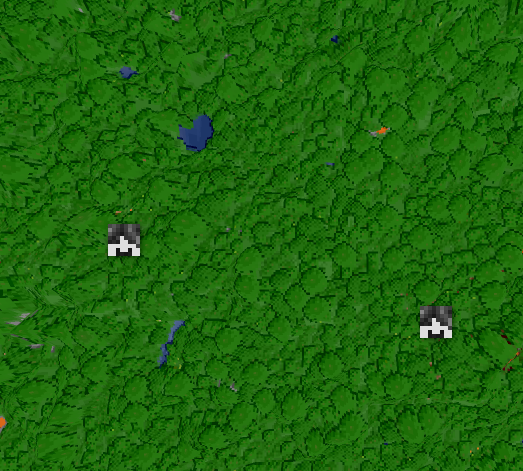
Adds markers where players last logged off to BlueMap.

Closeup Faraway
closeup of the two offline player markers far away shot of the two offline player markers

The Original Paper plugin source code by @TechnicJelle, Its Fabric port source code by @syorito-hatsuki.
Neither TechnicJelle nor syorito-hatsuki have any responsability to take concerning this mod or its code or its issues. So please do not report issues comming from my fork to their github/curseforge/modrinth pages.

Fork Informations

This fork includes:

  • All the features of TechnicJelle's plugin (as of right now, v3.0) (do tell me if I missed some features, old or new)

What has been added on top:

  • v1.4.1 (&& 1.3.2 coming soon or not, time flies by)
    • /fakeOfflineMarker <name> [<pos>] [<uuid>] to create fake offline player markers
    • /deleteOfflineMarker <name> to delete a choosen marker
    • hideBannedPlayers and removeBannedPlayerMarkers, unlike TechnicJelle's mod you can chose if you want to hide or delete the markers from banned players (or none of the above if both parameters are false) if put to delete, a server restart is advised
    • advancedMode this parameter enables the deleteOfflineMarker command server restart required

New naming convention:

  • 1.3.X (minor=3) refers to java 17 (minecraft 1.18 to 1.20.4)
  • 1.4.X (minor=4) refers to java 21 (minecraft 1.20.5 and up)

Small platform specific updates will now be under: 1.major.minor.platform-specific

  • Each new version will have the content of the past minor version plus new content (see above for fork contents)

Compatibility

The current mod requires BlueMap and Kotlin for Forge.
Please refer to the version changelog of the file your are using as to which versions to choose from.

If you are interested in what is planned for this fork, see my Github TODO List

Current Compatibility:

Forge 1.18.2 -> 1.21.4

  • Bluemap 3.12 -> 5.5 (or up)
  • Kotlin For Forge 3.9.1 -> 5.9.0

NeoForge 1.20.2 -> 1.21.4

  • Bluemap 3.12 -> 5.5 (or up)
  • Kotlin For Forge 4.6.0 -> 5.9.0

Kotlin For Forge v5.10 introduces a compatibility Mod's Breaking change, please use KFF 5.9.0 OR UNDER

My special thanks to:

syorito-hatsuki and @TechnicJelle for providing their source code, as without them I would not have been able to port the mod from syorito-hatsuki's fabric version to Forge and NeoForge

👥 Team & Contributors

F
FLORIAN4600Owner
TechnicJelle
TechnicJelle
Member
syorito-hatsuki
syorito-hatsuki
Member

⚙️ Compatibility

Environment
🖥️ Server-side
Loaders
forgeneoforge
Minecraft Versions
1.20.51.20.61.211.21.11.21.21.21.31.21.4

🔗 Links

Modrinth Page