
Logo
MINECRAFTBIBLE
Items
Items

All game items

Blocks
Blocks

Building blocks

Mobs
Mobs

Creatures & monsters

Biomes
Biomes

World biomes

Structures
Structures

Generated structures

Recipes
Recipes

Crafting guides

Advancements
Advancements

Achievements

Loot Tables
Loot Tables

Drop rates

Tags
Tags

Item groupings

All Versions
View all data →
Capes
Cape ArchiveNEW

Browse rare Minecon capes, OptiFine capes, and custom capes from players worldwide

Browse

Player Database
Player DatabasePopular

Search any player

Skin Browser
Skin Browser

Browse & download skins

Cape Gallery
Cape GalleryNEW

Minecon & OptiFine capes

Seed Vault
Seed Vault

Curated seeds

Learn

Guides
GuidesNew

Tutorials & tips

Blog
Blog

News & updates

Community

Community Hub
Community HubHub

Posts, discussions & more

All Versions
View community →
Seed Analyzer
Seed Analyzer

World seed analysis

Loot Explorer
Loot Explorer

Drop rates

Crafting Calculator
Crafting Calculator

Material planning

Enchant Calculator
Enchant Calculator

Probability math

Redstone Lab
Redstone Lab

Signal timing

Trading Profit
Trading Profit

Villager ROI

All Versions
View all tools →
Mods
Mods

Browse all mods

Plugins
Plugins

Server plugins

Resource Packs
Resource Packs

Textures & sounds

Shaders
Shaders

Visual enhancements

Datapacks
Datapacks

World logic

Scanner
Mod Intelligence

Scan & analyze any mod

All Versions
View all mods →
Loading...
IntroductionIntroductionVersion HistoryVersion HistoryGuidesGuidesBlog & NewsBlog & News
ItemsItemsBlocksBlocksMobsMobsRecipesRecipesBiomesBiomesStructuresStructuresAdvancementsAdvancementsLoot TablesLoot TablesTagsTags
ModsModsPluginsPluginsResource PacksResource PacksShadersShadersDatapacksDatapacks

MinecraftBible

The Ultimate Wiki

Logo
MINECRAFTBIBLE

The ultimate Minecraft reference. Every item, block, mob, and recipe documented with precision.

Community

  • Player Database
  • Skin Browser
  • Cape Gallery
  • Community Hub
  • Seed Vault

Database

  • Items
  • Blocks
  • Mobs
  • Recipes
  • Biomes
  • Structures

Tools

  • Seed Analyzer
  • Mod Intelligence
  • Crafting Calculator
  • Enchant Calculator

Mods & Packs

  • Mods
  • Plugins
  • Resource Packs
  • Shaders
  • Datapacks

© 2026 MinecraftBible. Not affiliated with Mojang or Microsoft.

PrivacyTermsContact
BlueMap
ModMIT

BlueMap

A Minecraft mapping tool that creates 3D models of your Minecraft worlds and displays them in a web viewer.

278.1K
Downloads
1,207
Followers
2 months ago
Updated
📦
30
Versions
utilityfabricfoliaforgeneoforgepaperpurpurspigotsponge
Download Latestv5.16-spongeView on Modrinth

📖About BlueMap

title-banner

create 3D-maps of your Minecraft worlds and display them in your browser
>> DEMO MAP <<

GitHub issues
GitHub all releases
GitHub release (latest by date)
Discord


What is BlueMap

BlueMap is a program that reads your Minecraft world files and generates not only a map, but also 3D-models of the whole surface.
With the web-app you then can look at those in your browser and basically view the world as if you were ingame!
Or just look at it from far away to get an overview.
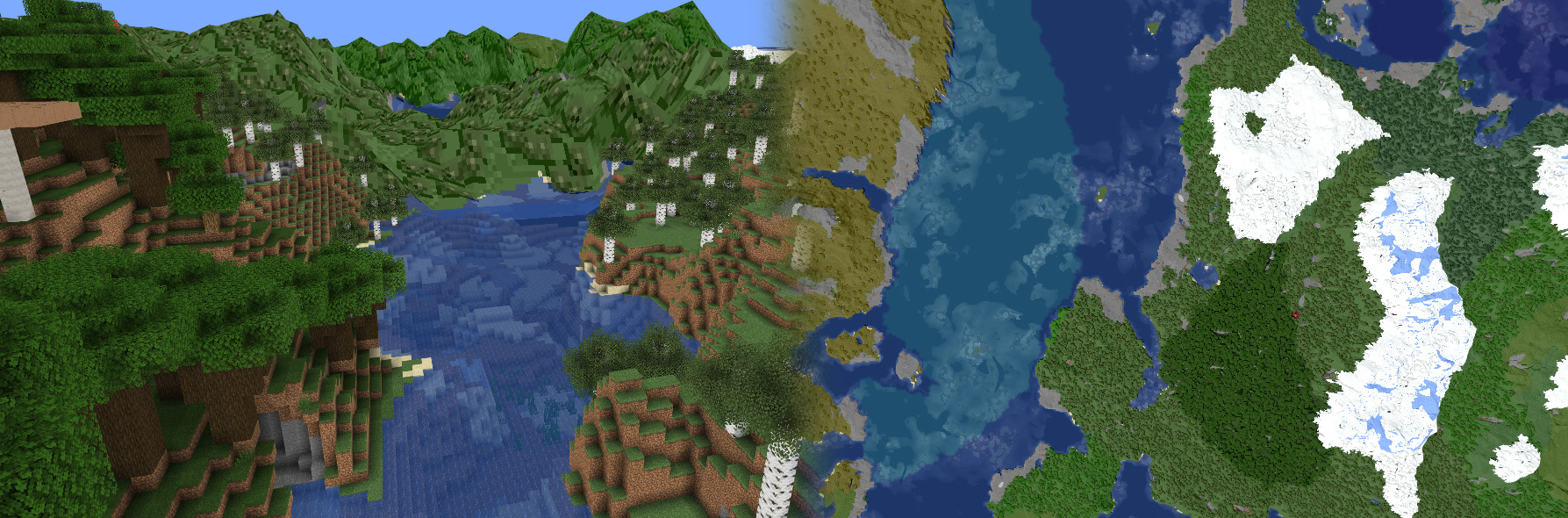
screenshot

BlueMap comes as a Spigot/Paper or Sponge Plugin, as a Fabric or Forge-Mod and you can also use BlueMap without any Server
from the Command-Line as a standalone tool.

If installed as a Plugin/Mod, BlueMap renders asynchronously to your MinecraftServer-Thread.
This means at no time will it block your server-thread directly.
So as long as your CPU is not fully utilized, your server should not be slowed down while BlueMap is rendering.

Using BlueMap

You can download BlueMap from here.
Read the installation instructions to get started!
And here is a list of addons and tools that work with bluemap.

Here you can see how many servers are using BlueMap:

BlueMap Graph

If you need help with the setup, feel free to join the Discord-server, we'll be happy to help you there!

Metrics and Webserver

BlueMap uses bStats and an own metrics-system and is hosting a web-server!

Metrics are really useful to keep track of how the plugin is used and helps me stay motivated! Please turn them on :)

bStats: All data collected by bStats can be viewed here: https://bstats.org/plugin/bukkit/BlueMap/5912.

own metrics: Additionally to bStats, BlueMap is sending a super small report, containing only the implementation-name and the version of the BlueMap-plugin to my server. I do this, because there are some other implementations for BlueMap (Fabric, Forge, CLI) that are not supported by bStats. Here is an example report:

{
    "implementation": "sponge",
    "version": "0.0.0"
}

All metrics can be disabled in the plugins config.

web-server: The web-server is a core-functionality of this plugin. So it is enabled by default but can be disabled in the plugin-config. By default the web-server is bound to all network-interfaces ('0.0.0.0') on port 8100 and is hosting the content of the ./bluemap/web/-folder.

Todo / planned features

Here is a todo-list ordered by what i right now think is the priority, but might always change or be reordered at my discretion. (I develop BlueMap in my free-time, so nothing here is a promise and there are no ETA's)

Issues / Suggestions

You found a bug, have another issue or a suggestion?
You are very welcome to to join the Discord-server and the reddit and share your thoughts!

👥 Team & Contributors

BlueColored
BlueColoredOwner

⚙️ Compatibility

Environment
🖥️ Server-side
Loaders
fabricfoliaforgeneoforgepaperpurpurspigotsponge
Minecraft Versions
1.201.20.11.20.21.20.31.20.41.20.51.20.61.21+11 more

🔗 Links

Modrinth Page
