Logo
MINECRAFTBIBLE
Items
Items

All game items

Blocks
Blocks

Building blocks

Mobs
Mobs

Creatures & monsters

Biomes
Biomes

World biomes

Structures
Structures

Generated structures

Recipes
Recipes

Crafting guides

Advancements
Advancements

Achievements

Loot Tables
Loot Tables

Drop rates

Tags
Tags

Item groupings

All Versions
View all data →
Capes
Cape ArchiveNEW

Browse rare Minecon capes, OptiFine capes, and custom capes from players worldwide

Browse

Player Database
Player DatabasePopular

Search any player

Skin Browser
Skin Browser

Browse & download skins

Cape Gallery
Cape GalleryNEW

Minecon & OptiFine capes

Seed Vault
Seed Vault

Curated seeds

Learn

Guides
GuidesNew

Tutorials & tips

Blog
Blog

News & updates

Community

Community Hub
Community HubHub

Posts, discussions & more

All Versions
View community →
Seed Analyzer
Seed Analyzer

World seed analysis

Loot Explorer
Loot Explorer

Drop rates

Crafting Calculator
Crafting Calculator

Material planning

Enchant Calculator
Enchant Calculator

Probability math

Redstone Lab
Redstone Lab

Signal timing

Trading Profit
Trading Profit

Villager ROI

All Versions
View all tools →
Mods
Mods

Browse all mods

Plugins
Plugins

Server plugins

Resource Packs
Resource Packs

Textures & sounds

Shaders
Shaders

Visual enhancements

Datapacks
Datapacks

World logic

Scanner
Mod Intelligence

Scan & analyze any mod

All Versions
View all mods →
Loading...
IntroductionIntroductionVersion HistoryVersion HistoryGuidesGuidesBlog & NewsBlog & News
ItemsItemsBlocksBlocksMobsMobsRecipesRecipesBiomesBiomesStructuresStructuresAdvancementsAdvancementsLoot TablesLoot TablesTagsTags
ModsModsPluginsPluginsResource PacksResource PacksShadersShadersDatapacksDatapacks

MinecraftBible

The Ultimate Wiki

Logo
MINECRAFTBIBLE

The ultimate Minecraft reference. Every item, block, mob, and recipe documented with precision.

Community

  • Skin Browser
  • Cape Gallery
  • Seed Vault
  • Blog
  • Guides

Database

  • Items
  • Blocks
  • Mobs
  • Recipes
  • Biomes
  • Structures

Tools

  • Seed Analyzer
  • Mod Intelligence
  • Crafting Calculator
  • Enchant Calculator

Mods & Packs

  • Mods
  • Plugins
  • Resource Packs
  • Shaders
  • Datapacks

Site & Legal

  • About
  • Authors
  • Editorial Policy
  • Corrections
  • Contact
  • Privacy Policy
  • Terms of Service
  • DMCA
  • Sitemap

© 2026 MinecraftBible. Not affiliated with Mojang or Microsoft.

PrivacyTermsContact
Block Meter
ModMIT

Block Meter

A mod to measure block distances

80.8K
Downloads
327
Followers
5 months ago
Updated
📦
20
Versions
utilityfabric
Download Latestv1.19View on Modrinth

📖About Block Meter

This is a continuation mod of the discontinued BlockMeter, forked under MIT license.

It allows you to measure sizes of builds or areas, so you can verify things line up the way you want, or having the distances they're expected to.

To use, hold any item and tap the BlockMeter key. Right click that item anywhere to set a starting point. Right-click the item somewhere else to get a second point. BlockMeter will draw a cuboid and show the lengths of each of the sides.

Tap the key again to deactivate the BlockMeter cubes. Tap Shift and the key to remove the last cube. Tap Ctrl and the key to remove all cubes.

To edit an existing box, right click while crouching to "loosen" one corner and right click again to place it somewhere else.
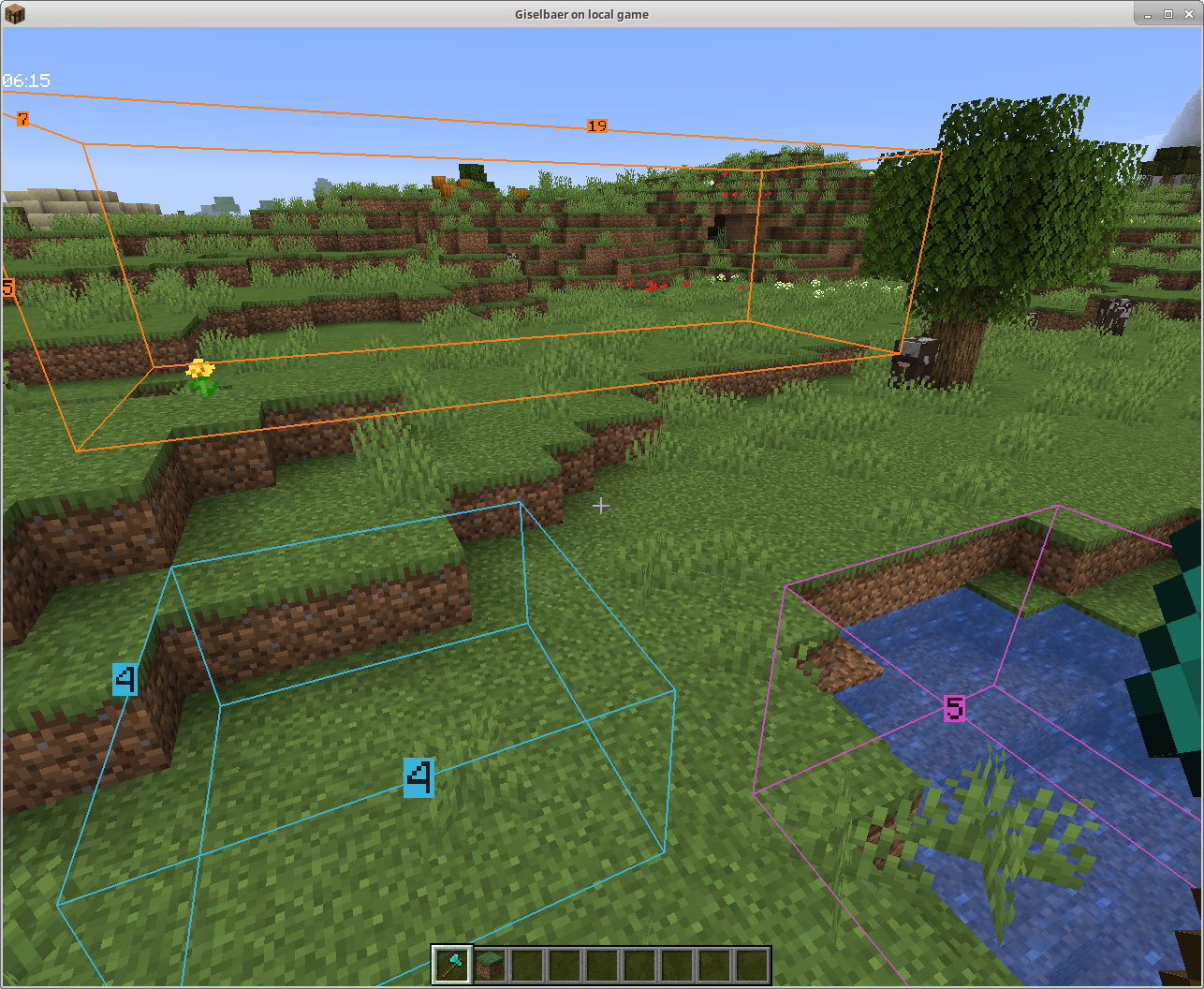
A few Boxes Nature

Dependencies

To use this mod, you'll need to:

Required

  • install the Fabric modloader from https://fabricmc.net/use/
  • install the Fabric API from https://modrinth.com/mod/fabric-api
  • install this mod

Optional

  • install ModMenu from https://modrinth.com/mod/modmenu (this is not absolutely necessary, but strongly recommended)

Collaborative Building

From version 1.4 on, you can collaborate and see each other's boxes if the mod is installed on the server as well.

The mod will still work client-side only, so you can play on any (vanilla, spigot, paper, ...) servers without the server owner having to do anything.

Fabric Server

In a LAN world with the host having the mod, or with a dedicated Fabric server that has the mod, you can see other people's boxes - enable BlockMeter, press the ALT button while holding the BlockMeter block, and toggle the new button. Now you'll see other players' boxes, and each block count will have the name of the player who created the box in front.

Bukkit Server

Version 1.4.1 works as server part with Bukkit/Spigot/Paper as well. If you want to share block outlines on your favorite server (non-modded, but has plugins), ask your server owner to download the jar file from here and put it in the plugins directory (make sure it's the correct Minecraft version, i.e. 1.15, and at least version 1.4.1 of the mod). The client part is the same as 1.4, so there's no reason to update your client.

👥 Team & Contributors

ModProg
ModProgOwner

⚙️ Compatibility

Environment
💻 Client-side
Loaders
fabric
Minecraft Versions
1.21.11

🔗 Links

Modrinth Page