Logo
MINECRAFTBIBLE
Items
Items

All game items

Blocks
Blocks

Building blocks

Mobs
Mobs

Creatures & monsters

Biomes
Biomes

World biomes

Structures
Structures

Generated structures

Recipes
Recipes

Crafting guides

Advancements
Advancements

Achievements

Loot Tables
Loot Tables

Drop rates

Tags
Tags

Item groupings

All Versions
View all data →
Capes
Cape ArchiveNEW

Browse rare Minecon capes, OptiFine capes, and custom capes from players worldwide

Browse

Player Database
Player DatabasePopular

Search any player

Skin Browser
Skin Browser

Browse & download skins

Cape Gallery
Cape GalleryNEW

Minecon & OptiFine capes

Seed Vault
Seed Vault

Curated seeds

Learn

Guides
GuidesNew

Tutorials & tips

Blog
Blog

News & updates

Community

Community Hub
Community HubHub

Posts, discussions & more

All Versions
View community →
Seed Analyzer
Seed Analyzer

World seed analysis

Loot Explorer
Loot Explorer

Drop rates

Crafting Calculator
Crafting Calculator

Material planning

Enchant Calculator
Enchant Calculator

Probability math

Redstone Lab
Redstone Lab

Signal timing

Trading Profit
Trading Profit

Villager ROI

All Versions
View all tools →
Mods
Mods

Browse all mods

Plugins
Plugins

Server plugins

Resource Packs
Resource Packs

Textures & sounds

Shaders
Shaders

Visual enhancements

Datapacks
Datapacks

World logic

Scanner
Mod Intelligence

Scan & analyze any mod

All Versions
View all mods →
Loading...
IntroductionIntroductionVersion HistoryVersion HistoryGuidesGuidesBlog & NewsBlog & News
ItemsItemsBlocksBlocksMobsMobsRecipesRecipesBiomesBiomesStructuresStructuresAdvancementsAdvancementsLoot TablesLoot TablesTagsTags
ModsModsPluginsPluginsResource PacksResource PacksShadersShadersDatapacksDatapacks

MinecraftBible

The Ultimate Wiki

Logo
MINECRAFTBIBLE

The ultimate Minecraft reference. Every item, block, mob, and recipe documented with precision.

Community

  • Player Database
  • Skin Browser
  • Cape Gallery
  • Community Hub
  • Seed Vault

Database

  • Items
  • Blocks
  • Mobs
  • Recipes
  • Biomes
  • Structures

Tools

  • Seed Analyzer
  • Mod Intelligence
  • Crafting Calculator
  • Enchant Calculator

Mods & Packs

  • Mods
  • Plugins
  • Resource Packs
  • Shaders
  • Datapacks

© 2026 MinecraftBible. Not affiliated with Mojang or Microsoft.

PrivacyTermsContact
Biome Replacer
ModMIT

Biome Replacer

A quick way to get rid of a biome. Useful for tweaking datapack-based generators (like Terralith) that don't have a convenient configuration

2.3M
Downloads
296
Followers
3 months ago
Updated
📦
30
Versions
utilityworldgenfabricforgeneoforgequilt
Download Latestv2.2.1-pinkeen-neoView on Modrinth

📖About Biome Replacer

Biome Replacer Banner
Modrinth Downloads CurseForge Downloads Minecraft Versions Server Side License Discord

Biome Replacer is a simple and easy-to-use utility mod for removing unwanted biomes

Features

  • Easy configuration: Simple properties file with intuitive syntax
  • Designed for datapacks Configure Terralith or other worldgen packs with ease*
  • (Limited) mod integration: Remove biomes from a mod that has no configuration of its own**
  • Server-side: No client installation needed (unless you want to use it in singleplayer, of course!)
  • High availability: From 1.18.2 up to the most current Minecraft version, all equally supported
  • Negligible performance impact: Runs only once on world start, does not slow down the generation

*Please note that Biome Replacer cannot change terrain shape. This means that it's impossible
to change oceans to land, create ocean-only worlds, etc.

**The only currently supported biome libraries are TerraBlender & Blueprint, so you won't be able to change Biolith biomes,
for example. Still, BR should not break, and will work fine alongside most world generation mods.

Setup

  1. Install the mod, then run your client/server once to generate configuration file
  2. Find biome_replacer.properties in the config folder
  3. Add your replacement rules (see examples below), then load up the world

If you made any mistakes, you will see warnings in chat. Check for typos in your biome IDs, and try again.

Tip: on client, you don't deed to restart the game every time you change your rules, you can simply leave and enter the world again.

Examples

Rules follow the format old_biome > new_biome. Here is an example with vanilla biomes:

minecraft:dark_forest > minecraft:cherry_grove
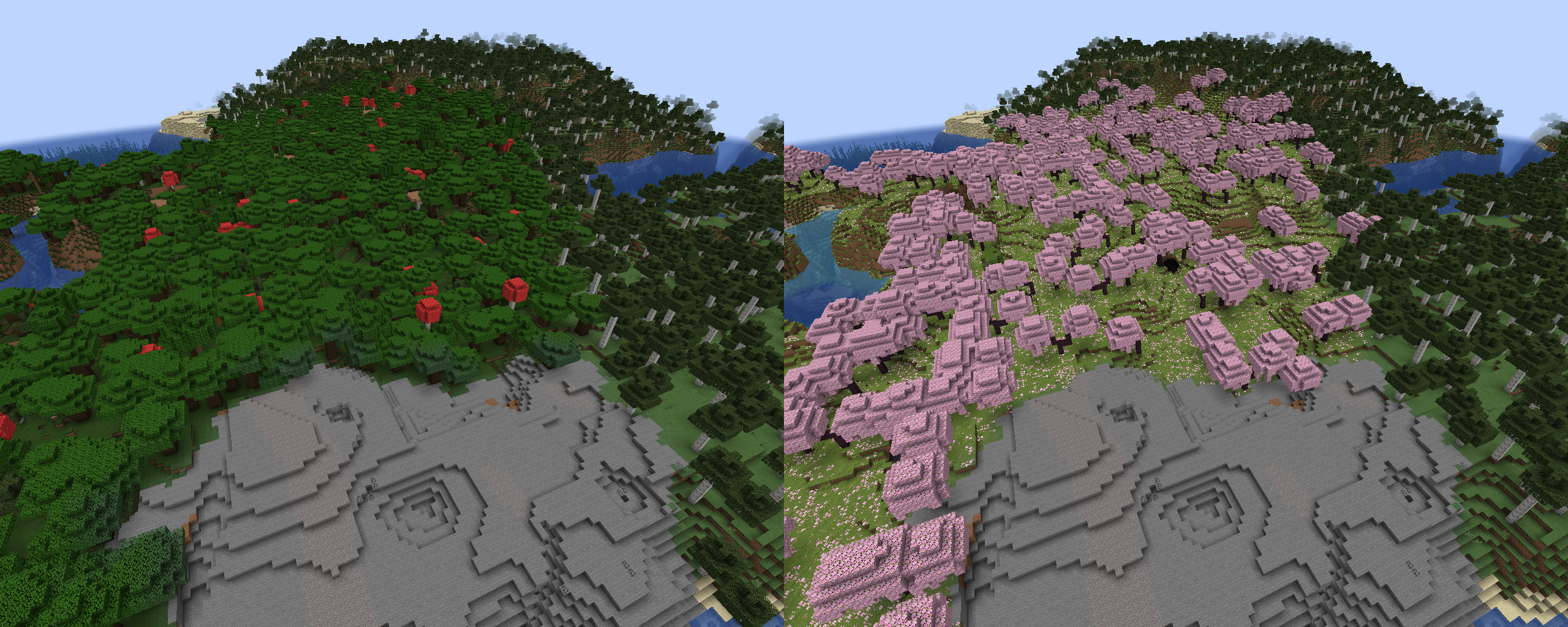
Dark forest replaced by cherry grove

Using biome tags is supported:

#minecraft:is_forest > minecraft:desert
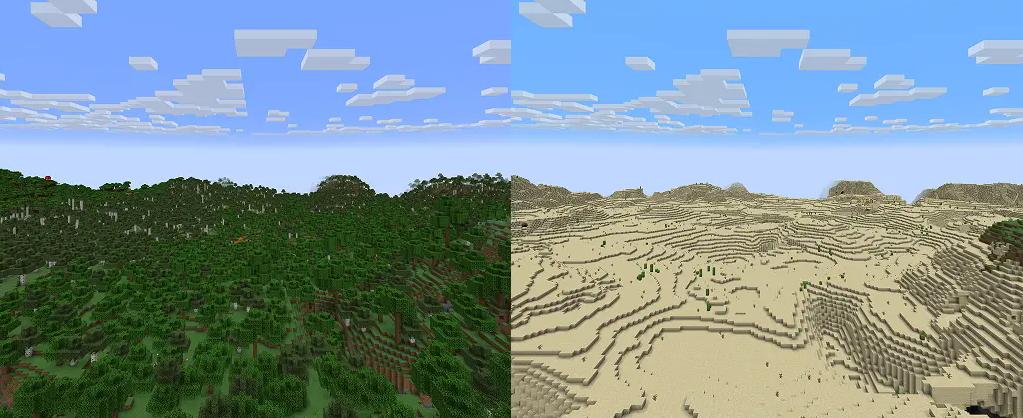
Two forest types replaced by Desert

it's possible to completely remove biomes using a "null" keyword. For example, these rules will remove Terralith's skylands:

terralith:skylands_autumn > null
terralith:skylands_winter > null
terralith:skylands_spring > null
terralith:skylands_summer > null

You can also use a biome tag to achieve the same effect:

#terralith:skylands > null

Important: if you're not careful, using this method on biomes from vanilla and datapacks can cause crashes, or mess up biome distribution.
Please test thoroughly before using it in a world you care about!
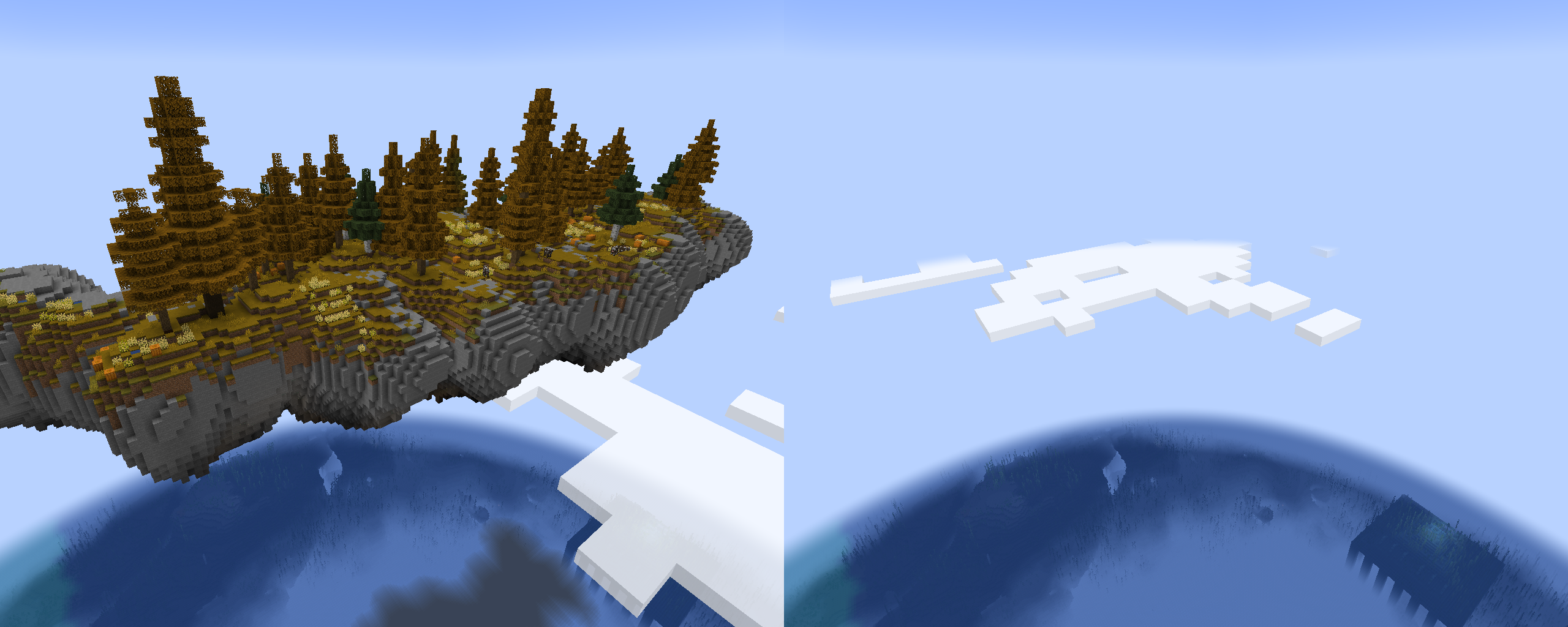
Sky Island is removed

Advanced features

To target specific dimensions, use headers with dimension ID: [mod:dimension]. Rules following it will only be applied to a specified dimension.
(Note that this typically isn't needed, unless you have custom dimensions that generate the same biomes, and you want to target only one of them)

[minecraft:overworld]
minecraft:desert > null

[custom:dimension]
minecraft:desert > minecraft:badlands

Resources

  • Report bugs and issues here
  • Vanilla Biome Tags
  • Vanilla Biome IDs
  • Source code

👥 Team & Contributors

werdei
werdeiOwner
LegendarySpy
LegendarySpy
Contributor

⚙️ Compatibility

Environment
🖥️ Server-side
Loaders
fabricforgeneoforgequilt
Minecraft Versions
1.21.11

🔗 Links

Modrinth Page