BGM Fields
ModLicenseRef-

BGM Fields

BGM Fields lets you place Realm Blocks that create server-authoritative “BGM zones” (Realms).

42
Downloads
2
Followers
2 months ago
Updated
📦
5
Versions

📖About BGM Fields

BGM Fields (Forge 1.20.1)

🎥 **Watch the BGM Fields demo:**  
https://www.youtube.com/shorts/meaJewowPdg

BGM Fields lets you place Realm Blocks that create server-authoritative “BGM zones” (Realms). When a player is inside a Realm, the Realm can:

  • Switch BGM (single track or playlist)
  • Apply “Vision” visuals (fog / overlay / sky-only tint / particles / colored precipitation)
  • Optionally render a glowing boundary ring (visible from inside and outside)

This mod does not send .ogg audio files over the network. Music is referenced by Sound Event IDs; you provide the actual audio via a client resource pack (per-player) or a server-pushed resource pack.


Multiplayer: install the mod on both the server and all clients.

Getting Started

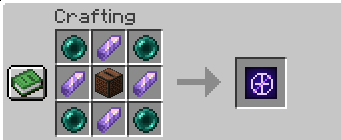
  1. Craft and place a Realm Block.

alt text

  1. Right-click the Realm Block to open the settings screen.

  1. Set:
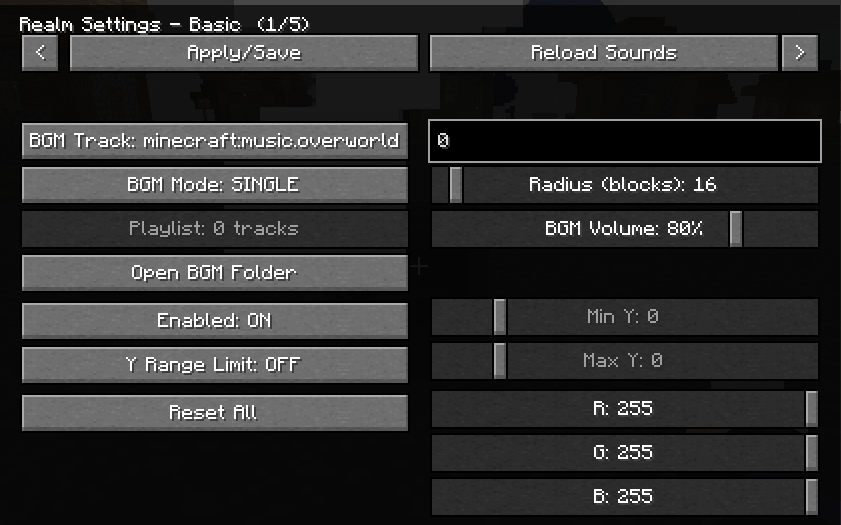
  • Radius (max 300)
  • Y-range (optional; you can limit the realm vertically)
  • Realm color (used by visuals)
  • BGM settings (track or playlist)
  • Per-realm BGM volume (0–100, default 80)

Only the owner can edit the Realm. OPs (permission level 2) can also edit.


Realm Placement Rules

  • If another player’s Realm overlaps the new one, placement is denied.
  • Even for the same owner, partial overlap is denied.
  • Full nesting is allowed (one Realm completely inside the other).

BGM: How Tracks Work

A track is a Sound Event ID (namespace:path). Examples:

  • Vanilla music: minecraft:music.overworld
  • User BGM generated by this mod: bgmfieldmod:bgm.my_song

BGM Modes:

  • Single: play one Sound Event.
  • Playlist: multiple entries; each entry has:
    • track (Sound Event ID)
    • loop (true/false)

Add Your Own Music (Client-side, per player)

BGM Fields auto-creates a folder resource pack called:

  • BGMFields_UserBGM

Put your .ogg files under:

resourcepacks/BGMFields_UserBGM/assets/bgmfieldmod/sounds/bgm/

Then reload resources (in-game “Reload” button or F3+T).

You do not need to write sounds.json yourself; BGM Fields generates it automatically.

Sound ID mapping:

  • my_song.oggbgmfieldmod:bgm.my_song
  • dungeon/boss.oggbgmfieldmod:bgm.dungeon.boss

Notes:

  • Filenames are sanitized to valid resource paths (spaces, uppercase, etc. are converted).
  • The resource pack still needs to be enabled in Minecraft’s Resource Packs menu (that is vanilla behavior). There is also an optional client config that can attempt to auto-enable it.

Provide Music to Everyone (Server Resource Pack Push)

BGM Fields can ask clients to apply a server resource pack on join.

Two modes:

  • external-url: set serverResourcePack.url to a public URL to a .zip resource pack.
  • internal-http: leave serverResourcePack.url empty; the server hosts the .zip via a built-in HTTP server.

Config keys (in the Forge common config):

  • serverResourcePack.enabled
  • serverResourcePack.required
  • serverResourcePack.publicHost
  • serverResourcePack.url
  • serverResourcePack.port
  • serverResourcePack.packFile
  • serverResourcePack.sha1
  • serverResourcePack.prompt

Zip requirements:

  • pack.mcmeta and assets/ must be at the zip root (zipping the parent folder often breaks this).

Vision (Visual Effects)

Each Realm has a “Vision” visual module (server-authoritative settings synced to nearby clients). You can control:

  • Master enable
  • Strength (0–100)
  • Ramp up/down (fade in/out)
  • Fog
  • Overlay
  • Sky Tint (sky-only)
    • Gradient is optional
    • Can follow the realm color or use an independent RGB
  • Particles
  • Colored precipitation (rain/snow via custom particles)
  • Boundary visualization (glowing ring)

Realm Vision Keybind (Owner Utility)

There is a client keybind:

  • V = toggle “Realm Vision” ON/OFF

This is used for owners to reveal the real Realm Block when the Realm is disguised:

  • Owner + Realm Vision ON + Sneak (Shift) → show the real block

Commands (OP)

  • /bgmfields_rp start
  • /bgmfields_rp stop
  • /bgmfields_rp send
  • /bgmfields_rp reload

Notes / Tips

  • If your particle setting is “Minimal”, some Vision particles/precipitation may be hard to see.
  • The boundary ring is designed to be visible both from inside and outside the Realm (useful for large radii).