Logo
MINECRAFTBIBLE
Items
Items

All game items

Blocks
Blocks

Building blocks

Mobs
Mobs

Creatures & monsters

Biomes
Biomes

World biomes

Structures
Structures

Generated structures

Recipes
Recipes

Crafting guides

Advancements
Advancements

Achievements

Loot Tables
Loot Tables

Drop rates

Tags
Tags

Item groupings

All Versions
View all data →
Capes
Cape ArchiveNEW

Browse rare Minecon capes, OptiFine capes, and custom capes from players worldwide

Browse

Player Database
Player DatabasePopular

Search any player

Skin Browser
Skin Browser

Browse & download skins

Cape Gallery
Cape GalleryNEW

Minecon & OptiFine capes

Seed Vault
Seed Vault

Curated seeds

Learn

Guides
GuidesNew

Tutorials & tips

Blog
Blog

News & updates

Community

Community Hub
Community HubHub

Posts, discussions & more

All Versions
View community →
Seed Analyzer
Seed Analyzer

World seed analysis

Loot Explorer
Loot Explorer

Drop rates

Crafting Calculator
Crafting Calculator

Material planning

Enchant Calculator
Enchant Calculator

Probability math

Redstone Lab
Redstone Lab

Signal timing

Trading Profit
Trading Profit

Villager ROI

All Versions
View all tools →
Mods
Mods

Browse all mods

Plugins
Plugins

Server plugins

Resource Packs
Resource Packs

Textures & sounds

Shaders
Shaders

Visual enhancements

Datapacks
Datapacks

World logic

Scanner
Mod Intelligence

Scan & analyze any mod

All Versions
View all mods →
Loading...
IntroductionIntroductionVersion HistoryVersion HistoryGuidesGuidesBlog & NewsBlog & News
ItemsItemsBlocksBlocksMobsMobsRecipesRecipesBiomesBiomesStructuresStructuresAdvancementsAdvancementsLoot TablesLoot TablesTagsTags
ModsModsPluginsPluginsResource PacksResource PacksShadersShadersDatapacksDatapacks

MinecraftBible

The Ultimate Wiki

Logo
MINECRAFTBIBLE

The ultimate Minecraft reference. Every item, block, mob, and recipe documented with precision.

Community

  • Skin Browser
  • Cape Gallery
  • Seed Vault
  • Blog
  • Guides

Database

  • Items
  • Blocks
  • Mobs
  • Recipes
  • Biomes
  • Structures

Tools

  • Seed Analyzer
  • Mod Intelligence
  • Crafting Calculator
  • Enchant Calculator

Mods & Packs

  • Mods
  • Plugins
  • Resource Packs
  • Shaders
  • Datapacks

Site & Legal

  • About
  • Authors
  • Editorial Policy
  • Corrections
  • Contact
  • Privacy Policy
  • Terms of Service
  • DMCA
  • Sitemap

© 2026 MinecraftBible. Not affiliated with Mojang or Microsoft.

PrivacyTermsContact
BBS CML EDITION
ModMIT

BBS CML EDITION

A bbs mod version that improves or adds some basic features

8.7K
Downloads
25
Followers
4 months ago
Updated
📦
30
Versions
decorationutilityfabricforgeneoforge
Download Latestv1.9.2-1.21.4View on Modrinth

📖About BBS CML EDITION

What is BBS CML EDITION?

BBS CML Edition is a modified version of the original BBS mod’s source code.
Its goal is to expand and enhance the animation tools while maintaining full compatibility with the original system, adding advanced features for creators, animators, and users who want a more complete and powerful workflow.

miniature


🔧 Main improvements over the original BBS

🧱 Structure Models

  • Allows you to animate entire structures simply by saving them in-game.
  • Structures can be viewed, organized, and used just like any other model.
  • To use them, simply save it with a structure block, then go into the tree model and select it from the list.

Example: This is a miniature made with the structural models.
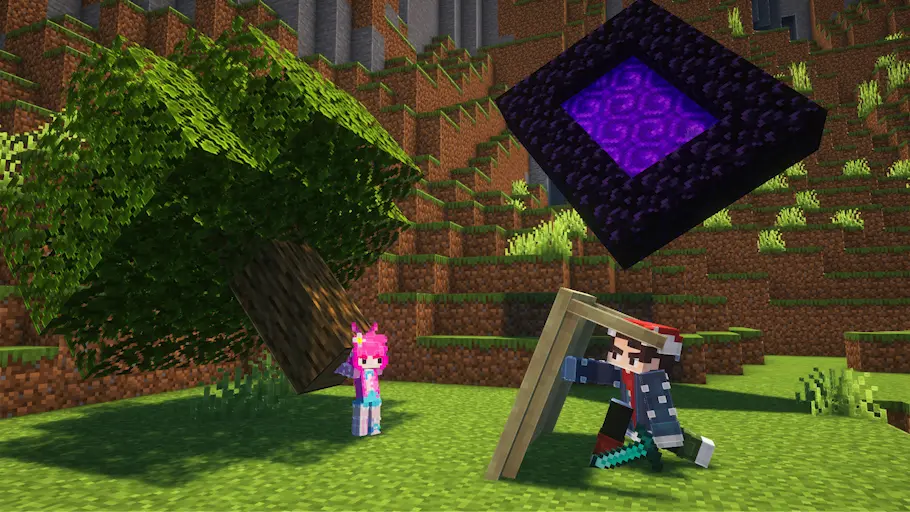
an example of what the structural model could be used for

🎚️ Advanced Gizmos

  • Visual tools for moving, rotating, and scaling, similar to professional animation software.
  • Improves precision, speed, and comfort while animating inside the editor.
  • alternates with the "U" key

Example: This is the gizmo for translating, and there are other variations (rotate, scale, and pivot).
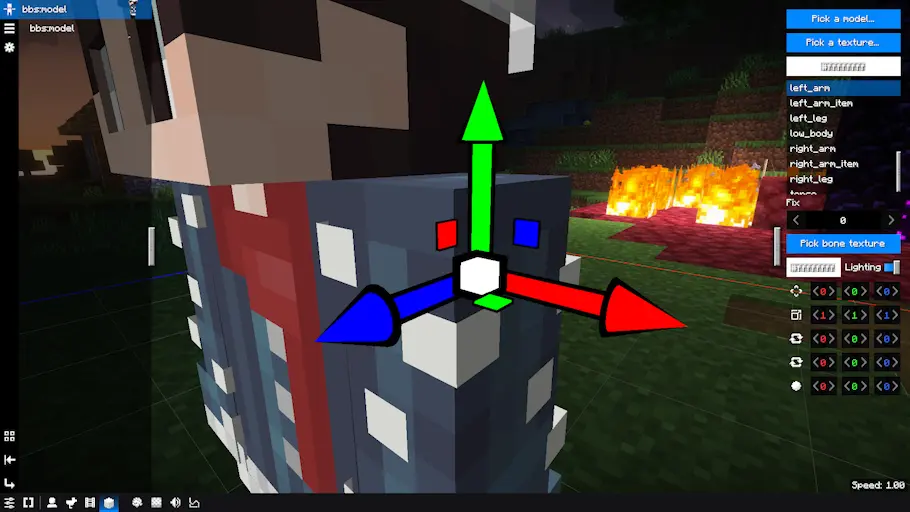
gizmo

🖌️ Per-bone Textures

  • Each bone in the model can have its own texture while keeping the original UV mapping.
  • Ideal for complex models, advanced customization, or highly detailed designs.

🦴 Bone Anchoring

  • Allows you to anchor bones to pose tracks for more controlled and flexible animation.
  • This option is enabled in the mod settings

Here's an example of what the bone anchoring would look like (this is to animate each bone individually):
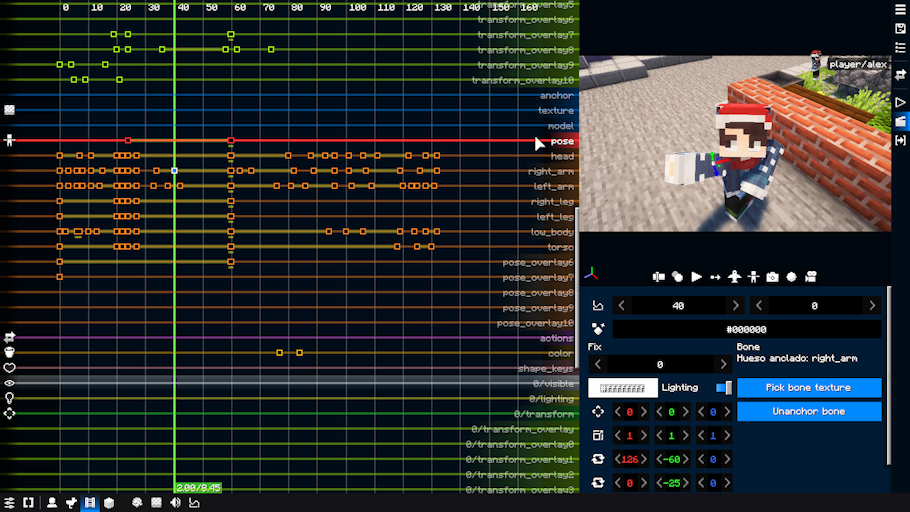
bone anchorage

🎯 Editable Pivot

  • You can change the pivot point of any model directly inside the editor.
  • No need for external software to adjust pivot positions.
  • This is more useful if you work with obj models

🗂️ Group System

  • Organize your replays into categories, improving order and workflow in complex animations.
  • To create a group of replays, you must first select the models you want to group, then right-click and use the groups button.

an example of what the replays category would look like
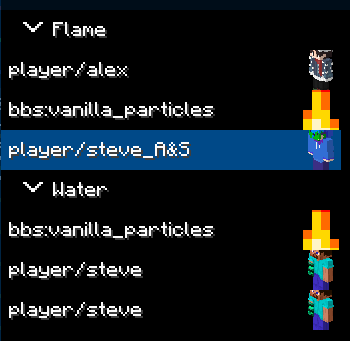
categories


This fork is under the MIT license

👥 Team & Contributors

ElGatoPro300
ElGatoPro300Owner

⚙️ Compatibility

Environment
💻 Client-side
Loaders
fabricforgeneoforge
Minecraft Versions
1.21.4

🔗 Links

Modrinth Page