
MINECRAFTBIBLE
Loading...

Keep mining while leaving the game.
Moving forward, only fabric and neoforge will be supported, since Architectury droped forge support more or less.
Make sure to use the correct version of architectury together with this mod for it to run.
Simple client side Mod that allows you to leave the game while mining in Background. Keeps swapping tools of the same type in hotbar. Very useful for cobblestone generators or other blockstreams for example from a tree-farm
❗ This mod may be considered as cheating or boting on some servers, so don't use it, if it is not allowed and don't blame me for use it against server rules ❗
Everything can be controlled via ingame menu. Check key bounds for it, default is n to activate Mining and o for the Ingame Config (was m and p in older versions). Sneaking while activating the mod allows automatic attacking.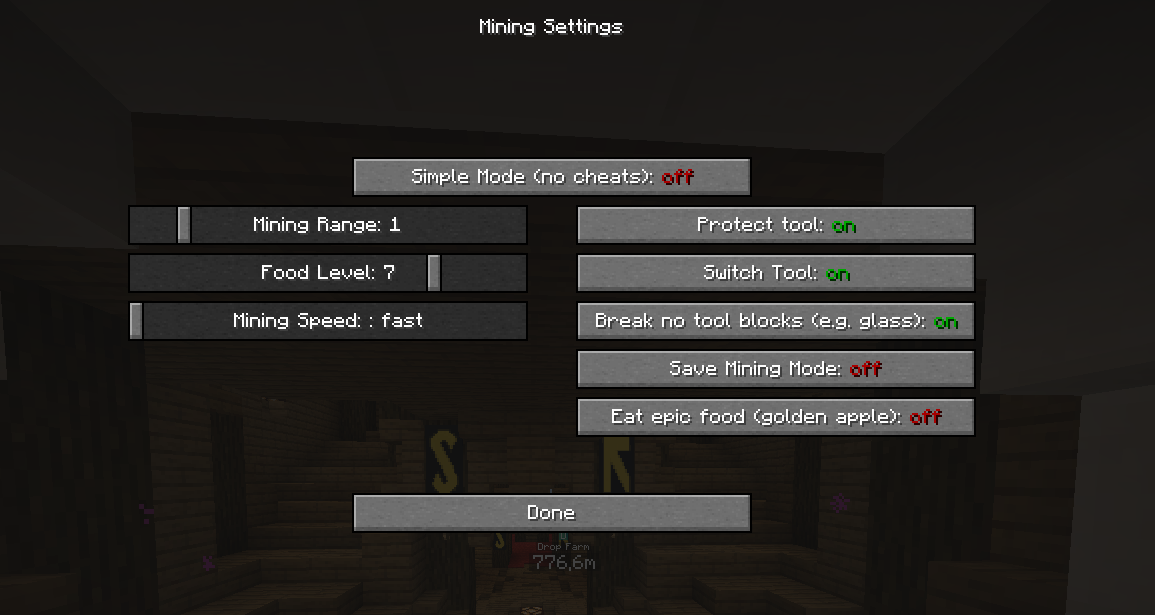
Simple Mode: The mod just presses the mouse button, if there is a block or entity in attacking mode in front of you.
Mining Range: Increases the range of mining. Always centered on the block you are aiming at. (See picture) 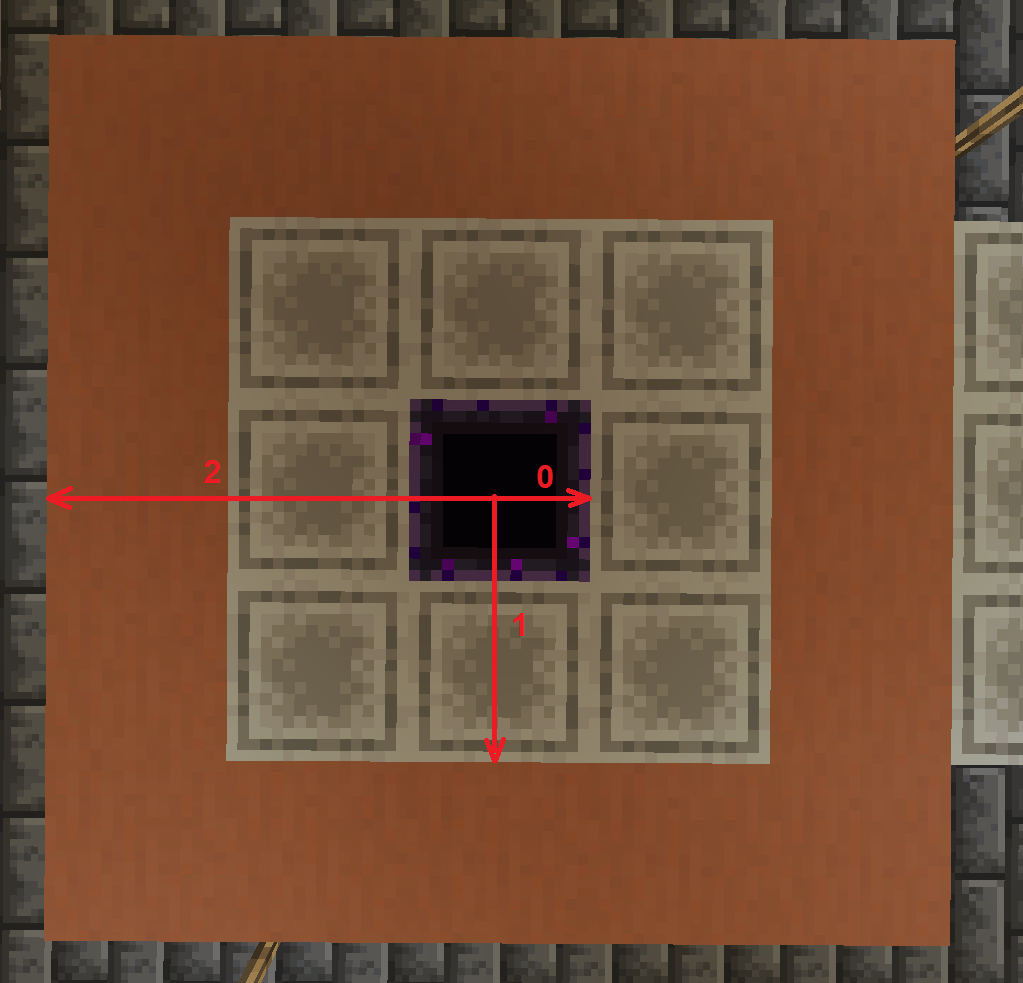
Food Level: The amount of hunger bars that should be hold.
Mining speed: The speed of which blocks should be broken. Fast can cause some issues between client and server, so blocks may reappear.
Protect tool: Protects your tool from breaking and stops using it at low durability. Higher mining range increases that minimum durability.
Switch Tool: Makes you switch the tool for the appropriate one. Turning that of, allows to only mine the appropriate material (pickaxe -> stone, shovel -> dirt etc.)
Break no tool blocks: Toggle weather blocks that don't have a tool should be broken or not. A simple example is glas or glowstone.
Save Mining Mode: Lock the position on the block you activated first time. You can look independently and as long as you are close enough, the blocks in the target area will be broken.
Eat epic food: Toggles weather gold apples and enchanted golden apples should be eaten or not.
German-translations is added too.
give me more mod (refills your current inventory slot if empty, helpful for building, also works only client side)
moretooltips (shows the nbt-data of an item in the inventory)
Client Builders Wand (Allows Building like you have a builders wand.)
Eine kleine Mod, die es dir erlaubt, Minecraft in den Hintergrund zu stellen, z.B. über den Pause oder Inventar Screen und im Hintergrund weiter abzubauen. Die Modifikation wechselt automatisch zu Werkzeugen den selben Typs und besitz einen umschaltbaren Werkzeugschutz.
Zudem ist eine automatischer Hungerschutz eingebaut, der essen aus der Hotbar oder Offhand nutz, um ein gewisses Hungerlevel zu halten. Das Hungerlevel ist umschaltbar oder auch ganz abschaltbar.
Diese Modifikation kann bei einigen Servern als Cheaten oder Boten angesehen werden, also benutze sie nicht, wenn sie nicht erlaubt ist und beschuldige mich nicht, wenn du die Modifikation gegen die Serverregeln verwendest.
Fragen können gerne in den Kommentaren gestellt werden.