Logo
MINECRAFTBIBLE
Items
Items

All game items

Blocks
Blocks

Building blocks

Mobs
Mobs

Creatures & monsters

Biomes
Biomes

World biomes

Structures
Structures

Generated structures

Recipes
Recipes

Crafting guides

Advancements
Advancements

Achievements

Loot Tables
Loot Tables

Drop rates

Tags
Tags

Item groupings

All Versions
View all data →
Capes
Cape ArchiveNEW

Browse rare Minecon capes, OptiFine capes, and custom capes from players worldwide

Browse

Player Database
Player DatabasePopular

Search any player

Skin Browser
Skin Browser

Browse & download skins

Cape Gallery
Cape GalleryNEW

Minecon & OptiFine capes

Seed Vault
Seed Vault

Curated seeds

Learn

Guides
GuidesNew

Tutorials & tips

Blog
Blog

News & updates

Community

Community Hub
Community HubHub

Posts, discussions & more

All Versions
View community →
Seed Analyzer
Seed Analyzer

World seed analysis

Loot Explorer
Loot Explorer

Drop rates

Crafting Calculator
Crafting Calculator

Material planning

Enchant Calculator
Enchant Calculator

Probability math

Redstone Lab
Redstone Lab

Signal timing

Trading Profit
Trading Profit

Villager ROI

All Versions
View all tools →
Mods
Mods

Browse all mods

Plugins
Plugins

Server plugins

Resource Packs
Resource Packs

Textures & sounds

Shaders
Shaders

Visual enhancements

Datapacks
Datapacks

World logic

Scanner
Mod Intelligence

Scan & analyze any mod

All Versions
View all mods →
Loading...
IntroductionIntroductionVersion HistoryVersion HistoryGuidesGuidesBlog & NewsBlog & News
ItemsItemsBlocksBlocksMobsMobsRecipesRecipesBiomesBiomesStructuresStructuresAdvancementsAdvancementsLoot TablesLoot TablesTagsTags
ModsModsPluginsPluginsResource PacksResource PacksShadersShadersDatapacksDatapacks

MinecraftBible

The Ultimate Wiki

Logo
MINECRAFTBIBLE

The ultimate Minecraft reference. Every item, block, mob, and recipe documented with precision.

Community

  • Player Database
  • Skin Browser
  • Cape Gallery
  • Community Hub
  • Seed Vault

Database

  • Items
  • Blocks
  • Mobs
  • Recipes
  • Biomes
  • Structures

Tools

  • Seed Analyzer
  • Mod Intelligence
  • Crafting Calculator
  • Enchant Calculator

Mods & Packs

  • Mods
  • Plugins
  • Resource Packs
  • Shaders
  • Datapacks

© 2026 MinecraftBible. Not affiliated with Mojang or Microsoft.

PrivacyTermsContact
Vortex
ModGPL-3.0-or-later

Vortex

Server-side modpack analytics developed by Atmospace. Tracks player usage of modded blocks, items, crafting, and entities. View in-game summaries and get CSV reports on shutdown to optimize your modpack based on actual player engagement.

416
Downloads
7
Followers
3 months ago
Updated
📦
7
Versions
managementoptimizationutilityneoforge
Download Latestv1.21.1-NeoForge-3.0.0View on Modrinth

📖About Vortex

Vortex: Mod Usage Analyzer for NeoForge Servers

Vortex Banner Transparent Background

Vortex is a lightweight, server-side NeoForge mod designed to give server administrators clear insights into how their modpack is actually being used by players.

What it Does:

  • Tracks Modded Content Usage: Vortex silently monitors player interactions with content from other mods, including:

    • Right-clicking on modded blocks.
    • Right-clicking with modded items.
    • Crafting recipes that output modded items.
    • Dealing damage to modded entities.
  • Filters Out Vanilla: It intelligently ignores all interactions with vanilla Minecraft content, focusing solely on the mods you've added.

  • In-Game Summaries: Administrators can use a simple command (/vortex or /vx) to get an immediate summary of the most and least used mods across all tracked categories directly in the game chat.

  • Dataview web-panel: A simple web-panel that allows admins to view the data Vortex has collected on their server in an easy to read and sortable manner.
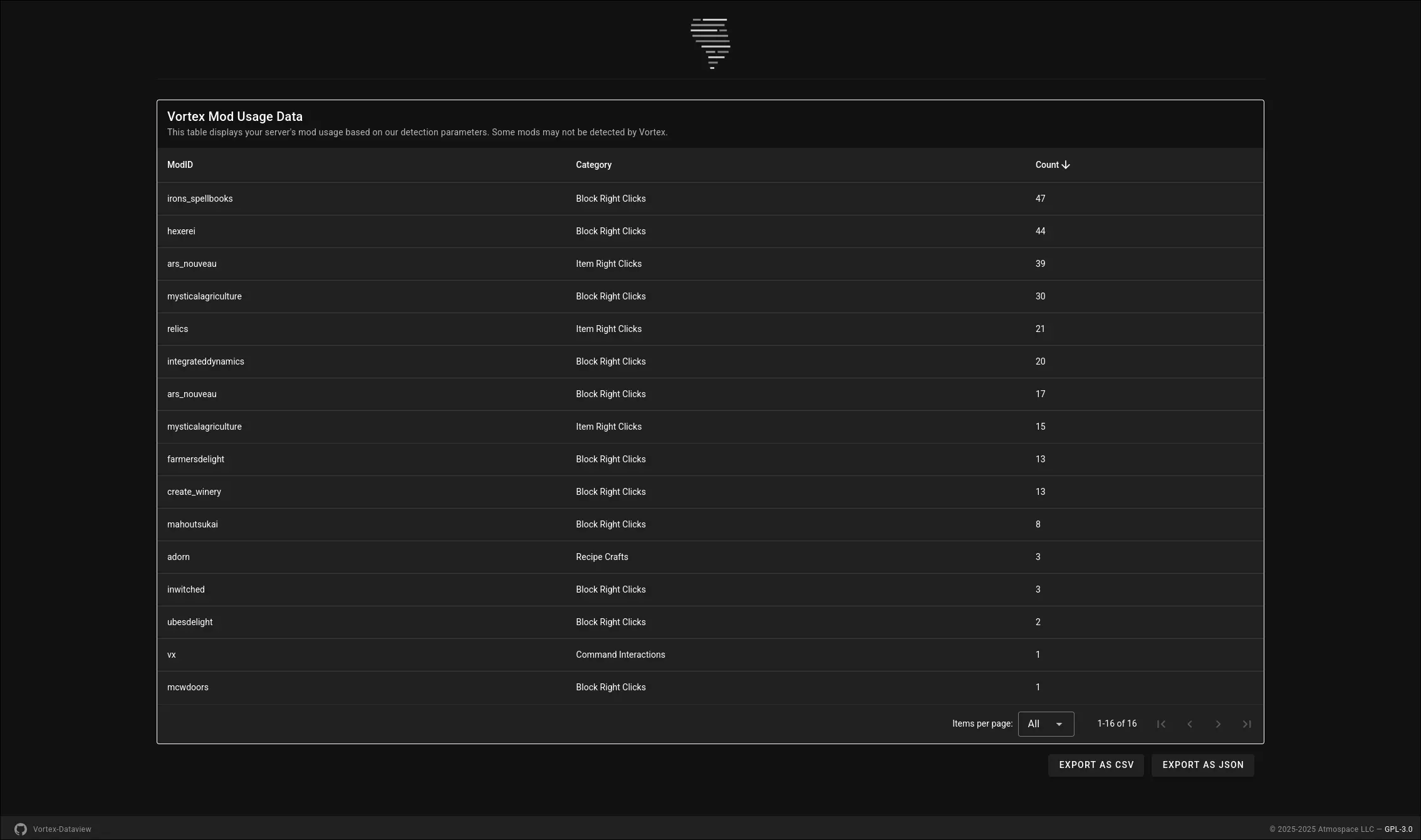
Dataview Example

  • Detailed CSV Export: When your server shuts down, Vortex automatically generates a detailed CSV file (e.g., vortex_mod_usage_data_MM-DD-YYYY.HH-mm.csv) in your server's config/vortex/ folder. This file provides raw, organized data for deeper analysis in spreadsheet software or data visualization tools.

Why Your Server Needs Vortex:

  • Optimize Your Modpack: Make data-driven decisions to streamline your modpack. Identify mods that are rarely used and consider removing them to reduce server load, client lag, and overall file size.
  • Enhance Player Experience: Discover which mods your community loves and uses the most, helping you focus on content that truly engages your players.
  • Informed Decisions: Move beyond guesswork or player polls. Vortex provides concrete usage statistics to refine your server's modded experience.

Vortex is an essential tool for any NeoForge server administrator looking to maintain a lean, efficient, and player-centric modpack.

NOTICE!

This mod is still in development.

Features may be added, removed, or modified during the development process.

Atmospace is not responsible for any issues the mod might cause while it is within the beta development cycle, but will try to assist with issues when possible.

👥 Team & Contributors

No authors recorded.

⚙️ Compatibility

Environment
🖥️ Server-side
Loaders
neoforge
Minecraft Versions
1.211.21.11.21.21.21.31.21.41.21.51.21.61.21.7+4 more

🔗 Links

Modrinth Page